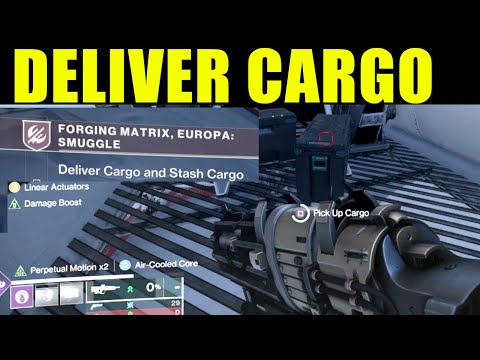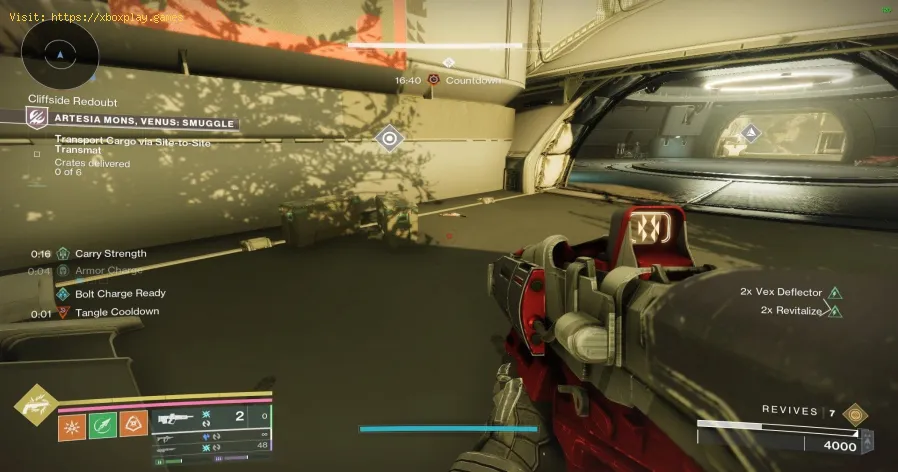
Destiny 2 の最新拡張パック「レネゲード」の混沌としたフロンティアを進むのは、新たな敵、戦利品、アクティビティが満載のスリル満点の冒険です。「無法地帯」エンドゲームで追加された目玉の一つが「スマグル」アクティビティです。これは、ガーディアンたちが戦争で荒廃した世界で星間輸送の運び屋として行動する、一見単純なミッションです。ミッションの目的はシンプル。貨物を拾い、指定された場所に届けることです。しかし、PC、PlayStation、Xbox、そしてクラウドプラットフォーム上で、ある特定の目標が多くのプレイヤーにとっての悩みの種となっています。ようやく軌道に乗ったと思った矢先、指令が更新され、不可解な新しいタスク「サイト間トランズマットで貨物を輸送する」が追加されます。
この問題は、ゲーム内で明確なチュートリアルなしに新しいメカニクスを導入したために発生します。走り回って銃を撃つことに慣れたプレイヤーは、直感に従って行動してしまい、トランスマットポータルを使用した後に貨物が消えたり、預けられなくなったりするといったイライラさせられるバグに陥ることがよくあります。これはゲームコードの不具合ではなく、新しいメカニクスのルールの誤解によるものです。このガイドでは、このプロセスを分かりやすく解説し、問題が発生する理由を説明し、プラットフォームに依存しない明確な解決策を提示することで、密輸を成功に導くための方法を紹介します。
最もイライラする原因は、貨物が「動けなくなる」こと、または目標が進行しないことです。これが発生する理由を詳しく説明します。
ダッシュまたは移動能力の使用:これが一番の原因です。サイト間トランスマットは、精密かつ調整されたテレポートです。過度の運動エネルギーや、ガーディアンのダッシュ、ショルダーチャージ、イカロスダッシュ、グラップルなどのパラコーシス干渉は、カーゴの物質流を不安定にする可能性があります。ゲームプレイの観点から言えば、移動速度がスクリプトのシーケンスを破るため、ゲームはカーゴを原点に「ドロップ」します。
輸送中の敵の妨害:攻撃を受けている最中に貨物を拾ったり、敵がポータルエリアを攻撃している最中に輸送を試みたりすると、輸送が妨害される可能性があります。ゲームはダメージの急上昇を「妨害」と解釈する場合があります。
ポータルの誤った使用法:トランスマットポータルは特定の光るリングです。近くを歩くだけでは不十分で、トリガーを作動させるには中心を直接通過する必要があります。少しでもコースを外れると、トランスマットが作動しない可能性があります。
Sequence Breaking (Killing Enemies Out of Order): While not always consistent, some reports suggest that killing themajor combatant (like a Brig) that spawns after you pick up the cargo,but before you transmat, can sometimes confuse the activity's scripting.
Think of it like mailing a fragile parcel. The transmat portal is the automated sorting machine. If you sprint and throw the package (cargo) into the machine, it might get rejected or damaged. The game expects you to walk up and place it gently into the system for a clean scan and teleport. The "bug" is actually afailsafe that removes the cargo if the correct, gentle sequence isn'tfollowed.
Stop sprinting. Seriously. Clear all enemies from the cargo area first. Walk to the cargo, pick it up, and walk—don't run, don't jump, don't use abilities—directly into the center of the glowing orange transmat portal. On the otherside, continue walking to the deposit zone. Do this four times. That'sit.
Follow these steps meticulously to ensure success every time.
Step 1: Advance the Activity. Begin the Smuggle activity in the Lawless Frontier. Complete theinitial 1-2 standard cargo deliveries until your objective updates to"Transport cargo via site-to-site transmat."
Step 2: Locate the New Cargo. New cargo markers will appear, distinct from the earlier ones. They are often in more exposed or defended positions.
Step 3: Clear the Area Thoroughly. Before you even look at the cargo crate, eliminate every single enemy in the vicinity. This includes snipers, shanks, and any major units. Create a safe perimeter.
Step 4: The Mindset Shift. Approach thecargo as if you're carrying a vase full of water. Your sprint, lift, and strafe jump are now disabled in your mind.
Step 5: Pick Up the Cargo. Walk to the crate and hold your interact button (E on PC, Square on PlayStation, X on Xbox).
Step 6: The Careful Walk. With cargo in hand, walk at normal speed towards the glowing, pulsing transmat portal. It looks like a vertical ring of orange energy.
Step 7: Perfect Alignment. Ensure your Guardian walks directly through the center of the portal. You'll see a screen effect and hear a transmat sound.
Step 8: Arrival and Continuation. You'll materialize in a new, usually safer, area. Continue walking. A new deposit marker will be nearby, often just a few yards away.
Step 9: Successful Deposit. Walk into the deposit zone. You'll get an on-screen confirmation and a progress update (e.g., 1/4).
Step 10: Repeat. Return to the cargo area (now you can run!), clear newly respawned enemies, and repeat steps 3-9 three more times.
PC: The default "Shift" to sprint is tempting. Be disciplined. Simply don't press it while holding cargo.
Console: Ease off the left stick/L3. A gentle push is all you need. Avoid clicking the stick to sprint.
All Platforms: Disabling "Toggle Sprint" in settings can offer more control, but mindful play is the real key.
If you're still encountering issues, try these:
Fireteam Fix: Have a teammate clear enemies ahead of you while you walk with the cargo. They can also test the portal first.
The "Reset": If the cargo seems bugged, deliberately let yourself be killed by enemies. Upon respawn, the cargo should reset to its pickup state.
Change Character/Reload: In extreme cases, returning to orbit and reloading the activity, or switching characters, can reset any lingering phase errors.
Adopt the "Slow is Smooth, Smooth is Fast"mantra for this specific objective. Once you understand the mechanic, it becomes routine. Mentally tag the "site-to-site transmat" objective asthe "walking simulator" phase. Always prioritize total area clearancebefore cargo retrieval. This method is not only reliable but oftenfaster than repeated failed attempts due to rushing.
Q: Can I use a Sparrow?
A: No. You cannot pick up cargo while on a Sparrow.
Q: Does my Guardian's weight/mobility stat affect this?
A: No. The mechanic is scripted and identical for all classes and stats.
Q: What if the transmat portal doesn't activate?
A: Ensure you are at the correct portal. It will have a distinct circularmarker. If it's still inactive, a stealth enemy (like a mine or acloaked unit) might be nearby—clear the area again.
Q: I delivered cargo but didn't get progress. Why?
A: You likely sprinted or used an ability, causing a silent fail. The next cargo you deliver properly will still count, so just continue.
Q: Is this required for a quest or just the activity?
A: Successfully completing this objective is necessary to finish theSmuggle activity and progress certain Renegades quest steps and rewards.
サイト間のトランスマットをマスターすることが、密輸アクティビティを制覇し、無法地帯のフロンティアで効率的に報酬を獲得するための鍵となります。混沌と隣り合わせのゲームにおいて、忍耐と正確さを磨くための教訓となるでしょう。さあ、この知識を身につけて、フロンティアの冒険へ出発しましょう。
ガーディアン、貨物は無事に確保できましたか?無法地帯のフロンティアに戻り、このガイドを実践して、難解な目標を完璧なルーティンに変えましょう。このガイドをファイアチームで共有して、全員がスムーズに行動できるようにしましょう。他にどんなレネゲードチャレンジに直面していますか?下のコメント欄でコミュニティに教えてください!