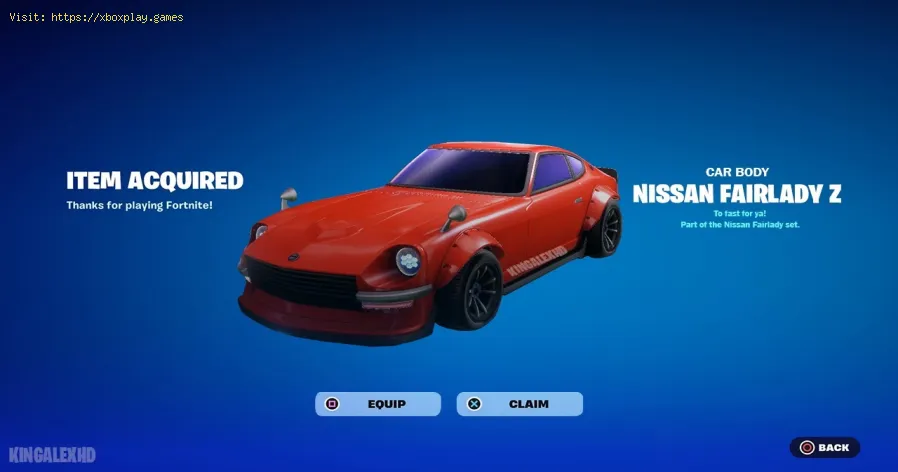
How to unlock the Backfire Car Body in Fortnite
We invite you to discover How to unlock the Backfire car body in Fortnite with our detailed guide today.
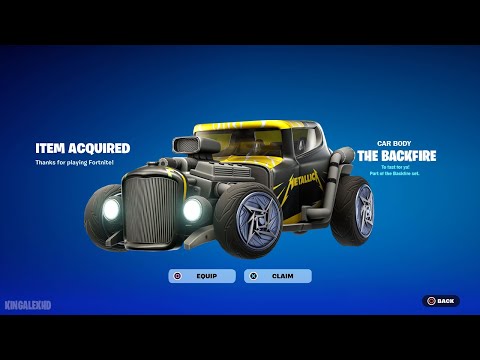
The Fortnite Festival Season 4 update has introduced a collaboration with the legendary band Metallica, including new content for Rocket Racing. Among the highlights is the Metallica-themed Backfire car body. This document provides a detailed guide to unlocking this coveted item.
To get started, you need to access the Rocket Racing mode within Fortnite. This can be achieved by using the search bar and entering "Rocket Racing", followed by selecting the first thumbnail that appears.
Get the Starbrite Smasher Pickaxe in Fortnite without spending V-Bucks!This guide explains the limited-time methods to unlock this cosmicharvesting tool for free.
How to Get All SpongeBob Cosmetics in Fortnite
guide to unlocking all SpongeBob cosmetics in Fortnite. Dive into tips, tricks, and strategies to enhance your gaming
How to Collect Shiny Llamas in Fortnite
guide to collecting shiny llamas in Fortnite. Unlock tips, strategies, and locations to enhance your gaming experience
How to Get Harry Potter Skins in Fortnite
Learn the secrets to obtaining Harry Potter skins in Fortnite. Ourcomprehensive guide provides tips and tricks
Where to Find Back to the Future Mythic DeLorean in Fortnite
locations of the Mythic DeLorean from Back to the Future in Fortnite. Unlock its secrets and enhance your gameplay
How to Get the Free Rust Bucket Back Bling in Fortnite
unlock the Free Rust Bucket Back Bling in Fortnite with our step-by-step guide. Elevate your gameplay and style
How to Get a Perfect Gift in Fortnite
Learn how to gift items in Fortnite! Step-by-step guide for gifting skins,V-Bucks & more from the Item Shop. Requirements, restrictions &tips explained.
How to Get Free Cheeks and Glacial Dummy Skins in Fortnite
Want free Fortnite cosmetics? Learn legitimate methods to earn the Cheeksand Glacial Dummy skins without spending V-Bucks. Get tips for in-gamechallenges, events, and promotions.
Where to Find the Yule Trooper Boss in Fortnite
Discover the Yule Trooper Boss location in Fortnite! tips and strategies to defeat this festive foe and enhance your gameplay.
How to Fix Fortnite Unable to connect to server
Struggling with Fortnite connection errors? Discover effective solutions to fix your issues and get back to gaming
How to Repair Items in Soulmask
In this guide post, we will tell you everything you need to know about How to Repair Items in Soulmask.
How to Find Planetary Assimilation Piston in Destiny 2
Find out How to Find Planetary Assimilation Piston in Destiny 2 with our walkthrough guide today.
How to Use Pocket Death Rez in Destiny 2
We invite you to discover How to Use Pocket Death Rez in Destiny 2, a new task.
How to gain experience in Dragon Age Origins
Our guide today aims to explain to you How to gain experience in Dragon Age Origins.
How to get the Facet of Dominance in Destiny 2
Find out How to get the Facet of Dominance in Destiny 2 in this excellent and precisely explanatory guide.
The Fortnite Festival Season 4 update has introduced a collaboration with the legendary band Metallica, including new content for Rocket Racing. Among the highlights is the Metallica-themed Backfire car body. This document provides a detailed guide to unlocking this coveted item.
To get started, you need to access the Rocket Racing mode within Fortnite. This can be achieved by using the search bar and entering "Rocket Racing", followed by selecting the first thumbnail that appears.
How to unlock the Backfire car body in Fortnite?
- Metallica Missions: The key to unlocking the Backfire body lies in completing 10 of the Metallica missions available in Rocket Racing. These missions are located in a separate section of the Metallica-themed Battle Royale missions.
- Accessing Missions: To access the Metallica missions, head to the "Missions" tab located at the top of the screen within Rocket Racing. There you will find the list of Metallica missions currently active.
- Progress and Tracking: At the time of writing, there are 10 missions available, with 5 additional ones scheduled to release on June 17 and 21, respectively. To unlock the Backfire body, you need to complete 10 of the 20 total missions.
- Reward: Upon completing 10 Metallica missions, you will be awarded the Backfire car body. However, to obtain the full car along with all the themed decals and paints, the completion of all 20 missions is required.
- Nature of Missions: Most Metallica missions can be achieved simply by participating in Rocket Racing matches regularly. This means that, for many regular players of this mode, completing them should not require excessive effort.
By following the steps outlined above, Fortnite players will be able to unlock the coveted Backfire car body and deck out their vehicles in Metallica style in Rocket Racing.
Tags: Battle Royale, Fortnite Skins, V-Bucks, Fortnite Challenges, Fortnite Events, Fortnite Map, Fortnite Weapons, Fortnite S
Platform(s): Microsoft Windows PC, macOS, PlayStation 4 PS4, Xbox One, Nintendo Switch, PlayStation 5 PS5, Xbox Series X|S Android, iOS
Genre(s): Survival, battle royale, sandbox
Developer(s): Epic Games
Publisher(s): Epic Games
Engine: Unreal Engine 5
Release date: July 25, 2017
Mode: Co-op, multiplayer
Age rating (PEGI): 12+
Other Articles Related
How to Get the Starbrite Smasher Pickaxe for Free in FortniteGet the Starbrite Smasher Pickaxe in Fortnite without spending V-Bucks!This guide explains the limited-time methods to unlock this cosmicharvesting tool for free.
How to Get All SpongeBob Cosmetics in Fortnite
guide to unlocking all SpongeBob cosmetics in Fortnite. Dive into tips, tricks, and strategies to enhance your gaming
How to Collect Shiny Llamas in Fortnite
guide to collecting shiny llamas in Fortnite. Unlock tips, strategies, and locations to enhance your gaming experience
How to Get Harry Potter Skins in Fortnite
Learn the secrets to obtaining Harry Potter skins in Fortnite. Ourcomprehensive guide provides tips and tricks
Where to Find Back to the Future Mythic DeLorean in Fortnite
locations of the Mythic DeLorean from Back to the Future in Fortnite. Unlock its secrets and enhance your gameplay
How to Get the Free Rust Bucket Back Bling in Fortnite
unlock the Free Rust Bucket Back Bling in Fortnite with our step-by-step guide. Elevate your gameplay and style
How to Get a Perfect Gift in Fortnite
Learn how to gift items in Fortnite! Step-by-step guide for gifting skins,V-Bucks & more from the Item Shop. Requirements, restrictions &tips explained.
How to Get Free Cheeks and Glacial Dummy Skins in Fortnite
Want free Fortnite cosmetics? Learn legitimate methods to earn the Cheeksand Glacial Dummy skins without spending V-Bucks. Get tips for in-gamechallenges, events, and promotions.
Where to Find the Yule Trooper Boss in Fortnite
Discover the Yule Trooper Boss location in Fortnite! tips and strategies to defeat this festive foe and enhance your gameplay.
How to Fix Fortnite Unable to connect to server
Struggling with Fortnite connection errors? Discover effective solutions to fix your issues and get back to gaming
How to Repair Items in Soulmask
In this guide post, we will tell you everything you need to know about How to Repair Items in Soulmask.
How to Find Planetary Assimilation Piston in Destiny 2
Find out How to Find Planetary Assimilation Piston in Destiny 2 with our walkthrough guide today.
How to Use Pocket Death Rez in Destiny 2
We invite you to discover How to Use Pocket Death Rez in Destiny 2, a new task.
How to gain experience in Dragon Age Origins
Our guide today aims to explain to you How to gain experience in Dragon Age Origins.
How to get the Facet of Dominance in Destiny 2
Find out How to get the Facet of Dominance in Destiny 2 in this excellent and precisely explanatory guide.