How to Unlock Kiko and Kato in Party Animals
How to Unlock Kiko and Kato in Party Animals! Comprehensive guide for the ultimate gaming experience.
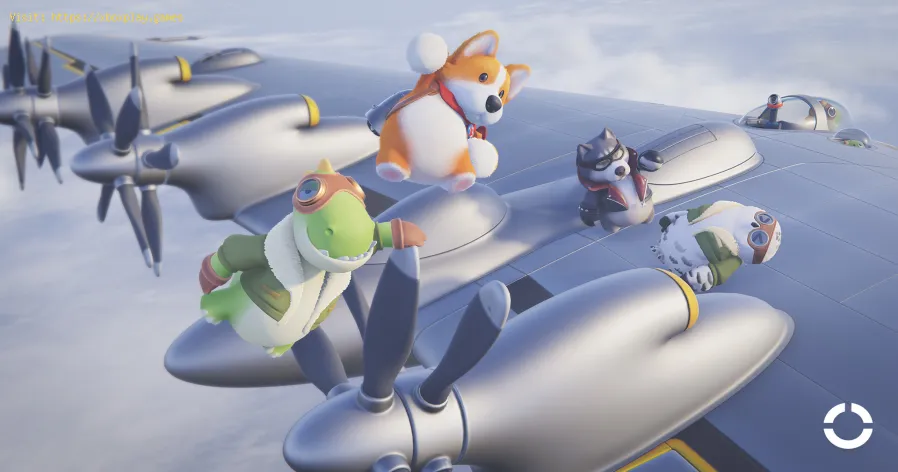
Welcome to the thrilling world of Party Animals, where you can dive into action with the charismatic characters, Kiko and Kato. In this blog post, we will guide you on how to unlock these lovable characters and join the vibrant Party Animals community. We are incredibly grateful to gongi from the Steam community for sharing this guide, ensuring that everyone can access the fun and excitement that Kiko and Kato bring to the game.
To unlock Kiko and Kato, the first step is to head to the in-game Item Shop. This hub is where all the magic happens, offering a wide range of items and characters for players to discover and enjoy. The Item Shop is your gateway to unlocking Kiko and Kato, so make sure to take a moment to soak in the atmosphere and prepare for an unforgettable adventure.
Once you're inside the Item Shop, the next step is to locate the "redeem" button. This button is the key to unlocking Kiko and Kato, so keep your eyes peeled for it. The developers have designed it to be easily accessible, ensuring that players don't miss out on the opportunity to add these fantastic characters to their collection. Once you find the "redeem" button, you're one step closer to joining the Party Animals fun.
Calibrate your TV for gaming with our step-by-step guide. Optimize response time, HDR, color, and input lag for the ultimate competitive edge and visualexperience.
How to Fix PC Blue Screen While Gaming
Stop gaming crashes! Learn step-by-step fixes for the PC blue screen (BSOD)during gameplay. Troubleshoot drivers, overheating, hardware &settings for a stable system.
How to Fix PC Restarts While Gaming
Expert tips to diagnose and fix sudden PC restarts during gaming. Learntroubleshooting steps for overheating, PSU issues, driver problems, andhardware stability.
How to Fix CPU Overheating While Gaming
Learn how to fix CPU overheating while gaming with effective coolingsolutions, proper maintenance, and system optimization tips to preventdamage and boost performance.
How to Fix Game Won’t Save Progress
"Troubleshoot and fix game progress not saving with our step-by-step guide. Learn how to check settings, clear cache, fix corrupt files, and solve storageissues to prevent lost saves."
How to fix PC Fans Too Loud While Gaming
Meta description: "PC fans too loud while gaming? Learn 8 simple fixes toreduce noise & cool your PC effectively. Easy, step-by-step guidefor a quieter gaming rig."
How to Fix PC Won’t Boot After Update
Struggling with a black screen or errors after an update? Learn step-by-step fixes to get your PC booting again. From safe mode to recovery tools, we'llguide you through the solutions.
How to Fix PC Stuttering in Games
Troubled by PC stuttering in games? Our guide shows you how to fix gamestuttering & lag with step-by-step solutions for settings, hardware, & drivers.
How to Fix PC Freezing While Gaming
Expert troubleshooting guide to stop PC freezing during games. Learn quickfixes for overheating, driver issues, and hardware bottlenecks torestore smooth gameplay.
How to Fix Game Crashes on Startup
Learn effective solutions to fix game crashes on startup and enjoy seamless gaming. Troubleshoot issues
Where to find Stroud-Eklund Staryard in Starfield
Where to find Stroud-Eklund Staryard in Starfield with our guide! Discover the best routes, hidden treasures.
How to Fix EA Sports FC 24 Direct X DXGI Error Access Denied
Get easy, step-by-step solutions on How to Fix EA Sports FC 24 Direct X DXGI Error Access Denied & enjoy uninterrupted gaming.
How to solve Explore Dungeon Puzzle in Moonstone Island
How to solve Explore Dungeon Puzzle in Moonstone Island with our step-by-step guide. Unleash your inner adventurer.
How to Fix EA Sports FC 24 No Online Access Fixed!
How to Fix EA Sports FC 24 No Online Access Fixed!! Dive into our step-by-step guide and enjoy uninterrupted gaming.
How to Get VIP Invitation and Blue Keycard in PayDay 3
Learn How to Get VIP Invitation and Blue Keycard in PayDay 3. We provide expert tips and detailed steps to enhance your game experience.
Welcome to the thrilling world of Party Animals, where you can dive into action with the charismatic characters, Kiko and Kato. In this blog post, we will guide you on how to unlock these lovable characters and join the vibrant Party Animals community. We are incredibly grateful to gongi from the Steam community for sharing this guide, ensuring that everyone can access the fun and excitement that Kiko and Kato bring to the game.
Section 1: Visiting the In-Game Item Shop
To unlock Kiko and Kato, the first step is to head to the in-game Item Shop. This hub is where all the magic happens, offering a wide range of items and characters for players to discover and enjoy. The Item Shop is your gateway to unlocking Kiko and Kato, so make sure to take a moment to soak in the atmosphere and prepare for an unforgettable adventure.
Section 2: Locating the "Redeem" Button
Once you're inside the Item Shop, the next step is to locate the "redeem" button. This button is the key to unlocking Kiko and Kato, so keep your eyes peeled for it. The developers have designed it to be easily accessible, ensuring that players don't miss out on the opportunity to add these fantastic characters to their collection. Once you find the "redeem" button, you're one step closer to joining the Party Animals fun.
Section 3: Unlocking with Codes
Unlocking Kiko and Kato is simpler than you might think. All you need to do is enter specific codes, and these adorable characters will be at your fingertips.
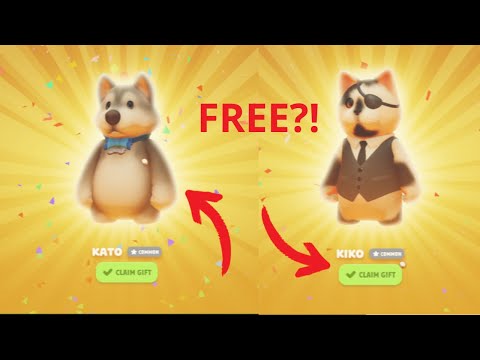
To unlock Kiko, you need to enter the code "beardbox" in the redeem section. Once you've entered the code, the game will recognize it and grant you access to Kiko. It's as simple as that! Kiko is a lovable character with a charming personality, and having him in your roster will surely bring a smile to your face.
For unlocking Kato, enter the code "joshandkato" in the redeem section. By using this code, you'll gain free access to Kato, a character known for his energetic and mischievous nature. With Kato by your side, your Party Animals adventures will be even more exhilarating.
It's important to note that these codes are provided for free to the players. The developers understand the value of creating a welcoming and inclusive gaming environment, where everyone can enjoy the full range of characters without any additional cost. So, take advantage of these codes and embrace the Party Animals experience to the fullest.
Unlocking Kiko and Kato in Party Animals is a breeze thanks to the redeem codes "beardbox" and "joshandkato." By following the simple steps outlined in this guide, you can add these charismatic characters to your collection and join the vibrant Party Animals community. We hope this blog post has inspired you to try out this nifty trick and dive into the fun-filled world of Party Animals. So, what are you waiting for? Grab your controller, enter the codes, and get ready for an unforgettable adventure with Kiko and Kato!
Mode:
Other Articles Related
How to Calibrate Your TV for GamingCalibrate your TV for gaming with our step-by-step guide. Optimize response time, HDR, color, and input lag for the ultimate competitive edge and visualexperience.
How to Fix PC Blue Screen While Gaming
Stop gaming crashes! Learn step-by-step fixes for the PC blue screen (BSOD)during gameplay. Troubleshoot drivers, overheating, hardware &settings for a stable system.
How to Fix PC Restarts While Gaming
Expert tips to diagnose and fix sudden PC restarts during gaming. Learntroubleshooting steps for overheating, PSU issues, driver problems, andhardware stability.
How to Fix CPU Overheating While Gaming
Learn how to fix CPU overheating while gaming with effective coolingsolutions, proper maintenance, and system optimization tips to preventdamage and boost performance.
How to Fix Game Won’t Save Progress
"Troubleshoot and fix game progress not saving with our step-by-step guide. Learn how to check settings, clear cache, fix corrupt files, and solve storageissues to prevent lost saves."
How to fix PC Fans Too Loud While Gaming
Meta description: "PC fans too loud while gaming? Learn 8 simple fixes toreduce noise & cool your PC effectively. Easy, step-by-step guidefor a quieter gaming rig."
How to Fix PC Won’t Boot After Update
Struggling with a black screen or errors after an update? Learn step-by-step fixes to get your PC booting again. From safe mode to recovery tools, we'llguide you through the solutions.
How to Fix PC Stuttering in Games
Troubled by PC stuttering in games? Our guide shows you how to fix gamestuttering & lag with step-by-step solutions for settings, hardware, & drivers.
How to Fix PC Freezing While Gaming
Expert troubleshooting guide to stop PC freezing during games. Learn quickfixes for overheating, driver issues, and hardware bottlenecks torestore smooth gameplay.
How to Fix Game Crashes on Startup
Learn effective solutions to fix game crashes on startup and enjoy seamless gaming. Troubleshoot issues
Where to find Stroud-Eklund Staryard in Starfield
Where to find Stroud-Eklund Staryard in Starfield with our guide! Discover the best routes, hidden treasures.
How to Fix EA Sports FC 24 Direct X DXGI Error Access Denied
Get easy, step-by-step solutions on How to Fix EA Sports FC 24 Direct X DXGI Error Access Denied & enjoy uninterrupted gaming.
How to solve Explore Dungeon Puzzle in Moonstone Island
How to solve Explore Dungeon Puzzle in Moonstone Island with our step-by-step guide. Unleash your inner adventurer.
How to Fix EA Sports FC 24 No Online Access Fixed!
How to Fix EA Sports FC 24 No Online Access Fixed!! Dive into our step-by-step guide and enjoy uninterrupted gaming.
How to Get VIP Invitation and Blue Keycard in PayDay 3
Learn How to Get VIP Invitation and Blue Keycard in PayDay 3. We provide expert tips and detailed steps to enhance your game experience.