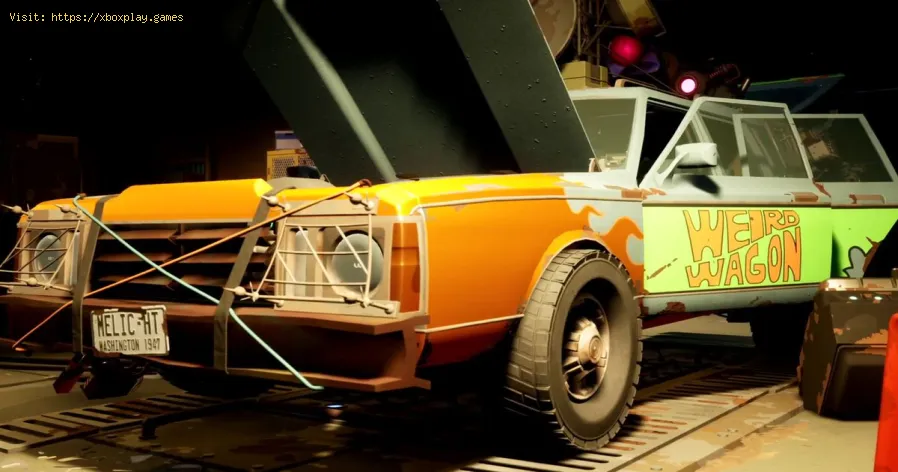
How to get a Side Rack in Pacific Drive
Learn the step-by-step process of How to get a Side Rack in Pacific Drive through our comprehensive online guide.
Hey there, fellow car enthusiasts and survivalists! Are you ready to take your Pacific Drive adventures to the next level? If you're looking to enhance your Station Wagon for epic journeys through the rugged terrains and How to get a Side Rack in Pacific Drive, then you've come to the right place. One of the most crucial components for these upgrades is the Side Rack. In this comprehensive guide, we'll walk you through the process of acquiring and installing these essential Side Racks, unlocking their full potential to transform your Station Wagon into a true survival machine.
To equip your Station Wagon with extra fuel tanks, side storage, flood lights, and more, you'll need to unlock and install four Side Racks. These vital components are available at the Fabrication Station under the Expansion Racks category. However, before you can fully utilize these Side Racks, you'll need to meet specific requirements for unlocking and installing them.
Each Side Rack comes with unique requirements that you'll need to fulfill in order to unlock it. These requirements typically include items such as Craft Mat, Scanning Antenna, Research Steel Sheet, Steel Sheet x2, 1.5 kLIM Stable Energy, and 2 kLIM Stable Energy. Meeting these requirements is essential to gaining access to the full range of capabilities that the Side Racks offer.
Unlock the toughest game achievements and trophies with our expert guides. Get step-by-step strategies, hidden tips, and proven methods to conquer any gaming challenge.
How to complete side quests faster
Boost your gameplay efficiency! Learn expert tips and strategies to completeside quests faster without sacrificing rewards or story enjoyment. Level up efficiently!
How to play better in co-op mode: tips and strategies
Enhance your team's success in co-op mode with expert tips, strategies, andcommunication tactics. Master coordination, role selection, and resource sharing for victory.
How to choose the best class in shooters (beginners)
Unsure which class to pick in shooters? Learn key beginner tips for choosingthe right class (Assault, Support, Sniper, etc.) to match your playstyle and dominate the game.
How to Farm Resources Fast in Any Game
Maximize your in-game progress with these universal resource farming strategies. Learn efficient methods, time-saving tricks, and optimization tips toaccelerate your grind in any video game.
Microphone not working in games: how to fix it
Is your microphone not working in games? Fix audio settings, permissions& hardware issues with this quick, step-by-step troubleshootingguide. Get back to team chat fast.
How to fix extreme lag in online games
Reduce lag spikes & high ping in online games. Get playable ping withinternet fixes, in-game settings tweaks, PC optimizations & routerfixes. Start winning again.
How to manage inventory in RPGs without mistakes
Master inventory management in RPGs with our expert tips to avoid common mistakes and enhance your gaming
How to choose the best weapons according to your play style
Discover how to select the best weapons tailored to your unique play style for optimal performance and enjoyment
How to improve in any battle royale
Master the art of survival with our tips on how to improve in any battle royale game. Elevate your skills and dominate the competition!
Where to find Gas Cylinders in Pacific Drive
Explore the best locations to Where to find Gas Cylinders in Pacific Drive for your convenience.
How long is a day in Sons of the Forest
Discover How long is a day in Sons of the Forest and unravel the mysteries of time in this captivating website.
How to save your game in Pacific Drive
Learn How to save your game in Pacific Drive. Don't lose your game - follow these simple tips now!
How to deal with radiation damage in Pacific Drive
Learn How to deal with radiation damage in Pacific Drive. Discover key tips for minimizing exposure and protecting yourself. Expert advice inside!
How to fix the Among Us could not find game error
Learn How to fix the Among Us could not find game error. Fix server connection issues and get back to playing in no time!
Hey there, fellow car enthusiasts and survivalists! Are you ready to take your Pacific Drive adventures to the next level? If you're looking to enhance your Station Wagon for epic journeys through the rugged terrains and How to get a Side Rack in Pacific Drive, then you've come to the right place. One of the most crucial components for these upgrades is the Side Rack. In this comprehensive guide, we'll walk you through the process of acquiring and installing these essential Side Racks, unlocking their full potential to transform your Station Wagon into a true survival machine.
How to get a Side Rack in Pacific Drive
Unlocking and Installing Side Racks
To equip your Station Wagon with extra fuel tanks, side storage, flood lights, and more, you'll need to unlock and install four Side Racks. These vital components are available at the Fabrication Station under the Expansion Racks category. However, before you can fully utilize these Side Racks, you'll need to meet specific requirements for unlocking and installing them.
Requirements for Unlocking Side Racks
Each Side Rack comes with unique requirements that you'll need to fulfill in order to unlock it. These requirements typically include items such as Craft Mat, Scanning Antenna, Research Steel Sheet, Steel Sheet x2, 1.5 kLIM Stable Energy, and 2 kLIM Stable Energy. Meeting these requirements is essential to gaining access to the full range of capabilities that the Side Racks offer.
Installing Side Racks
Once you've successfully unlocked the Side Racks, the next step is to install them on your Station Wagon. These Side Racks can be directly attached to your car, offering additional storage and customization options. It's important to note that the Side Racks will remain empty until you unlock other blueprints for upgrades that can be attached to them, allowing for further customization and functionality.
Transforming Your Station Wagon into a Survival Machine
Now that you've unlocked and installed the Side Racks, it's time to harness their full potential and transform your Station Wagon into a true survival machine. These Side Racks are not just for aesthetic purposes; they are essential for equipping your vehicle to navigate through the challenging zones of Pacific Drive with ease. With added storage, increased fuel capacity, and other upgrades, your Station Wagon will be well-equipped to handle the demands of the rugged terrain and unpredictable environments.
The versatility of the Side Racks allows you to customize your vehicle based on your specific needs and preferences. Whether you're storing essential supplies, extending your fuel capacity for long journeys, or adding specialized equipment for off-road navigation, the Side Racks provide the foundation for creating a personalized and highly functional vehicle tailored to your unique adventuring style.
Congratulations! You are now well-versed in the process of acquiring and How to get a Side Rack in Pacific Drive. By unlocking and installing these Side Racks, you've taken a significant step towards enhancing your Station Wagon for the ultimate adventure. Whether you're embarking on a solo expedition or a group outing, the Side Racks will serve as your indispensable companions on the road, providing the additional capacity and functionality needed to tackle the challenges that await you in Pacific Drive.
Mode:
Other Articles Related
How to unlock difficult achievements and trophiesUnlock the toughest game achievements and trophies with our expert guides. Get step-by-step strategies, hidden tips, and proven methods to conquer any gaming challenge.
How to complete side quests faster
Boost your gameplay efficiency! Learn expert tips and strategies to completeside quests faster without sacrificing rewards or story enjoyment. Level up efficiently!
How to play better in co-op mode: tips and strategies
Enhance your team's success in co-op mode with expert tips, strategies, andcommunication tactics. Master coordination, role selection, and resource sharing for victory.
How to choose the best class in shooters (beginners)
Unsure which class to pick in shooters? Learn key beginner tips for choosingthe right class (Assault, Support, Sniper, etc.) to match your playstyle and dominate the game.
How to Farm Resources Fast in Any Game
Maximize your in-game progress with these universal resource farming strategies. Learn efficient methods, time-saving tricks, and optimization tips toaccelerate your grind in any video game.
Microphone not working in games: how to fix it
Is your microphone not working in games? Fix audio settings, permissions& hardware issues with this quick, step-by-step troubleshootingguide. Get back to team chat fast.
How to fix extreme lag in online games
Reduce lag spikes & high ping in online games. Get playable ping withinternet fixes, in-game settings tweaks, PC optimizations & routerfixes. Start winning again.
How to manage inventory in RPGs without mistakes
Master inventory management in RPGs with our expert tips to avoid common mistakes and enhance your gaming
How to choose the best weapons according to your play style
Discover how to select the best weapons tailored to your unique play style for optimal performance and enjoyment
How to improve in any battle royale
Master the art of survival with our tips on how to improve in any battle royale game. Elevate your skills and dominate the competition!
Where to find Gas Cylinders in Pacific Drive
Explore the best locations to Where to find Gas Cylinders in Pacific Drive for your convenience.
How long is a day in Sons of the Forest
Discover How long is a day in Sons of the Forest and unravel the mysteries of time in this captivating website.
How to save your game in Pacific Drive
Learn How to save your game in Pacific Drive. Don't lose your game - follow these simple tips now!
How to deal with radiation damage in Pacific Drive
Learn How to deal with radiation damage in Pacific Drive. Discover key tips for minimizing exposure and protecting yourself. Expert advice inside!
How to fix the Among Us could not find game error
Learn How to fix the Among Us could not find game error. Fix server connection issues and get back to playing in no time!