Where to Find All crows in the Necropolis in Little Nightmares 3
- Play as Low: You must be playing as Low to use the bow, which is essential for shooting down the crows.
- Use Accessibility Features: Head to the Options menu and enable 'Highlight Interactibles' in the Accessibility settings. This will make the crows glow, significantly easing the spotting process.
- Be Quick on the Draw: Some crows are skittish and will fly away if you hesitate. Have your bow ready and don't be afraid to use the "Restart from Checkpoint" feature if you miss one.
Detailed Walkthrough: All 11 Necropolis Crow Locations
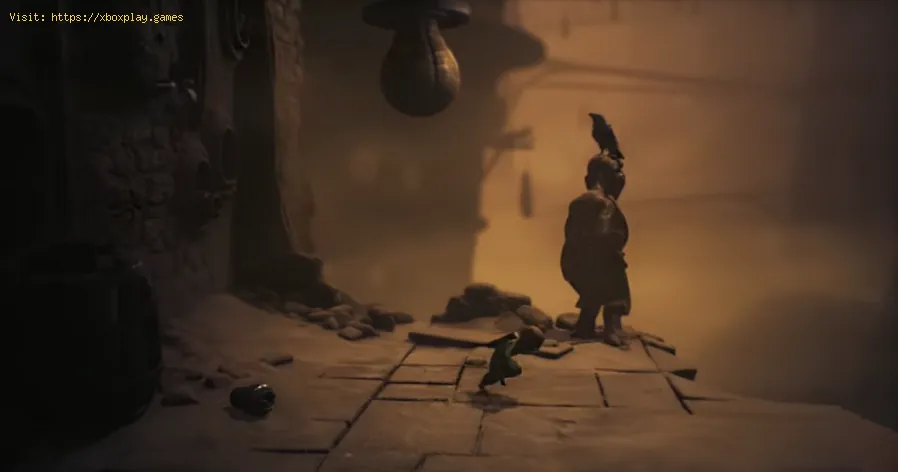
Crow #1: Shortly after the chapter begins, you'll climb a long ladder to officially enter the Necropolis. At the top, look towards the background doorway. Your first target is perched in a gap in the upper-right section of the wall.Crow #2: From the first crow, simply move to the next scene on the right. You'll see a large statue in the near background. Aim for the crow calmly sitting on the statue's head.Crows #3, #4, & #5: Progress until you find a locked door requiring a key. The game guidesyou to shoot one crow perched on a seated statue to retrieve the key.Once you have that one, carefully scan the background to the right. Twoadditional crows are sitting together on a ledge or gap in thearchitecture—don't leave this area without all three.
Crow #6: After obtaining the umbrella and using the zipline, you'll land on aledge before a required jump. Before you leap, immediately look to thetop-right corner. A crow is perched here but flies off extremely fast.Listen for the sound of Low drawing his bowstring as your cue to takethe shot instantly.
Crows #7, #8, #9, & #10: This section comes after you've successfully sneaked past the MonsterBaby for the first time and defeated a group of flying insects. You'llride upward on air shafts and survive a brief chase sequence with thebaby, eventually landing in an area filled with unsettling statues.
- Crow #7: As you enter this statue area, be cautious. Before moving too far intothe scene, look left. A crow is on a statue there and will flee if youapproach carelessly. Take it out from the entrance.
- Crows #8 & #9: In the same area, focus on the center background. You'll find two crows sitting together on a small, out-of-reach ledge.
- Crow #10: Complete the set in this area by looking to the top-right corner, where a final crow is waiting.
Crow #11: The final crow appears after a story sequence where the Monster Babycaptures you and a subsequent cutscene in a child's bedroom. When youemerge outside and see the baby again, look at the large, white Rattlerring in the background, near the Monster Baby. Your last target isperched there, waiting for your final, well-aimed arrow.
With this guide, you're equipped to track down every elusive bird and addthe Feather Collector achievement to your collection. Happy hunting

Other Articles Related
What is VRR and why it improves your gaming experienceLearn about Variable Refresh Rate (VRR) and how it eliminates screen tearingand stuttering for a smoother, more responsive gaming experience.
What is HDR and how to enable it correctly
Unlock stunning visuals with our guide to HDR. Learn what High Dynamic Rangetechnology is and how to properly enable it on your TV, monitor, orgaming console for richer contrast and vibrant colors.
What is ray tracing and how does it work?
Discover what ray tracing is: a rendering technique that simulates realisticlighting in graphics. Learn how it works, its applications in gaming and film, and why it creates such lifelike visuals.
What is crossplay and how to enable it
Crossplay allows gamers on different platforms to play together. Learn whatcrossplay is, how it works, and step-by-step instructions to enable itin your favorite games.
What is input lag and how to reduce it
Discover what input lag is and learn effective strategies to reduce it for a smoother gaming experience.
How to start a new game without making mistakes
Learn how to start a new game successfully with our expert tips to avoid common mistakes and enhance your gaming
How to choose the right difficulty level in any game
Discover tips on selecting the perfect difficulty level for any game to enhance your gaming experience and challenge yourself
How to avoid losing progress in games
Never lose your progress again! Discover effective strategies to safeguard your work and ensure seamless continuity.
How to play with friends using crossplay
Join the fun and play with friends in crossplay! Experience seamless gaming across platforms and enjoy endless adventures together.
How to Unlock the Graveyard Map in Megabonk
Discover the secrets to unlocking the Graveyard Map in Megabonk. Learnstep-by-step strategies and tips to access this spooky new level andenhance your gameplay experience.
Best Settings To Improve Visibility in Battlefield 6
Discover the best settings for Battlefield 6 to enhance visibility and elevate your gaming experience. Optimize your gameplay today!
How to Fly Jets & Helicopters in Battlefield 6
Master the skies in Battlefield 6! Discover essential tips and tricks for flying jets and helicopters like a pro. Elevate your gameplay today!
How to Complete a Mission with 30 Headshots in Battlefield 6
Join the action in Battlefield 6! Complete a mission with 30 headshots and showcase your skills. Dive into intense gameplay now!
How to Fix Little nightmares 3 controller not working
Struggling with controller issues in Little Nightmares 3? Get your gamepad working again. Our guide covers PC & console fixes for connection, inputlag, and recognition problems.
How to Play With Friends in Battlefield 6
Join your friends in Battlefield 6 with our ultimate guide! Discover tips and tricks for seamless multiplayer gameplay and enhance your gaming experience.