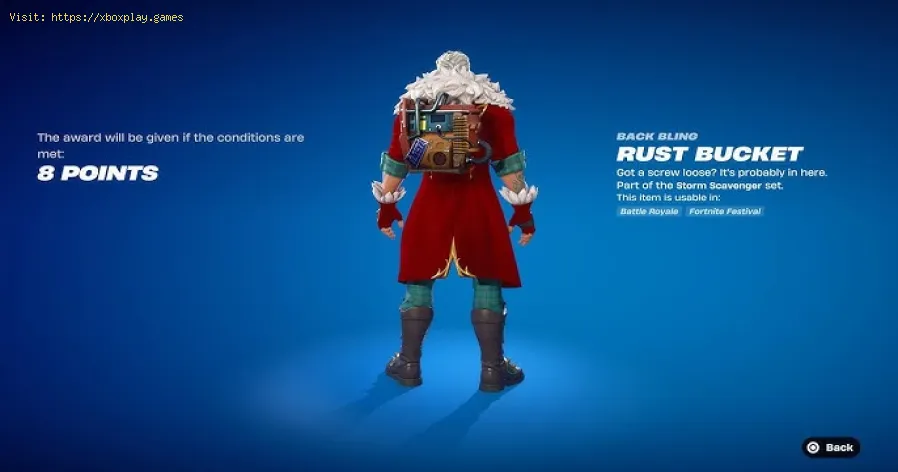
How to Get the Free Rust Bucket Back Bling in Fortnite
Why the Rust Bucket is Back (and Why It’s Hard to Get)
The return of the Rust Bucket is tied to a massive partnership between Epic Games and NVIDIA to celebrate the launch of the RTX 50-series GPUs. While the back bling is technically "free," it is locked behind a competitive tournament wall.Many players are finding the tournament "locked" in their Compete Tab. This isn't a bug; it’s due to the high eligibility bar Epic has set for this specific event. Because the prize pool includes over $100,000 in cash and custom RTX 5080 GPUs, the requirements are much stricter than a standard community cup.Possible Causes for "Locked" Tournament Access:
- Rank Requirement: You must have reached Gold Rank or higher in Battle Royale, Zero Build, or Reload Ranked.
- Account Level: Your Epic Account level must be at least 350.
- Tournament History: You must have participated in at least 14 different Epic tournaments in the last 180 days.
- 2FA: Two-Factor Authentication must be enabled on your account.
Quick Solution (For Impatient Players)
If you meet all the requirements, here is the "Too Long; Didn't Read" version:Detailed Step-by-Step Solutions
To ensure you don’t miss out on this limited-time window, follow these steps to prepare and compete.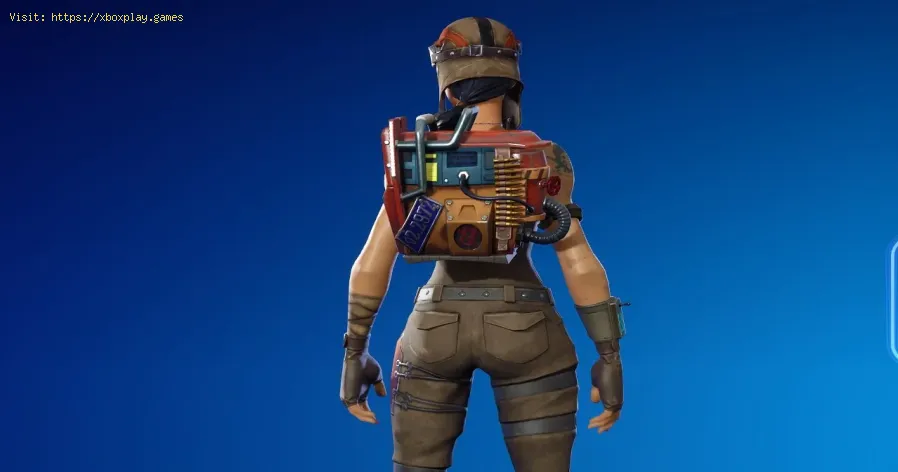
Step 1: Verify Your Eligibility
Check your rank in the lobby. If you are currently Silver or Bronze, you need to grind to Gold I immediately. Fortnite Reload Ranked is often the fastest way to rank up due to the high frequency of combat and placement points. Also, ensure your account level (found in theCareer tab) is 350+.
Step 2: Check the "14 Tournament" Rule
This is the hurdle stopping most casual players. Epic requires a history ofcompetitive play to prevent "smurfing" (pros using alt accounts). To see if you qualify, go to the Compete Tab and click on the NVIDIA Cup icon. If it says "Qualifying Round Required," it likely means you haven't played enough tournaments lately.
- Platform Tip: On console, the Compete Tab can sometimes be slow to update. Restarting your game often clears the "locked" icon if you’ve recently met arequirement.
Step 3: Enable 2FA
If you haven't done this, you won't be allowed to enter any tournament. Head to the Epic Games website, log in, go to Account Settings > Password & Security, and enable Email or App-based 2FA.
Step 4: Join the Session
The tournament starts on December 21, 2025. The exact time depends on your region (e.g., NA Central, Europe, Asia). Check the in-game timer to see exactly when the "Queue Open" messageappears. You have a 3-hour window to play up to 10 matches.
Step 5: Play for Survival (The 8-Point Strategy)
You don’t need to be a pro to get 8 points.
- The "Bush Camper" Method: In a Solo cup, players are very aggressive. If you land at a quiet edge of the map and simply survive until the Top 40, you will earn 11 placement points instantly.
- The "Aggro" Method: If you’re confident, 4 kills will net you the 8 points you need. Each elimination is worth 2 points.
Step 6: Confirm Your Points
Once you hit 8 points, you can technically stop playing. The Rust Bucket Back Bling will be granted to your account once the tournament results are finalized (usually within 24–48 hours after the event ends).
The Points Breakdown
If you’re aiming higher (for the cash prizes or the RTX 5080), here is how the points are distributed:
| Action | Points |
| Elimination | 2 Points |
| Victory Royale | 60 Points |
| 11th Place | 40 Points |
| 21st Place | 30 Points |
| 31st Place | 20 Points |
| 50th Place | 1 Point |
How to Prevent Missing Out on Future Rewards
Missing a tournament because of a rank or "tournament count" requirement isfrustrating. Here is how to stay ready for the next "Legacy" itemreturn:
- Play the "Trash" Cups: Even if you don't care about a specific tournament, join one match, die off spawn, and leave. This counts as one tournament participation toward your 180-day quota.
- Maintain Gold Rank: Try to hit Gold in at least one Ranked mode (Battle Royale or ZeroBuild) every season. This is the standard "entry fee" for most cosmeticcups.
- Check the Compete Tab Weekly: Epic often hides small rewards (sprays, emoticons) in regional cups that are easy to overlook.
Frequently Asked Questions
1. Is the Rust Bucket the exact same as the 2018 version?
Yes. This is a rare instance where Epic is re-releasing an "OG" item in itsoriginal form. If you already owned it from 2018, you won't get a"second" one, but you can still compete for the cash prizes and the GPU.
2. Can I play on my phone or Nintendo Switch?
Yes! The NVIDIA GeForce RTX Cup is open to all platforms. However, keep inmind that you will be playing in a "cross-platform" pool, so you’ll beup against PC players with high frame rates. Playing for placement(hiding) is the best strategy for mobile/Switch players.
3. What if I have 8 points but didn't get the item yet?
Don't panic! Tournament rewards are rarely instant. Epic usually processesthe leaderboard and verifies that no cheating occurred before sendingthe rewards to player lockers. Expect to see it by December 23–24.
4. Can I play in multiple regions to get more points?
No. You are locked to the first region you play in for the duration of thecup. Attempting to play in multiple regions can sometimes lead to acompetitive disqualification.
The Rust Bucket return is a brilliant move for Winterfest 2025, bridging the gapbetween Fortnite’s legendary past and its high-tech future. While the14-tournament requirement is a steep barrier for some, the 8-point goalis incredibly achievable for anyone who can make it into the lobby.
Are you going for the Rust Bucket today, or are you aiming for that custom RTX 5080 GPU? Let us know your strategy in the comments! If you found this guidehelpful, be sure to share it with your squad so they don't miss the3-hour window. Good luck on the Island, and may your rotations be safe!
Would you like me to look up the exact start times for your specific region so you don't miss the queue?
Other Articles Related
How to Get the Starbrite Smasher Pickaxe for Free in FortniteGet the Starbrite Smasher Pickaxe in Fortnite without spending V-Bucks!This guide explains the limited-time methods to unlock this cosmicharvesting tool for free.
How to Get All SpongeBob Cosmetics in Fortnite
guide to unlocking all SpongeBob cosmetics in Fortnite. Dive into tips, tricks, and strategies to enhance your gaming
How to Collect Shiny Llamas in Fortnite
guide to collecting shiny llamas in Fortnite. Unlock tips, strategies, and locations to enhance your gaming experience
How to Get Harry Potter Skins in Fortnite
Learn the secrets to obtaining Harry Potter skins in Fortnite. Ourcomprehensive guide provides tips and tricks
Where to Find Back to the Future Mythic DeLorean in Fortnite
locations of the Mythic DeLorean from Back to the Future in Fortnite. Unlock its secrets and enhance your gameplay
How to Get the Free Rust Bucket Back Bling in Fortnite
unlock the Free Rust Bucket Back Bling in Fortnite with our step-by-step guide. Elevate your gameplay and style
How to Get a Perfect Gift in Fortnite
Learn how to gift items in Fortnite! Step-by-step guide for gifting skins,V-Bucks & more from the Item Shop. Requirements, restrictions &tips explained.
How to Get Free Cheeks and Glacial Dummy Skins in Fortnite
Want free Fortnite cosmetics? Learn legitimate methods to earn the Cheeksand Glacial Dummy skins without spending V-Bucks. Get tips for in-gamechallenges, events, and promotions.
Where to Find the Yule Trooper Boss in Fortnite
Discover the Yule Trooper Boss location in Fortnite! tips and strategies to defeat this festive foe and enhance your gameplay.
How to Fix Fortnite Unable to connect to server
Struggling with Fortnite connection errors? Discover effective solutions to fix your issues and get back to gaming
How to Fix Washed‑Out Colors on Consoles
effective solutions for fixing washed-out colors on your gaming console. Enhance your visual experience with our expert tips
How to Reduce Lag in Cloud Gaming
Level up your cloud gaming experience! Learn expert tips to reduce lag,optimize streaming quality, and enjoy smoother gameplay with ouractionable guide.
How to Enable HDR on Consoles
Learn how to activate HDR on your consoles effortlessly. Our detailedinstructions will help you elevate your gaming
How to Enable VRR on Your TV
Unlock the full potential of your TV with our guide on enabling VRR. Enhance your gaming and viewing experience today!
How to Reduce Screen Tearing
Discover how to enable VRR on your TV for smoother gaming and enhancedvisuals. Follow our step-by-step guide