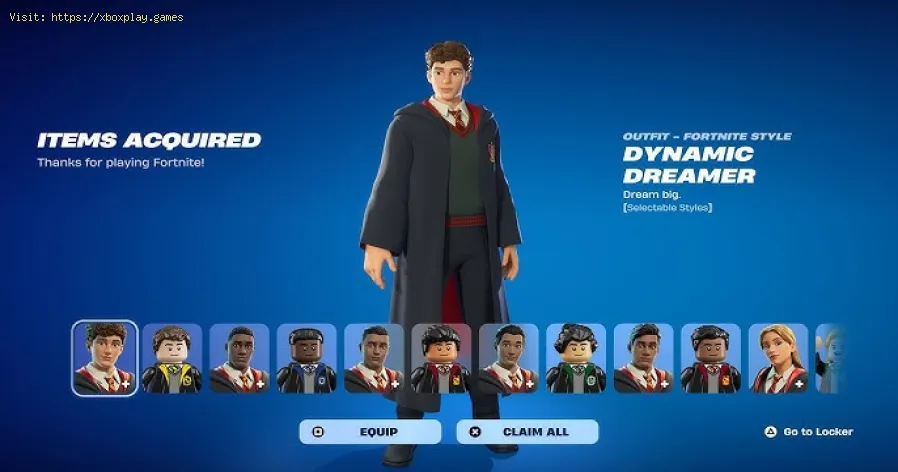
How to Get Harry Potter Skins in Fortnite
The Rumor vs. Reality
For weeks leading up to the event, rumors suggested that a specific "wizard" skin might be the final free gift hidden inside the Winterfest Lodge. While players do get free skins this year (like the Glacial Dummy), the Harry Potter-themed outfits have taken up residence in the Item Shop instead. This has caused a bit of confusion among fans who expected a freebie, but as we’ll explain, the sheer level of customization offered in the paid versions makes them a standout addition to any collection.Why You Might Be Having Trouble Finding the Skins
If you’ve logged in and can’t find the "Harry Potter" tab, it’s likely due to one of a few simple reasons:Quick Solution (For the Impatient Wizard)
To get the Harry Potter skins right now:- Open Fortnite and navigate to the Item Shop tab.
- Look for the "Celebration of Hogwarts" or "Wizarding World" section.
- Individual skins cost 1,500 V-Bucks each.
- The Celebration of Hogwarts Bundle costs 3,200 V-Bucks and includes multiple items for a significant discount.
- Deadline: You have until January 1, 2026, to make your purchase.
Detailed Step-by-Step Solutions
To ensure you get exactly the house and style you want, follow these steps to navigate the new Hogwarts collection:Step 1: Access the Item Shop
From the main lobby, move to the Item Shop tab. During Winterfest, this section is usually themed with snow and festive lights. Look for the Harry Potter branding—it's hard to miss.Step 2: Choose Your Base Model
There are ten different "Hogwarts Student" skins available. Each has a unique look and name (e.g., Dynamic Dreamer, Hallway Hero, Knowledge Keeper). Since they all share the same customization options, pick the character model that you like best.Step 3: Preview the House Styles
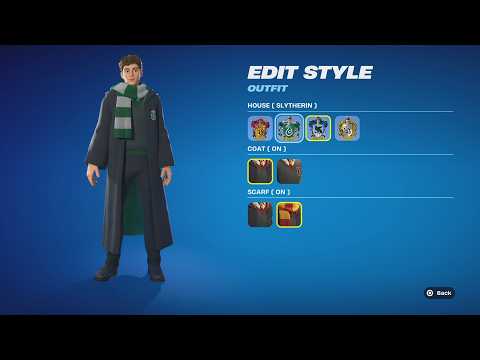
Before you hit "Buy," click into the skin to see the Selectable Styles. Every single one of these skins allows you to switch between:- Gryffindor (Red and Gold)
- Slytherin (Green and Silver)
- Ravenclaw (Blue and Bronze)
- Hufflepuff (Yellow and Black)
Step 4: Toggle Clothing Options
The customization doesn't stop at colors.13 You can also choose to have the Hogwarts Robe (Coat) on or off, and toggle the House Scarf to suit your preferred level of "coziness."Step 5: Finalize the Purchase
Ensure you have enough V-Bucks. If you plan on buying more than two skins, the Celebration of Hogwarts Bundle is a much better value at 3,200 V-Bucks, as it includes the skins, the Snowy Owl back bling, and more.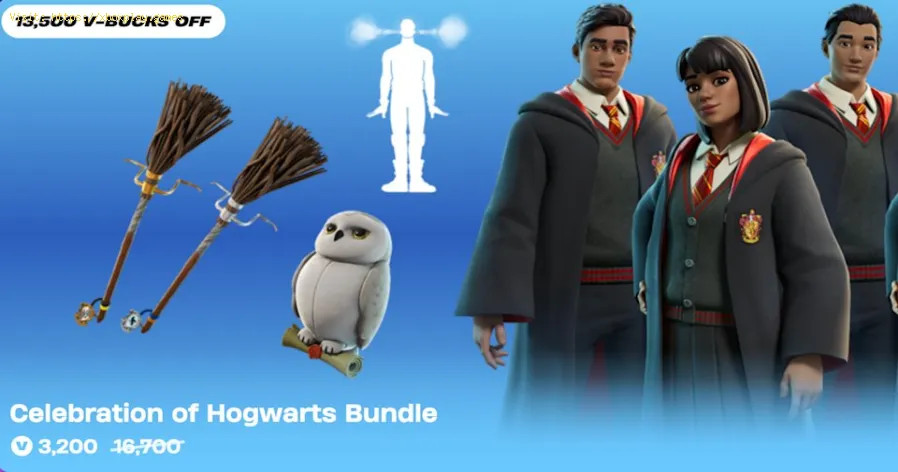
All Harry Potter Cosmetics in Fortnite
Here is the full breakdown of every magical item currently available in the shop:
| Item Name | Type | Price (V-Bucks) |
| Hogwarts Student Skins (10 variations) | Outfit | 1,500 each |
| Snowy Owl | Back Bling | 500 |
| Firebolt | Pickaxe | 800 |
| Peppermint Imps | Emote | 400 |
| Celebration of Hogwarts | Bundle | 3,200 |
| Aston Martin Valhalla + Wizarding World | Vehicle Bundle | 2,800 |
| Hogwarts Wheels | Vehicle Wheels | 400 |
Note: The Aston Martin bundle and Hogwarts wheels are separate from the main character bundle.
Alternative Solutions & Cross-Game Rewards
If you’re looking for ways to rep the Wizarding World without spending all your V-Bucks, there are a few "hidden" ways to get gear through Epic’sother properties:
The Chocolate Frog Back Bling
As part of a special promotion, players who played Hogwarts Legacy on the Epic Games Store for at least two hours by December 18 were eligible for a Free Chocolate Frog Back Bling.16 If you met these requirements, check your locker! It may take up to 48 hours to appear after your first login during the event.
Rocket League "Frosty Fest"
The collaboration extends to Rocket League. By participating in the Hogwarts House Rivalry event in Rocket League:
- Complete in-game challenges to earn Hogwarts House Scarf Boosts.
- Since these items are "Cross-Game" compatible, they will also appear in your Fortnite Racing and Battle Royale lockers as vehicle trails/boosts.
How to Prevent Missing Out
Because this is a licensed collaboration tied to a specific seasonal event(Winterfest), these skins are likely to enter the "Vault" for a longtime once they leave the shop.
- Set a Reminder: The shop rotation for these items ends on January 1, 2026.
- Check Daily Presents: While the Harry Potter skins aren't in the boxes, the Winterfest Lodge still offers 14 free gifts. Make sure you log in daily to claim them, as they do not stack this year!
Frequently Asked Questions
1. Can I change my Hogwarts House after I buy the skin?
Yes! You are not "locked" into the house you choose at the time of purchase. You can go into your Locker at any time and change the style between Gryffindor, Slytherin, Ravenclaw, and Hufflepuff for free.
2. Is there a "Harry Potter" character skin (Daniel Radcliffe)?
Currently, the collaboration focuses on "generic" student models that allowplayers to project themselves into the world. While characters likeHarry, Ron, or Hermione aren't in this specific wave, the customizablestudents are meant to fill that role for now.
3. Does the Firebolt Pickaxe have a special animation?
The Firebolt uses a unique "swing" animation that mimics a wizard'smovement, and it features magical trail effects that match your chosenhouse colors if you have a house skin equipped.
4. Can I use the Hogwarts car items in Battle Royale?
Absolutely. Any car body (like the Aston Martin Valhalla) or wheels (HogwartsWheels) purchased in the shop can be equipped in your "Vehicle" lockerand will replace standard cars found on the Battle Royale map.
Conclusion
The arrival of Harry Potter in Fortnite is a "magical" milestone for thegame. Whether you’re gliding over the map on a Firebolt or repping yourhouse colors in a heated 1v1, these cosmetics add a layer of nostalgiaand flair that fits perfectly with the snowy vibe of Winterfest 2025.
Don't forget to grab your favorites before the Portkey closes on January 1!
Found this guide helpful? Share it with your Duo partner so they don't miss out on the Chocolate Frog reward! Have you already picked your house? Drop a comment below and let us know if you're team Gryffindor or team Slytherin! For more Fortnite tips, bundle value breakdowns, and event guides, be sure to explore our other articles.
Other Articles Related
How to Get the Starbrite Smasher Pickaxe for Free in FortniteGet the Starbrite Smasher Pickaxe in Fortnite without spending V-Bucks!This guide explains the limited-time methods to unlock this cosmicharvesting tool for free.
How to Get All SpongeBob Cosmetics in Fortnite
guide to unlocking all SpongeBob cosmetics in Fortnite. Dive into tips, tricks, and strategies to enhance your gaming
How to Collect Shiny Llamas in Fortnite
guide to collecting shiny llamas in Fortnite. Unlock tips, strategies, and locations to enhance your gaming experience
How to Get Harry Potter Skins in Fortnite
Learn the secrets to obtaining Harry Potter skins in Fortnite. Ourcomprehensive guide provides tips and tricks
How to Get a Perfect Gift in Fortnite
Learn how to gift items in Fortnite! Step-by-step guide for gifting skins,V-Bucks & more from the Item Shop. Requirements, restrictions &tips explained.
How to Get Free Cheeks and Glacial Dummy Skins in Fortnite
Want free Fortnite cosmetics? Learn legitimate methods to earn the Cheeksand Glacial Dummy skins without spending V-Bucks. Get tips for in-gamechallenges, events, and promotions.
Where to Find the Yule Trooper Boss in Fortnite
Discover the Yule Trooper Boss location in Fortnite! tips and strategies to defeat this festive foe and enhance your gameplay.
How to Fix Fortnite Unable to connect to server
Struggling with Fortnite connection errors? Discover effective solutions to fix your issues and get back to gaming
How to Boost Wi‑Fi Signal for Gaming
Maximize your gaming performance with expert tips on how to boost Wi‑Fi signalstrength. Reduce lag, eliminate drops, and ensure a stable connection.
Where to Find Back to the Future Mythic DeLorean in Fortnite
locations of the Mythic DeLorean from Back to the Future in Fortnite. Unlock its secrets and enhance your gameplay
How to Get the Free Rust Bucket Back Bling in Fortnite
unlock the Free Rust Bucket Back Bling in Fortnite with our step-by-step guide. Elevate your gameplay and style
How to Fix Washed‑Out Colors on Consoles
effective solutions for fixing washed-out colors on your gaming console. Enhance your visual experience with our expert tips
How to Reduce Lag in Cloud Gaming
Level up your cloud gaming experience! Learn expert tips to reduce lag,optimize streaming quality, and enjoy smoother gameplay with ouractionable guide.