
How to Get All SpongeBob Cosmetics in Fortnite
Why Is SpongeBob a Sidekick Instead of a Skin?
If you are confused as to why you can't wear a SpongeBob skin, the explanation is twofold. Technically, SpongeBob's rectangular shape creates "hitbox" problems; if he were a standard skin, he would either be too bulky to see around or have an unfair competitive disadvantage. From a branding perspective, Nickelodeon is often protective of their mascot holding realistic firearms. By making him a Sidekick, Epic allows SpongeBob to follow you into battle, react to your gameplay, and talk to you—without the mechanical issues of a traditional skin.Quick Solution (For the Impaired Patience)
If you want the SpongeBob experience immediately:- Navigate to the Item Shop and look for the "SpongeBob SquarePants" tab.
- The best value is the SpongeBob SquarePants Bundle for 3,000 V-Bucks, which includes the Sidekick, the DoodleBob back bling, several emotes, and more.
- The Patty Wagon car body is a separate purchase for 2,000 V-Bucks.
- Deadline: These items are scheduled to rotate out of the shop on January 2, 2026.
Detailed Step-by-Step Solutions
To get the most out of your Bikini Bottom gear and unlock every hidden style, follow these clear steps:Step 1: Purchase the SpongeBob Sidekick
Go to the Item Shop and select the SpongeBob SquarePants Sidekick (either individually for 1,800 V-Bucks or in the bundle). Unlike a back bling, a Sidekick is a separate entity that floats or walks beside you.Step 2: Equip Him in Your Locker
Once purchased, go to your Locker. You will see a new tab specifically for Sidekicks (introduced in Chapter 7). Select SpongeBob and choose your "Initial Style."Step 3: Earn "Sidekick Points"
To unlock his additional styles (like the SpongeBob Gradient Style), you must play matches with him equipped. Sidekick Points function like XP but are specific to your companion. You earn them by:- Eliminating opponents.
- Surviving storm circles.
- Performing "adorable" actions (SpongeBob reacts when you heal or find high-tier loot).
Step 4: Unlock the "Imagination!" Emote
As you accumulate Sidekick Points, you will automatically complete "Sidekick Quests." These don't require you to go to specific map locations—just play the game normally. The iconic "Imagination!" rainbow emote is one of the final rewards in this progression track.Step 5: Equip Your SpongeBob "Kicks"
The collab features four different types of Kicks (shoes). If you bought the Gary Slippies or the Crocs, head to the "Footwear" section of your locker. These can be worn by almost any human-model skin in your collection.Step 6: Drive the Patty Wagon
To use the Patty Wagon, go to the Vehicles tab. It replaces the Whiplash sports car. Once equipped, any Whiplash you find on the map will instantly transform into the "Sandwich Car" from the 2004 movie.All SpongeBob Cosmetics in Fortnite (Full List)

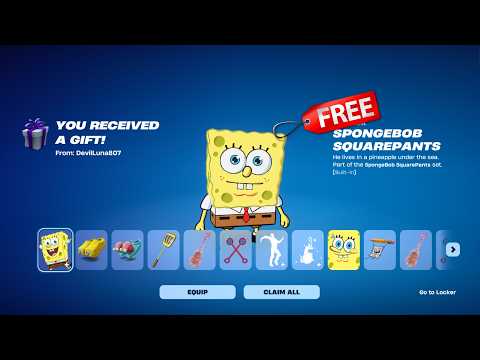
There are a whopping 15 items in this collaboration. If you want to own every single piece of Bikini Bottom history, you will need a total of 12,500 V-Bucks (if bought separately), though the bundle significantly reduces this cost.
| Item Name | Cosmetic Type | Cost (V-Bucks) |
| SpongeBob SquarePants | Sidekick (Voiced by Tom Kenny) | 1,800 |
| SpongeBob's Patty Wagon Bundle | Car Body (Whiplash) | 2,000 |
| Gary Slippies | Kicks (Footwear) | 1,000 |
| SpongeBob Slippies | Kicks (Footwear) | 1,000 |
| Crocs: Patrick Star | Kicks (Footwear) | 1,000 |
| Crocs: Squidward | Kicks (Footwear) | 1,000 |
| DoodleBob | Back Bling | 400 |
| The Golden Spatula | Pickaxe | 500 |
| Jellyfish Jam | Emote | 500 |
| Lil' Big Jellyfish | Emote | 500 |
| Goofy Goober | Guitar (Festival) | 800 |
| Bikini Bottom Kit | Drums (Festival) | 800 |
| Sweet Victory | Jam Track | 500 |
| Jelly Parade | Vehicle Boost | 400 |
| Flower Cloud Waves | Skydiving Trail | 300 |
Pro Tip: You can grab the first 10 items featured in this list within the SpongeBob SquarePants Bundle for 3,000 V-Bucks, saving you over 5,000 V-Bucks!
How to Prevent Missing Out
Because this collab is timed to promote the new movie on December 26, it is considered a Limited Time Event.
- Check the Countdown: The shop timer indicates that the SpongeBob tab will vanish at the start of the new year.
- Rocket League Sync: If you play Rocket League, the Patty Wagon and the Jelly Parade boost are Cross-Game compatible. Buying them in Fortnite will grant them to you in RocketLeague for free, provided your accounts are linked via Epic Games.
Frequently Asked Questions
1. Can I play as Patrick or Squidward?
Currently, Patrick and Squidward are only available as Kicks (shoes) or through references in the Bikini Bottom Kit (drums). There are no playable skins for them. However, rumors suggestPatrick may arrive as a Sidekick in the second wave of the collab.
2. Does SpongeBob talk during the game?
Yes! Voiced by the legendary Tom Kenny, the SpongeBob Sidekick has unique voice lines for when you get anelimination, when you take damage, and even when you win a VictoryRoyale.
3. Can I use the Patty Wagon in LEGO Fortnite?
Yes, but with a catch. You can't "drive" it as a car in LEGO mode, but you can use the Patty Wagon Decals on certain buildable structures if you have the vehicle bundle.
4. How do I get "Sweet Victory"?
The "Sweet Victory" Jam Track is available for 500 V-Bucks. You can play it on the main stage in Fortnite Festival or use it as a Lobby Track to get that "Bubble Bowl" hype before a match.
While it’s a bit of a bummer that we can't literally be the sponge, the SpongeBob x Fortnite collaboration is one of the most detailed and high-effort crossoverswe've seen in a long time. From the custom voice acting to theridiculousness of driving a burger with pickle wheels, there is plentyof fun to be had for fans of all ages.
Are you going to be rocking the Gary Slippies or tearing up the road in the Patty Wagon? Let us know in the comments below which Bikini Bottom item is yourfavorite! If you found this guide helpful, don't forget to share it with your friends—especially those who are still wondering where theSpongeBob "skin" is hiding!
Other Articles Related
How to Get the Starbrite Smasher Pickaxe for Free in FortniteGet the Starbrite Smasher Pickaxe in Fortnite without spending V-Bucks!This guide explains the limited-time methods to unlock this cosmicharvesting tool for free.
How to Get All SpongeBob Cosmetics in Fortnite
guide to unlocking all SpongeBob cosmetics in Fortnite. Dive into tips, tricks, and strategies to enhance your gaming
How to Get Harry Potter Skins in Fortnite
Learn the secrets to obtaining Harry Potter skins in Fortnite. Ourcomprehensive guide provides tips and tricks
Where to Find Back to the Future Mythic DeLorean in Fortnite
locations of the Mythic DeLorean from Back to the Future in Fortnite. Unlock its secrets and enhance your gameplay
How to Get the Free Rust Bucket Back Bling in Fortnite
unlock the Free Rust Bucket Back Bling in Fortnite with our step-by-step guide. Elevate your gameplay and style
How to Get a Perfect Gift in Fortnite
Learn how to gift items in Fortnite! Step-by-step guide for gifting skins,V-Bucks & more from the Item Shop. Requirements, restrictions &tips explained.
How to Get Free Cheeks and Glacial Dummy Skins in Fortnite
Want free Fortnite cosmetics? Learn legitimate methods to earn the Cheeksand Glacial Dummy skins without spending V-Bucks. Get tips for in-gamechallenges, events, and promotions.
Where to Find the Yule Trooper Boss in Fortnite
Discover the Yule Trooper Boss location in Fortnite! tips and strategies to defeat this festive foe and enhance your gameplay.
How to Fix Fortnite Unable to connect to server
Struggling with Fortnite connection errors? Discover effective solutions to fix your issues and get back to gaming
How to Fix High GPU Usage
"Learn effective solutions to reduce high GPU usage, improveperformance, and prevent overheating. Step-by-step troubleshooting guide for gamers and creators."
How to Collect Shiny Llamas in Fortnite
guide to collecting shiny llamas in Fortnite. Unlock tips, strategies, and locations to enhance your gaming experience
How to Fix High CPU Usage While Gaming
Fix high CPU usage while gaming with these effective troubleshooting tips.Learn to optimize settings, update drivers, and boost gaming performance effortlessly.
How to Get Harry Potter Skins in Fortnite
Learn the secrets to obtaining Harry Potter skins in Fortnite. Ourcomprehensive guide provides tips and tricks
How to Boost Wi‑Fi Signal for Gaming
Maximize your gaming performance with expert tips on how to boost Wi‑Fi signalstrength. Reduce lag, eliminate drops, and ensure a stable connection.