
How To Get the Chic Outfits in Clair Obscur Expedition 33
The "Problem": A Fashionable Hunt
So, why isn't getting these outfits straightforward? There's no bug or glitch here—the design is intentional. The game encourages exploration and rewards curiosity. After spending dozens of hours with Verso, Maelle, Sciel, and the crew, the "Thank You Update" provides a new reason to revisit the game's hauntingly beautiful landscapes. The Chic Outfits are positioned as a prestige reward for dedicated players, not a mandatory stat boost. The "challenge" isn't combat-based; it's about knowing where to look and having the resources (Chroma) to afford your shopping spree.Quick Solution (For the Impatient Stylist)
Short on time? Here's the fast track to fashion:Detailed Step-by-Step Guide
Follow these steps to become the expedition's premier fashion curator.Step 1: Prerequisites – Finish the JourneyYou must have completed the main story of Clair Obscur: Expedition 33. The secret merchant and the new dungeon, "Verso's Drafts," are post-game content. Ensure your save file is at a point where you can freely explore the world map.Step 2: Mount Up and Set a Course
Summon your faithful steed, Esquie. Open your world map. Your destination is the Coastal Cave. This is a location you likely visited during the main story, making it easy to find.Step 3: The Crucial Detour
This is the most critical step. Upon arriving at the Coastal Cave location, you will see the large, shimmering portal that serves as the dungeon entrance. DO NOT ENTER IT. Instead, immediately pan your camera or move Esquie to the LEFT side of the entrance area. You should spot a small, secluded nook or cliffside path.Step 4: Meet Your Personal Shopper
There, you will find the new Gestral Merchant, a mysterious figure added with the update. Approach and interact with them to open their unique shop interface.
Step 5: Browse the Collection
The merchant's inventory is split into two key categories:
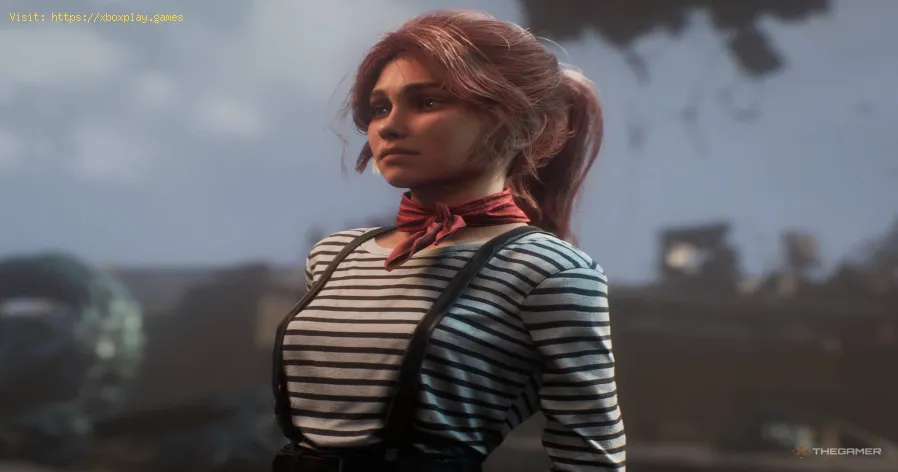
- Chic Outfits: A complete new ensemble for Verso, Maelle, Monoco, Sciel, and Lune.
- Double Bun Braid Hairstyles: A charming new hairstyle for Maelle, Lune, and Sciel.
Step 6: Check the Price Tag
Each individual item—whether an outfit or a hairstyle—costs 10,000 Chroma. This is a significant sum, emphasizing their status as premium cosmetics.
Step 7: Assess Your Funds
Open your menu and check your total Chroma. To buy everything (5 outfits + 3 hairstyles), you'll need 80,000 Chroma. For just the 5 Chic Outfits, you need 50,000 Chroma.
Step 8: Farm Chroma (If Necessary)
If you're short, don't worry. Chroma is farmable.
- Best Method: Re-enter Verso's Drafts (the new dungeon from the same update) or any high-level endgamedungeon. Defeat every enemy group. Enemies respawn when you re-enterareas, creating an infinite loop.
- Alternative Method: Roam the overworld on Esquie. Chroma appears as small, white glowing orbs scattered across the landscape. While slower, it's a more relaxed farming method.
Step 9: Make the Purchase
Once your wallet is sufficiently fat, return to the merchant. Select theitems you want and confirm the purchase. The items are added to yourinventory instantly.
Step 10: Equip Your New Look
Open the menu, navigate to the character you wish to customize, and selectthe "Cosmetics" or "Appearance" tab. You will find the newly purchased"Chic" outfit and/or "Double Bun Braid" hairstyle available forselection. Equip it and watch your character's model update inreal-time.
Alternative Acquisition Methods & Tips
- Focus on Favorites: You don't need to buy everything at once. Prioritize the outfits for your favorite characters or your main party lineup.
- Chroma Management: Before the final boss of the main game, consider saving a largestockpile of Chroma if you know you'll want these cosmetics later.
- Exploration Payoff: This secret merchant reinforces the game's design philosophy. Alwayscheck corners, alternate paths, and areas near major objectives forhidden secrets like this one.
How to Avoid "Losing" the Outfits
Once purchased, the Chic Outfits are permanently unlocked for that save file. There is no way to lose them or sell themaccidentally. They are purely cosmetic unlocks, tied to your profile.You can switch between the Chic outfit, default outfits, and any othercosmetic sets you own at any time from the menu without cost.
Frequently Asked Questions (FAQs)
Q: Do the Chic Outfits provide any stat boosts or gameplay advantages?
A: No, they are purely cosmetic. Their value is in personal expression and style, not in numerical power.
Q: I'm at the Coastal Cave but can't find the merchant. What's wrong?
A: Ensure you have downloaded and installed the "Thank You Update" (Version 1.XX or higher). The merchant will not appear on the basegame. Also, double-check that you are looking to the LEFT of the caveentrance, not right.
Q: Can I get these outfits on any platform?
A: Yes. The "Thank You Update" and the secret merchant are available on all platforms where Clair Obscur: Expedition 33 is sold: PlayStation 5, Xbox Series X/S, and PC (via Steam & Epic Games Store). The process is identical across all platforms.
Q: Is there a New Game+ mode, and do the outfits carry over?
A: As of the Thank You Update, Clair Obscur does not have a traditionalNew Game+ mode. Your cosmetics are tied to your completed save file,where you can continue exploring, farming, and enjoying the new dungeon.
Q: Are there other secret cosmetics in the update?
A: Yes! The "Esquie" outfit set mentioned in the intro is found inside the new "Verso's Drafts" dungeon. Be sure to explore every room thoroughly to find it.
Conclusion: Dress for the Expedition You Want
In a game about defying a predetermined fate, customizing your party'sappearance is a powerful act of personal agency. The Chic Outfits inClair Obscur: Expedition 33 are a testament to the developers'commitment to their audience—a reward for those who wish to linger inthis stunning world a little longer. The hunt for the hidden GestralMerchant is a final, delightful puzzle, and the resulting makeover is aperfect capstone to your journey.
Now that you know the secret, it's time to earn that Chroma, seek out the merchant, and redefine your team's style. Return to the Coastal Cave, find that hidden path, and give your expedition the chic, stylish farewell it deserves. Your party is waiting for their new look.
Other Articles Related
How To Get the Chic Outfits in Clair Obscur Expedition 33Learn how to unlock every chic outfit in Clair Obscur: Expedition 33. Get our guide to earning cosmetic gear and customizing your characters' stylefor any expedition.
All Weapons in Verso’s Drafts DLC in Clair Obscur Expedition 33
Master every new tool of war. Dive into our complete guide to all weapons inVerso's Drafts DLC for Clair Obscur: Expedition 33, covering stats,upgrades, and how to unlock each powerful armament.
How to Use Photo Mode in Clair Obscur Expedition 33
Master the art of cinematic photography in Clair Obscur Expedition 33. Ourguide reveals all Photo Mode controls, filters, and tips to capture your most stunning in-game moments.
How To Solve Esquie Statue Puzzle In Clair Obscur Expedition 33
Solve the Esquie statue puzzle in Clair Obscur Expedition 33 with this clear, step-by-step guide. Find all secret locations and unlock the hiddenrewards quickly.
How To Use Toy Boat In Clair Obscur Expedition 33
Learn how to unlock and use the Toy Boat artifact in Clair Obscur: Expedition 33, plus its best team applications and upgrade tips.
How To Get Birthday Cake In Clair Obscur Expedition 33
Earn the special birthday cake in Clair Obscur Expedition 33! Our guidecovers the exact objectives and steps to unlock this celebratory rewardfor your character.
How To Get Esquie Outfits in Clair Obscur Expedition 33
Discover how to obtain Esquie Outfits in Clair Obscur Expedition 33. Unlock unique styles and enhance your adventure !
Clair Obscur Expedition 33: How to Solve Seesaw Puzzle
Solve the seesaw puzzle in Clair Obscur Expedition 33 with our step-by-stepguide. Learn the exact weight distribution strategy to unlock the secret and advance through the game.
How To Beat The Balloon Gestral In Clair Obscur Expedition 33
Master the fight with our step-by-step guide on How To Beat The BalloonGestral in Genshin Impact's Clair Obscur Expedition: Expedition 33.Learn team comps, attack patterns, and essential strategies to claimvictory.
How To Counter Barbapapa Status in Clair Obscur Expedition 33
effective strategies to counter Barbapapa Status in the Clair Obscur Expedition 33. Master the challenges
How to Fix Fortnite Unable to connect to server
Struggling with Fortnite connection errors? Discover effective solutions to fix your issues and get back to gaming
How to Fix PS4: Application cannot be launched — complete solution
Fix the Application cannot be launched error on PS4 with our easy troubleshooting guide. Get back to gaming in no time!
How To Link Intrepid Account to Steam in Ashes of Creation
Connect your Intrepid account to Steam for Ashes of Creation! Follow our simple guide to link accounts, enabling seamless access, pre-order bonuses,and future beta participation.
“Data corrupted” error on PS5: how to fix it step by step
Fix the Data corrupted error on your PS5 with our step-by-step guide. Get your console back to gaming in no time!
Error 0xc0000005 on Windows: definitive solution
Fix Error 0xc0000005 on your PC with our guide. Discover effective solutions to resolve this common issue