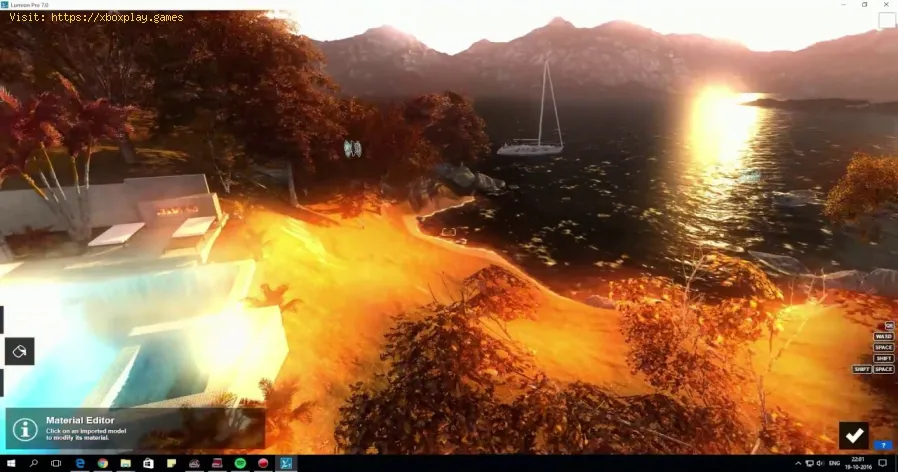
What Is Bloom Effect in Graphics - How it works
What is the Bloom Effect? A Simple Explanation
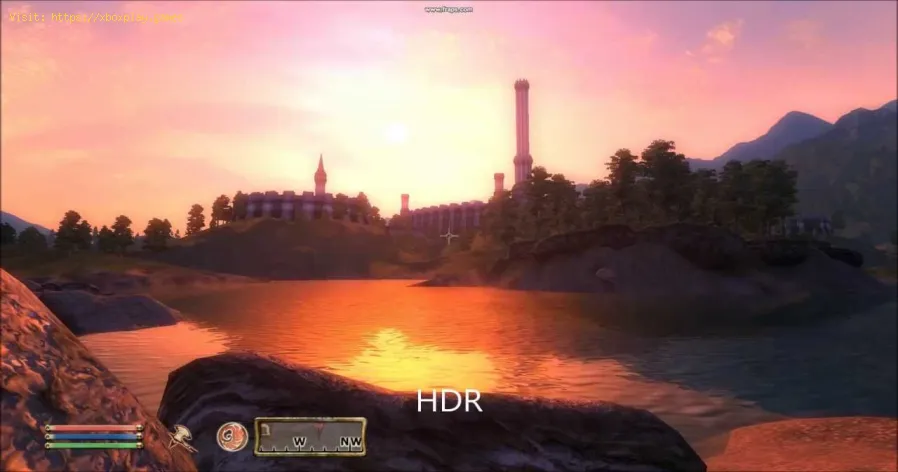
Bloom is a graphics rendering effect that makes bright areas of an image appear to glow and bleed light into darker surrounding areas.Think of it as a digital approximation of what happens when you look at a bright light bulb or the sun: the intensity "overwhelms" the lens of your eye or a camera, creating a halo or fuzz around the light source. In game graphics, the renderer identifies pixels that exceed a certain brightness threshold and then applies a blur and additive blend to those areas, creating the signature glow.The "Why": Purposes and Artistic Intent
Bloom isn't just eye candy; it serves several key artistic and perceptual functions:- Fantasy/Magic: Makes spells, enchanted items, and divine beings feel ethereal and powerful.
- Sci-Fi: Gives neon lights, holograms, and energy weapons a vibrant, futuristic sheen.
- Realism: Makes sunlight through windows, car headlights at night, and explosions feel more visceral and camera-like.
The Technical Breakdown: How Bloom is Created
The process, simplified for a game engine, is a multi-step pass:Bloom vs. Other Glowing Effects: Key Differences
It's easy to confuse bloom with similar effects. Here’s how to tell them apart:- Bloom vs. Lens Flare:
- Bloom is a glow around a light source itself.
- Lens Flare is a series of artifacts (circles, streaks, hexagons) that appear across the image as if caused by light hitting a camera lens. They often "move" as the camera angle changes.
- Bloom vs. Global Illumination (GI):
- Bloom is a post-process screen effect. It doesn't actually light up the 3D world; it's a 2D overlay.
- Global Illumination is a lighting simulation where light bounces realistically, coloring and illuminating other 3D objects and surfaces. GI is computationally expensive; bloom is a cheap approximation of some of its results.
- Bloom vs. HDR (High Dynamic Range):
- HDR is a rendering technique that allows for a much wider range of brightness values (from pitch black to super bright) to be stored and processed.
- Bloom is often a visual result of tonemapping an HDR image. The tonemapper compresses the HDR range for your screen, and bloom simulates how the brightest parts of that compressed range would "bloom out."
The Gamer's Dilemma: Should You Turn Bloom On or Off?
This is a hotly debated topic with a clear answer: It depends entirely on your goals.
Turn Bloom ON for:
- Single-Player, Narrative-Driven Games: Titles like The Witcher 3, God of War, Cyberpunk 2077, or Elden Ring. Bloom is part of the director's artistic vision and greatly enhances immersion and cinematic feel.
- Atmospheric Exploration: Games where mood and world-building are key.
- When Using HDR: On a proper HDR display, well-implemented bloom is essential for a realistic, high-contrast image.
Turn Bloom OFF for:
- Competitive Multiplayer Games: In esports titles like *Counter-Strike 2*, Valorant, Apex Legends, or Rainbow Six Siege. Bloom can:
- Reduce visual clarity by washing out details.
- Obscure enemies hiding in or near bright areas.
- Add visual noise that distracts from critical gameplay cues.
- If You Find It "Cheap" or "Overdone:" Some older games or poor implementations use bloom excessively, makingeverything look smeared in vaseline or overly dreamlike. Trust youreyes.
- Performance on Low-End Systems: While cheap, it's not free. Disabling it can sometimes grant a slight FPS boost on integrated graphics or very old GPUs.
How to Configure Bloom for the Best Experience
Most PC games and many console games offer bloom settings. Here’s what to look for:
- Bloom: Simple On/Off toggle.
- Bloom Intensity/Strength: The most important setting. Rarely should this be above 50-70%. Start low (30%) and increase until it looks natural, not overwhelming.
- Bloom Threshold: Controls how bright a pixel must be to start glowing. A higherthreshold means only the very brightest lights (the sun, explosions)will bloom. This is great for keeping the effect subtle and clean.
The Golden Rule: Good bloom is subtle. You should feel the atmosphere it creates, not constantly notice "the bloom effect."
Performance Impact & The Future of Bloom
- Performance: On modern GPUs (GTX 10-series / RX 500-series and newer), the performance cost of a standard bloom effect is negligible (1-3 FPS). It becomes a consideration only on extremely low-end hardware.
- The Future: Bloom is now a mature, standard effect. The future lies in moreadvanced, physically-based camera and lens simulation that integratesbloom, lens flare, chromatic aberration, and dirt/scratch effects in amore unified and realistic way—often seen in cutting-edge titles fromstudios like Naughty Dog or Guerrilla Games.
Frequently Asked Questions (FAQs)
Q: Why does bloom sometimes look terrible and blurry?
A: This is usually due to low resolution effects or an excessive blur radius. Some games render the bloom pass at a fraction of the screen resolution to save performance, leading to a blocky, pixelated glow. Others simply have the intensity/strength slider set too high by default.
Q: Is bloom the same as "motion blur"?
A: Absolutely not. Motion Blur simulates the blur caused by fast movement of objects or the camera. Bloom is specifically about the glow of bright, static or moving, lightsources. They are completely separate post-processing effects.
Q: Does ray tracing replace bloom?
A: No, they complement each other.Ray Traced Global Illumination and Reflections calculate real light behavior. Bloom is then applied on top as a post-process to simulate the finalcamera/eye perception of that calculated light. In fact, ray-tracedscenes often benefit from subtle bloom to look more natural.
Q: I turned off bloom, but lights still look soft. Why?
A: You might be seeing other effects:
1. Depth of Field: Blurs objects far from the focal point.
2. High-Quality Anti-Aliasing (TAA): Can cause a slight, overall softness or ghosting.
3. Actual In-Engine Volumetric Lighting/Fog: This is light interacting with particles in the air—a 3D effect, not a 2D post-process bloom.
Q: What's a famous example of iconic bloom usage?
A: The original Halo trilogy (especially Halo 3) is legendary for its use of "Bungie bloom" to create the distinctiveglowing energy shields, neon Forerunner architecture, and the radiantRingworld environments. It defined the visual identity of the series.
Bloom is a powerful tool in the graphics artist's kit—a sprinkle of visualmagic that can transform a sterile render into a living, breathingscene. Understanding it empowers you to tailor your visual experience,whether for competitive advantage or maximal immersion.
What's your take on bloom? Are you a purist who turns it off in every game for clarity, or do youcrank it up to feel the magic in every sunbeam? Share your favorite (ormost hated) example of bloom in the comments below. If you're tweakingsettings in a specific game and can't get the bloom to look right, askfor help! For more deep dives into graphics settings like Ambient Occlusion, Ray Tracing, and Anti-Aliasing, explore our complete PC and console optimization guides. Now, see the light—bloom and all.

Other Articles Related
How to Access the Laser Ore Processor Alpha to Search for Sarentu in Avatar Frontiers of PandoraDiscover how to access the Laser Ore Processor Alpha and search for Sarentu in Avatar: Frontiers of Pandora.
How to Fix Low CPU Usage
Discover effective strategies to fix low CPU usage issues and optimize your computer's performance.
What Is a Mechanical Keyboard
the benefits of mechanical keyboards, including enhanced typing experience, durability, and customizable features.
What Is Netcode and Why It Matters
what netcode is and why it’s crucial for online gaming performance. Learn how it impacts gameplay, latency, and player experience.
What Is Tick Rate in Online Games
Discover what tick rate means in online games and how it affects gameplay, performance, and player experience.
What Is Hit Registration
Discover what hit registration is and how it impacts gaming performance. Learn the key factors that affect accuracy and player experience.
What Is Input Buffering in Games
Discover what input buffering in games is and how it enhances gameplay by smoothing player actions and improving responsiveness.
What Is Texture Streaming - How it works
what texture streaming is and how it enhances gaming graphics by optimizing memory usage for smoother gameplay.
What Is Anisotropic Filtering - How is works
Discover what anisotropic filtering is and how it enhances image quality in 3D graphics. Learn its benefits for gaming
What Is Ambient Occlusion
Discover what ambient occlusion is and how it enhances realism in 3D graphics. Learn its importance in rendering
How to Get Soul Fragments in Fellhollow in RuneScape Dragonwilds
Uncover the secrets to obtaining Soul Fragments in Fellhollow for RuneScapeDragonwilds. Learn the best methods, locations, and strategies tocollect these essential items for your quest.
Where to Get Vials of Sacred Water in Path of Exile 2
Find Sacred Water Vials in Path of Exile 2. This guide lists vendorlocations, drop sources, and farming strategies to secure this crucialcrafting and quest item for your build.
Where to Find the Spaceport Container Storage Key in Arc Raiders
Unlock valuable loot in ARC Raiders! Discover the exact Spaceport ContainerStorage Key location to access exclusive gear & resources. Essential guide for survivalists.
How to Enter Fellhollow Region in RuneScape Dragonwilds
Embark on an epic quest to reach the Fellhollow Region in RuneScape'sDragonwilds. Our guide provides the essential steps, requirements, andstrategies you need to unlock this high-level area and face itsformidable challenges.
Where to Find Frying Pan in Arc Raiders
Find the Frying Pan location in Arc Raiders with our quick guide. Learnwhere this key melee weapon spawns to dominate in close-quarters combat.