
How to Get Candle Holders in ARC Raiders
Causes of the "Problem": Why Can't I Find Candle Holders?
Let's clarify: there's no technical bug preventing spawns. The challenge stems from two key player behaviors:Quick Solution (For the Impatient Raider)
Head directly to the Dam Battlegrounds map. Go to the northwestern corner and loot every drawer, cabinet, refrigerator, and suitcase inside the Ruby Residence and Pale Apartments complexes. Use your "Don't Shoot" emote to avoid unnecessary PvP, stash any Candle Holders in your safe pocket, and extract. Rinse and repeat.Detailed Step-by-Step Solutions
Follow this battle-tested plan to secure your three Candle Holders efficiently.Step 1: Prepare Your Loadout.Enter the match with a free loadout or a cheap, expendable kit. Your goal is loot, not combat. Prioritize mobility. A light build will help you navigate the apartments quickly and disengage from threats.Step 2: Set Your Destination.
From the spawn screen, select the Dam Battlegrounds map. Mentally mark your target: the cluster of apartment buildings in the northwest quadrant, specifically named Ruby Residence and Pale Apartments on your in-map labels.Step 3: Land Smartly & Signal Intent.
Parachute or maneuver to the roof or a top-floor balcony of one of the apartment buildings. Upon landing, immediately use the "Don't Shoot" emote or a friendly voice line. This signals to other players in the area that you're there to farm, not fight. While not a guarantee of safety, it often leads to tense but peaceful co-existence.Step 4: Systematically Loot Every Container.
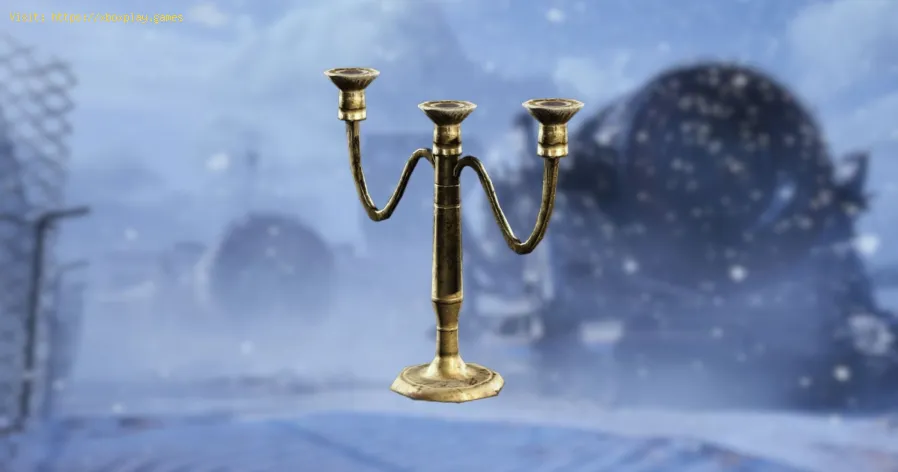
Candle Holders are "Residential" loot. They spawn in place of (or alongside) items like Tools, Consumables, and Gear. You must check:
- Every drawer in bedrooms and kitchens.
- All cabinets, especially in kitchens and bathrooms.
- Refrigerators (they're not just for food!).
- Suitcases and luggage lying on floors or in closets.
- Shelves and counters. Leave nothing unopened.
The moment you find a Candle Holder, open your inventory and drag it into your safe pocket. This is non-negotiable. If you die before extracting, you lose everything in your main inventory but keep safe pocket items. This guarantees your progress.
Step 6: Know When to Leave.
Once you've thoroughly combed through one building (or if the area becomes too hot with ARC or player activity), extract. Don't get greedy. A single Candle Holder secured is better than three lost in a firefight.
Step 7: Repeat the Process.
You will likely need multiple runs. Queue up again and repeat Steps 2-6.Consistency is key. These locations have a reliable spawn rate forresidential loot.
Step 8: Alternative Farming Routes.
If the Dam Battlegrounds is too crowded, try the Buried City map. Focus on the Grandioso Apartments and the Pattern House. While the spawn rate feels slightly lower here, the competition might be less fierce.
Step 9: Make the Donation.
Once you have three Candle Holders safely in your persistent inventory on the Speranza, navigate to the Flickering Flames event menu. Go to the Decorations donation tab and contribute your haul.
Step 10: Claim Your Reward.
For your donation, you'll receive the Red Light Stick blueprint. You can learn it for your collection or immediately sell it to a vendor for 5,000 Coins, a nice return on your scavenging effort.
Alternative Solutions & Approaches
- The Silent Partner: Play in Duos or Trios with friends. Have one person act as alookout/security while the others loot, then rotate. Communicate andshare the loot goal.
- The Night Owl: Try playing during off-peak hours for your region. Fewer players in the match mean less competition for the prime looting spots.
- The B-Line: Ignore all other loot. Sprint directly to your target buildings, lootonly containers that can spawn residential items, and extractimmediately. This creates very fast, focused runs.
How to Prevent Future "Junk Loot" Panics
- Hoard Strategically: During normal play, get into the habit of stashing one of every "common" junk item (Candle Holders, Mugs, Plates, etc.) in your warehouse. You never know when an event will require them.
- Check Event Requirements Early: As soon as a new seasonal event launches, preview all donation stages. Identify any tricky items and start looking for them before you reach that stage.
- Learn Loot Categories: Understanding that items are tied to location types (Residential,Industrial, Medical, etc.) will make you a more efficient farmer for any future needs.
Frequently Asked Questions
Q1: Can Candle Holders spawn anywhere else, like in crates or on ARC enemies?
A: No. They are exclusively found as loot inside containers withinhuman-made residential structures. ARC drops and military crates willnot contain them.
Q2: I've done 5 runs and found zero. Is my game broken?
A: It's likely just bad RNG luck and high player traffic. Try thealternative Buried City locations or a different time of day.Persistence pays off.
Q3: What's the point of the Red Light Stick blueprint? Is it useful?
A: Primarily, it's a cosmetic/collection item for completionists. Itspractical value is low, which is why selling it for 5,000 Coins is apopular and sensible choice.
Q4: Can I trade for Candle Holders with other players?
A: No, ARC Raiders does not currently have a player-to-player trading system. You must find them yourself in the world.
Q5: Do I need to extract to keep the Candle Holders for the donation?
A: Yes. Items must be in your persistent inventory on the Speranza. Items only in your match inventory are lost on death. Always use your safe pocket.
The grind for specific loot can test your patience, but the satisfaction of completing that event stage is a victory all its own. Now that you'rearmed with this knowledge, those Candle Holders won't stand a chance.Did this guide light the way for you? Share your own loot-running tipsin the comments below, and let other Raiders know which "junk" item gave you the hardest time! If you found this helpful, explore our otherguides to dominate the landscape of ARC Raiders. Happy raiding
Other Articles Related
How to Get Music Albums in ARC RaidersUnlock the full soundscape of ARC Raiders! Learn how to get official musicalbums, in-game tracks, and immersive OSTs to enhance your extractionshooter experience.
How to Get Fossilized Lightning in ARC Raiders
Unearth the secrets of fossilized lightning in ARC Raiders. Learn where tofind, how to harvest, and best uses for this rare conductive resource to upgrade your gear.
How to Get Candle Holders in ARC Raiders
Learn how to find & farm Candle Holders in ARC Raiders for progression and crafting. Essential loot guide for all players.
How to Get the Shaker in ARC Raiders
Learn step-by-step how to get the Shaker in ARC Raiders, including missiontriggers and key strategies to unlock this powerful energy weapon.
Where to Find Light Bulbs in Arc Raiders
Discover the best locations to find light bulbs in Arc Raiders. Illuminate your gameplay with essential items
How to Reset Skill Tree in Arc Raiders
Learn how to reset your skill tree in Arc Raiders with this step-by-stepguide. Unlock new builds, correct mistakes, and optimize your characterfor battle.
How to Claim the Free Nvidia Backpack in ARC Raiders
Discover how to claim the Nvidia Backpack in ARC Raiders with our step-by-step guide. Unlock exclusive rewards today!
How to Get the Bobcat SMG & Blueprint in ARC Raiders
how to obtain the Bobcat SMG and its blueprint in ARC Raiders. Unlock powerful gear and enhance your gameplay
How to Increase Brightness in ARC Raiders
Discover how to enhance brightness in ARC Raiders with our easy tips and tricks. Illuminate your gameplay
How to Get the Acoustic Guitar in ARC Raiders
Learn how to get the acoustic guitar in ARC Raiders, a special instrumentwith unique emotes. Find its location and collect it fast!
How to Set Up Surround Sound for Gaming
Elevate your gaming experience! Learn how to set up surround sound at home,from choosing the right speaker layout to calibrating audio settings for immersive gameplay.
How to Apply Thermal Paste Correctly
Step-by-step guide for correctly applying thermal paste on CPUs and GPUs. Learnoptimal methods, common mistakes, and best practices to maximize cooling and hardware performance.
How to Improve Cooling in Your PC
Learn how to boost airflow, optimize components, and reduce heat for acooler, faster, and more stable PC. Discover step-by-step coolingupgrade tips.
How to Clean Your PC for Better Performance
Learn easy steps to clean your PC for better performance—remove junk files,manage startup programs, update drivers, and optimize settings.