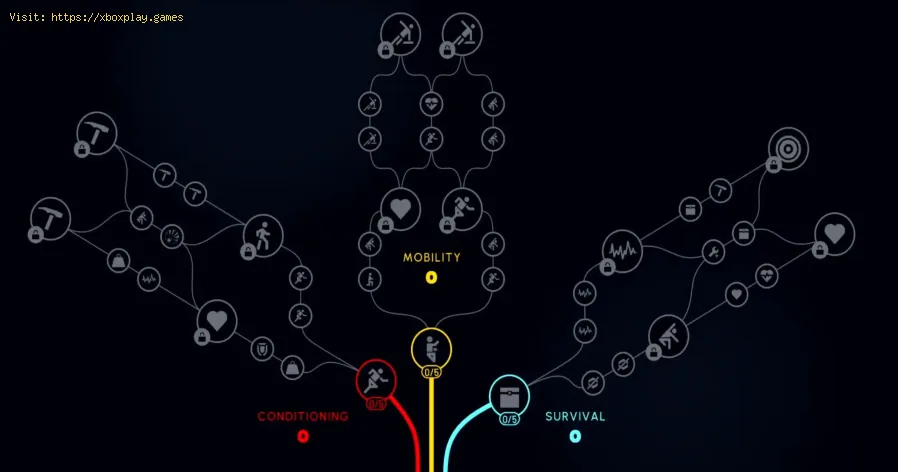
How to Reset Skill Tree in Arc Raiders
Causes for a Skill Tree Reset
You might be wondering, "Why would I need to reset in the first place?" It’s not about fixing a broken game; it’s about optimizing your fun and effectiveness. Here are the most common reasons players seek a fresh skill slate:- Early-Game Experimentation: It’s easy to misclick or throw points into a skill that sounds better on paper than in the chaotic heat of a drone swarm.
- Shifting Playstyle: Maybe you started as a lone wolf focusing on Survival but found your calling in a trio, where Mobility perks for team movement become essential.
- Meta Adaptation: As the game evolves with updates like Cold Snap, new strategies emerge. A build that worked last month might not be optimal today.
- Specialization for Endgame: Want to min-max for specific high-level expedition goals? You’ll need to fine-tune your tree without leftover points in irrelevant perks.
- Pure Curiosity: The joy of a skill tree is theory-crafting! Resetting lets you test wild builds without permanent consequences (aside from a coin cost).
Quick Solution (For the Impatient Raider)
Open the game, head to the Raider tab, select Skill Tree, and click the new "Reset Skill Tree" button. Confirm the cost (which scales with the number of points you’ve spent), pay the Coin fee, and all your points will be refunded. Now, reallocate them from scratch!Detailed Step-by-Step Guide to Resetting
Follow these steps carefully to ensure a smooth reset and reassignment of your hard-earned skill points.Step 1: Launch and Log InBoot up Arc Raiders on your PC and log into your account. Ensure you’re at your main base or in a social space where you can access your character menu.Step 2: Navigate to the Raider Tab
On the main menu screen, look for the “Raider” option. This is your hub for everything related to your character’s progression, cosmetics, and skills. Click on it.Step 3: Access Your Skill Tree
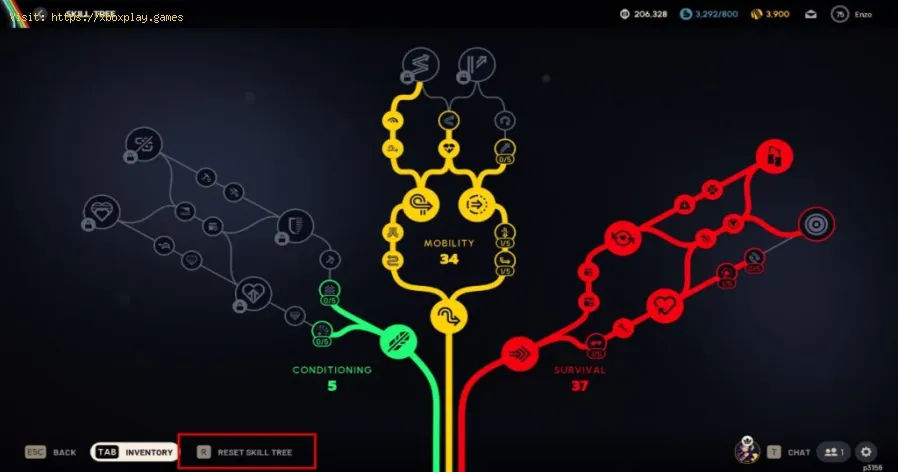
Within the Raider tab, you’ll see several sub-sections. Find and select the one labeled “Skill Tree.” This will bring up the expansive web of perks across the three branches: Conditioning (yellow), Mobility (blue), and Survival (green).Step 4: Locate the Reset Button
Prior to the Cold Snap update, this button didn’t exist. Now, you should clearly see a button at the bottom of the skill tree interface that says “Reset Skill Tree.” It’s intentionally placed to be visible but not easily misclicked.Step 5: Review the Cost
Clicking the reset button will bring up a confirmation screen. This is critical. The screen will show you the total Coin cost for the reset. The cost is calculated as 2,000 Coins per Skill Point you have allocated. If you are at the max level (75) with all points spent, the total will be 152,000 Coins.Step 6: Confirm the Reset
If you have sufficient Coins in your inventory, confirm the action. Your entire skill tree will be wiped clean, and every single skill point you’ve ever earned will be returned to your available points pool. Important: You cannot reset individual points or one branch at a time; it’s all or nothing.
Step 7: Plan Your New Build (Before Spending!)
Don’t start clicking immediately! Take a moment outside the game if needed. Think about your preferred playstyle:
- Aggressive PvP/Trio Player? Prioritize Mobility for evasion and flanking, and Conditioning for melee and critical survivability.
- Loot-Focused Solo Runner?Survival is key, especially the Security Breach perk for unlocking valuable containers.
- All-Rounder? A hybrid approach, perhaps focusing on one tree’s capstone while grabbing essentials from others, is often strongest.
Step 8: Reallocate Your Points
Start placing points along your chosen path. Remember, some skills areprerequisites for later, more powerful ones. Follow the brancheslogically from the center outward.
Step 9: Double-Check Your Selections
Before leaving the menu, review your new tree. Ensure you haven’t left anypoints unspent and that your choices reflect your intended build. Amisplaced point can be annoying, but remember—you can always reset again (for another fee).
Step 10: Test Your New Build
Jump into an expedition! The true test of any build is in the field. See how your new perks feel against drones and other Raiders. Does it flowbetter? Do you feel more powerful? Adjust as necessary.
Alternative Approaches & Considerations
While the in-game reset is the primary method, your approach to the skill tree itself offers flexibility:
- The “Soft Reset” by Leveling: Starting a completely new character is an option, but given the timeinvestment to reach level 75, it’s not practical for most. The in-gamereset is far more efficient.
- Community Builds: Before you respec, browse community forums, Discord, or YouTube forbuild guides. Seeing how top players allocate points can inspire you and prevent future costly resets.
- Focused Farming: If the Coin cost seems steep, dedicate a few play sessions purely tofarming Coins through expeditions and selling unwanted components.Consider it an investment in your Raider’s future.
How to Prevent "Respec Regret"
To minimize the need for frequent, costly resets, adopt these habits:
- Theorycraft First: Use online skill tree planners (when available) or simply study thetree in your base. Plan your path to a desired capstone skill beforespending a single point.
- Understand Synergies: Look for perks that work together. For example, Conditioning perks that boost melee damage synergize perfectly with Mobility perks that enhance sprint attack efficiency.
- Start with a Focus: Don’t spread points thinly early on. Choose one branch and push toward a powerful mid-tier perk first to feel a real power spike.
- Play to Your Style: Be honest with yourself. If you love shotguns and close-quarterscombat, a sniper-focused Survival build will always feel wrong. Buildfor the gameplay you enjoy most.
Frequently Asked Questions (FAQ)
Q: Does resetting my skill tree cost real money?
A: Absolutely not. It costs only in-game currency (Coins). There is no microtransaction for a skill reset.
Q: Can I reset just the Survival tree and keep my Mobility points?
A: No. The current system is a full reset. All points from all three trees are refunded, and you must reassign everything from scratch.
Q: What’s the maximum number of skill points I can get?
A: You earn skill points by leveling up, with the current maximum levelbeing 75. Therefore, the max skill points are also 75. You cannot earnmore outside of leveling.
Q: Is there a cool-down or limit on how often I can reset?
A: No, there is no cool-down. You can reset back-to-back if you want.However, the Coin cost will apply each time, so it’s an expensive habit.
Q: I’m only level 20. Should I reset if I messed up?
A: Yes! The cost is proportional. At level 20 with 20 points spent, areset would only cost 40,000 Coins, which is much more manageable. It’sbetter to fix your build early.
Closing Thoughts & Call to Action
Mastering your skill tree is a journey, not a one-time choice. The ability to reset in Arc Raiders empowers you to adapt, experiment, and ultimately create a Raider thatfeels like a true extension of your will on the battlefield. Don’t beafraid to use it—that’s what your hoarded Coins are for!
Now, we want to hear from you! What’s the most game-changing skill tree build you’ve discovered? Did this guide help you perfect your Raider? Share your powerful (orhilariously failed) build ideas in the comments below to help fellowRaiders. If you found this guide useful, please consider sharing it with your squad. And for more tips on dominating the dunes, from weaponbreakdowns to advanced drone tactics, explore our other Arc Raiders guides right here. Happy hunting, Raider

Other Articles Related
How to Reset Skill Tree in Arc RaidersLearn how to reset your skill tree in Arc Raiders with this step-by-stepguide. Unlock new builds, correct mistakes, and optimize your characterfor battle.
How to Claim the Free Nvidia Backpack in ARC Raiders
Discover how to claim the Nvidia Backpack in ARC Raiders with our step-by-step guide. Unlock exclusive rewards today!
How to Get the Bobcat SMG & Blueprint in ARC Raiders
how to obtain the Bobcat SMG and its blueprint in ARC Raiders. Unlock powerful gear and enhance your gameplay
How to Increase Brightness in ARC Raiders
Discover how to enhance brightness in ARC Raiders with our easy tips and tricks. Illuminate your gameplay
How to Get Advanced ARC Powercell in ARC Raiders
Discover the ultimate guide on how to obtain the Advanced ARC Powercell in ARC Raiders. Unlock powerful upgrades
How To Solve the Raider Refuge Button Puzzle in Arc Raiders
Learn how to solve the Raider Refuge button puzzle in Arc Raiders with thisstep-by-step guide. Find the correct sequence and timing to unlock thehidden loot.
How To Solve the Deforester Husk Puzzle in Arc Raiders
Master the Deforester Husk Puzzle in Arc Raiders with our step-by-step. Unlock secrets and enhance your gameplay
How to get Emerald Wave Electrician Backpack for free in ARC Raiders
Discover how to obtain the Emerald Wave Electrician Backpack in ARC Raiders. Unlock this unique item and enhance your gameplay
How To Defeat Matriarch in Arc Raiders
Conquer the Matriarch in Arc Raiders with our step-by-step guide. Learn keystrategies, optimal loadouts, and crucial weak points to defeat thisepic boss.
Where To Find Magnetron in Arc Raiders
the best locations to find Magnetron in Arc Raiders. Unlock powerful upgrades and enhance your gameplay with our guide!
How to Join the Velvet Shade Sect in Where Winds Meet
Discover how to join the elusive Velvet Shade Sect in Where Winds Meet. Unlockhidden quests, master stealth skills, and shape your destiny in thisWuxia open-world RPG. Your path to the shadows begins here.
How to Summon Azmodan in Diablo 4
Summon and defeat Azmodan in Diablo 4 with our step-by-step guide. Learn hisboss location in Kehjistan, the required quest, and strategies to earnhis legendary loot.
Guide to Understanding Latency in Video Games
"Learn what gaming latency is and how it impacts your play. Discover types,causes, and proven tips to reduce lag for a smoother, more responsivegaming experience."
Guide to enabling Cross-Save in your games
Enabling Cross-Save? This guide shows you how to link your accounts and syncgame progress seamlessly between consoles, PC, and mobile platforms.Unlock true gaming freedom.
What is cross-save and how to use it
Unlock seamless gameplay across platforms. Learn what cross-save is and get asimple step-by-step guide to sync your progress and play anywhere.