What Is Ambient Occlusion
What is Ambient Occlusion? The Core Concept
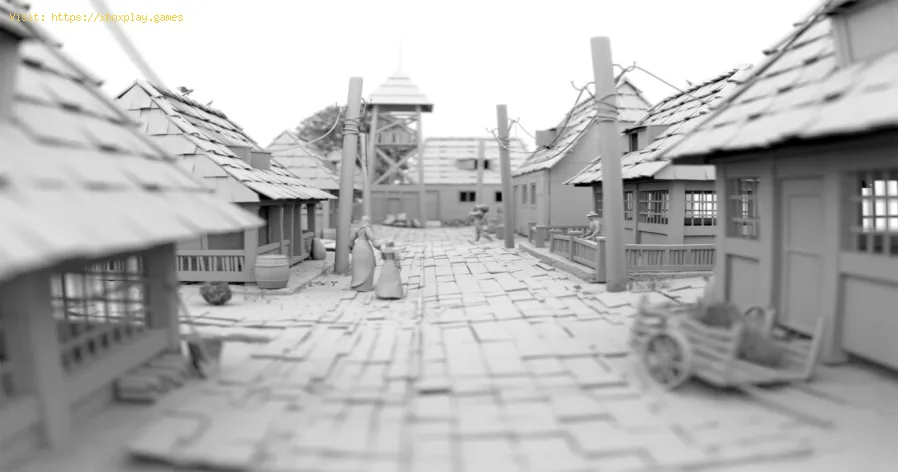
In simple terms: Ambient Occlusion is a graphics setting that adds realistic, soft contact shadows where surfaces meet or in tight spaces.Imagine a room with a single, diffuse light source in the center of the ceiling. The corners where the walls meet the floor and ceiling will be darker than the center of the walls, even though no direct light is blocked. This is because the geometry itself is "occluding" (blocking) the ambient light from filling those corners entirely. AO is a computational approximation of this real-world phenomenon.The Key Principle: It darkens surfaces based on their proximity to other geometry. The more "hemispherically occluded" a point is (i.e., the more other surfaces are blocking the light around it), the darker it gets.Why is Ambient Occlusion So Important? The Visual Impact
Without AO, 3D scenes can suffer from "floatiness" or a flat, over-lit cartoon look. AO solves this by:How Does Ambient Occlusion Work? (A Simplified Technical View)
AO is a screen-space effect, meaning it uses the depth and normal information from the already-rendered frame to calculate shadows.The Different Types of Ambient Occlusion: From Fast to Fancy
As GPUs have evolved, so have AO techniques. Here are the most common ones you'll see in game settings menus:1. SSAO (Screen Space Ambient Occlusion)
- The Original: The first widely adopted real-time AO method.
- How it works: Operates entirely on the screen-space depth buffer. It's fast but has known artifacts: it can create shadows on flat surfaces ("haloing"), doesn't work well for objects that move off-screen, and can produce noise.
- Performance: Low cost. The baseline option.
- Visuals: Good, but can be blurry or have artifacts. Often a "Low" or "Medium" setting.
2. HBAO / HBAO+ (Horizon-Based Ambient Occlusion)
- The Enhanced Standard: A significant improvement over SSAO, developed by NVIDIA.
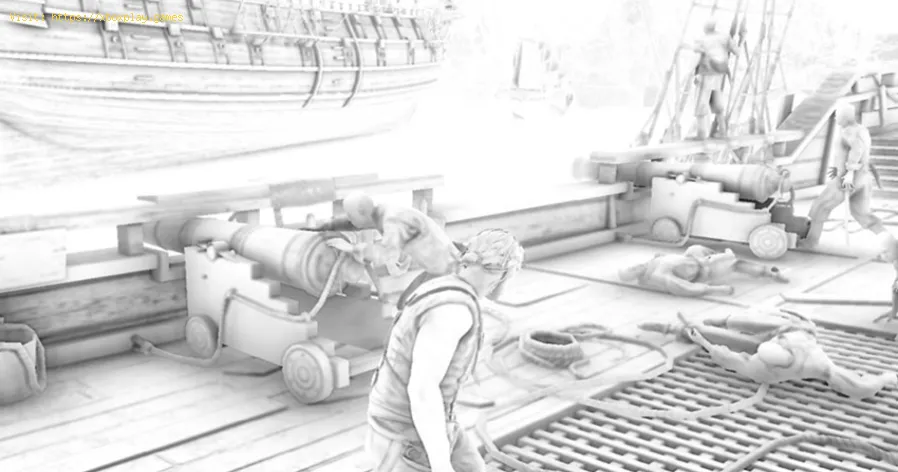
- How it works: Instead of sampling a full hemisphere, it intelligently samples alongthe horizon line of the surface, which is more efficient and accurate. HBAO+ adds better control over blur and detail, reducing the "haloing" artifact.
- Performance: Moderate cost. The common "High" or "Quality" setting in many games.
- Visuals: Cleaner, sharper, and more accurate contact shadows than SSAO.
3. VXAO / HDAO (Voxel Accelerated / High Definition AO)
- The High-End: More advanced techniques. VXAO (NVIDIA) uses voxel representations of the scene for extremely accurate, volumetric occlusion that works beyond the screen. HDAO (AMD) is an optimized high-quality variant.
- Performance: High cost. Can be demanding on GPU resources.
- Visuals: Excellent, with fewer artifacts and better accuracy for dynamic objects.
4. Ray Traced Ambient Occlusion (RTAO)
- The Cutting-Edge Gold Standard: Part of the ray tracing revolution.
- How it works: Uses actual ray tracing hardware (RT Cores on NVIDIA RTX cards) totrace rays from each point to determine occlusion. This is the mostphysically accurate method, as it considers the entire 3D scene, notjust the screen buffer.
- Performance:Very High cost. The most demanding form of AO. Requires an RTX-capable GPU and is often paired with DLSS for playable frame rates.
- Visuals: Near-perfect. Offers superior accuracy, especially for dynamic objects and complex geometry. Eliminates screen-space artifacts.
The Gamer's Guide: Settings, Performance, and Recommendations
You'll typically find AO in your game's Graphics or Advanced Graphics settings.
What Should You Set It To?
- Competitive Multiplayer (Valorant, CS2, Apex Legends):Off or Low (SSAO). The subtle shadows can sometimes obscure fine details or enemy outlines in dark corners. Prioritize clarity and max FPS.
- Single-Player / Immersive Games (Cyberpunk 2077, Elden Ring, Red Dead Redemption 2):High (HBAO/HBAO+) or Ultra (VXAO/RTAO if supported). This is where AO shines. The visual improvement in realism and depth is substantial and worth the performance cost for the experience.
- If You Have an RTX GPU: In supported titles, try Ray Traced AO. It is the definitive best-looking option. Be prepared to use DLSS Performance/Quality to maintain good frame rates.
Performance Impact Hierarchy (From Least to Most Costly):
OFF < SSAO (Low) < HBAO (Medium/High) < VXAO/HDAO (Ultra) <<< Ray Traced AO (Ultra+)
On a modern mid-range GPU, the jump from Off to HBAO might cost 5-10% FPS. The jump to Ray Traced AO can cost 20-40% FPS without upscaling help.
Common Artifacts & How to Spot Them
- "Haloing" or "Dark Creeping": A dark shadow that appears to bleed out from objects onto the flat surface behind them (common in SSAO). Solution: Use a higher quality AO method (HBAO+).
- "Disappearing Shadows": Shadows that vanish when the occluding object moves off-screen (a limitation of screen-space methods). Solution: Only Ray Traced AO fully solves this.
- Noise/Grain: The AO shadow looks speckled or noisy, especially in motion. Solution: Increase the sample count or quality setting, or use a temporal solution (which most modern HBAO+ implementations do).
The Future of Ambient Occlusion
AO is now a fundamental, non-negotiable component of realistic rendering. Its future is tied to ray tracing. As GPU power increases, RTAO will become the default standard forhigh-fidelity gaming, eventually replacing screen-space approximationsentirely due to its superior accuracy and lack of artifacts. For theforeseeable future, however, efficient screen-space methods like HBAO+will remain the performance-quality sweet spot for most players.
Frequently Asked Questions (FAQs)
Q: Is Ambient Occlusion the same as Shadows?
A: No, they are complementary but different.
- Shadows are cast by direct light sources (sun, lamp). They are sharp and have a specific direction.
- Ambient Occlusion is from ambient (indirect) light. It is soft, directionless, and occurs in contact areas regardless of light source position.
Q: Should I turn AO off for better FPS?
A: It depends on your GPU and target framerate. On a low-end systemstruggling for 60 FPS, turning AO from Ultra to Off can provide ameaningful boost. On a mid-to-high-end system, the visual benefit ofHBAO+ is usually worth the minor FPS cost.
Q: What does "GTAO" stand for in some games?
A:Ground Truth Ambient Occlusion. This is a modern, highly accurate screen-space algorithm that aims tomatch a ray-traced reference more closely than older methods. It's often found as the "Ultra" preset in recent titles.
Q: Does Ambient Occlusion work in tandem with Global Illumination (GI)?
A: Absolutely. GI simulates how light bounces and colors the environment. AO simulates how that bounced ambient light is blocked in corners. Theywork together to create a fully convincing lighting model. In fact, aproper GI solution often has AO "baked in."
Q: Why does AO sometimes make dark areas too dark to see?
A: This is usually due to poor implementation or excessive strength/intensity. Some games have a separate AO Intensity slider. If not, you may need to lower the overall AO quality settingor, in extreme cases, turn it off if it's harming gameplay visibility.
Ambient Occlusion is the invisible craftsman of the 3D world, quietly workingto add the weight, depth, and cohesion that separates a good image from a great one. Once you learn to see it, you can't unsee it—and you'llappreciate how much it contributes to immersion.
What's your typical AO setting strategy? Do you max it out for immersion, keep it low for competitive play, orhave you experienced the revelation of Ray Traced AO? Share yourthoughts and before/after screenshot experiences in the comments. Ifyou're tweaking settings in a specific game and can't decide on the AOoption, ask for advice! For more deep dives into critical graphicssettings like Bloom, Ray Tracing, and Anti-Aliasing, explore our full library of optimization guides. Now, look closely at those corners and see the depth.
Other Articles Related
How to Access the Laser Ore Processor Alpha to Search for Sarentu in Avatar Frontiers of PandoraDiscover how to access the Laser Ore Processor Alpha and search for Sarentu in Avatar: Frontiers of Pandora.
How to Fix Low CPU Usage
Discover effective strategies to fix low CPU usage issues and optimize your computer's performance.
What Is a Mechanical Keyboard
the benefits of mechanical keyboards, including enhanced typing experience, durability, and customizable features.
What Is Netcode and Why It Matters
what netcode is and why it’s crucial for online gaming performance. Learn how it impacts gameplay, latency, and player experience.
What Is Tick Rate in Online Games
Discover what tick rate means in online games and how it affects gameplay, performance, and player experience.
What Is Hit Registration
Discover what hit registration is and how it impacts gaming performance. Learn the key factors that affect accuracy and player experience.
What Is Input Buffering in Games
Discover what input buffering in games is and how it enhances gameplay by smoothing player actions and improving responsiveness.
What Is Texture Streaming - How it works
what texture streaming is and how it enhances gaming graphics by optimizing memory usage for smoother gameplay.
What Is Anisotropic Filtering - How is works
Discover what anisotropic filtering is and how it enhances image quality in 3D graphics. Learn its benefits for gaming
What Is Ambient Occlusion
Discover what ambient occlusion is and how it enhances realism in 3D graphics. Learn its importance in rendering
What Is Bloom Effect in Graphics - How it works
Discover the Bloom Effect in graphics, a stunning visual technique that enhances brightness and creates a dreamy atmosphere
How to Get Soul Fragments in Fellhollow in RuneScape Dragonwilds
Uncover the secrets to obtaining Soul Fragments in Fellhollow for RuneScapeDragonwilds. Learn the best methods, locations, and strategies tocollect these essential items for your quest.
Where to Get Vials of Sacred Water in Path of Exile 2
Find Sacred Water Vials in Path of Exile 2. This guide lists vendorlocations, drop sources, and farming strategies to secure this crucialcrafting and quest item for your build.
Where to Find the Spaceport Container Storage Key in Arc Raiders
Unlock valuable loot in ARC Raiders! Discover the exact Spaceport ContainerStorage Key location to access exclusive gear & resources. Essential guide for survivalists.
How to Enter Fellhollow Region in RuneScape Dragonwilds
Embark on an epic quest to reach the Fellhollow Region in RuneScape'sDragonwilds. Our guide provides the essential steps, requirements, andstrategies you need to unlock this high-level area and face itsformidable challenges.