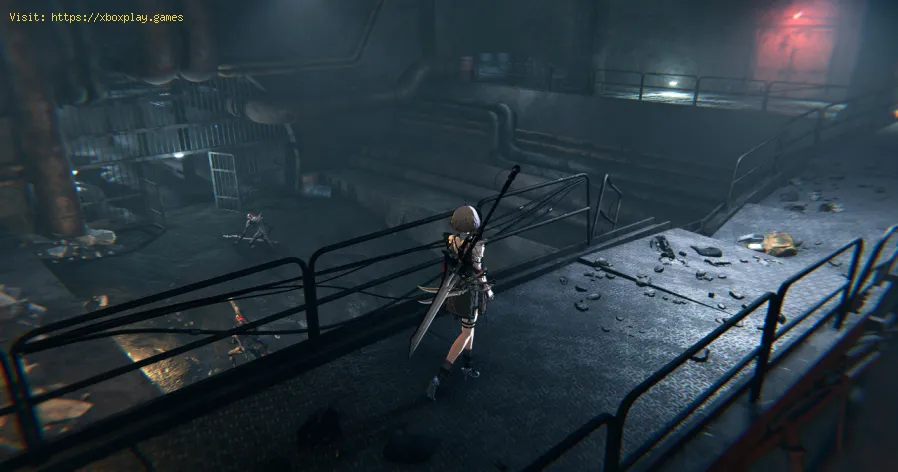
How to defeat Scavenger Patriarch in AI Limit
The Scavenger Patriarch in AI Limit is one of the first major challenges you'll encounter. As a mandatory story boss, this formidable foe awaits you shortly after reaching the Outer-Wall Ruins: Abandoned Houses Branch site. Although defeating him may seem daunting, this battle is a crucial stepping stone on your journey, especially as you prepare for the next boss, Necro, The Panic Reaper.
In this guide, we will explore strategies and tips to ensure your victory against the Scavenger Patriarch.
Before you engage the Scavenger Patriarch, you’ll need to navigate a treacherous area. Upon reaching the Abandoned Houses branch site, prepare for the following obstacles:
Rolling Barrels: After jumping down, three barrels will roll toward you. Dodge them carefully to avoid taking unnecessary damage. Timing your movement here is key. Bombing Scavengers: Next, scavengers will throw bombs your way. Run quickly to the alley on your left to avoid the explosions. Reaching this spot safely ensures you can save your healing items for the boss fight. By conserving your resources during this section, you’ll be in a strong position to face the Scavenger Patriarch.
The Scavenger Patriarch is an imposing figure armed with a massive hammer and a relentless arsenal of attacks. Here's a breakdown of his abilities and how you can counter them:
Experiencing crashes? Find out why your game keeps closing on PC or console. Learnto fix corrupted files, driver issues, overheating & more. Get backto gaming fast.
HDMI no signal: how to fix it on consoles and PCs
Learn how to fix "HDMI no signal" on PS4, PS5, Xbox, Nintendo Switch, and PCwith our step-by-step troubleshooting guide. Quick, easy fixes to getyour screen back.
PC not detecting controller: effective solutions - How to Fix
PC not detecting your controller? Discover effective solutions to quicklyfix connectivity issues on Windows PCs. Learn step-by-steptroubleshooting methods.
Black screen on PC gaming: how to fix it
Troubleshoot and resolve PC gaming black screen issues. Learn step-by-step fixes for driver, hardware, and game setting problems to get back to your game.
Unable to save game: how to fix it in any game
Fix your game save problems with our expert tips and solutions. Learnhow to troubleshoot and restore your gaming
How to Choose a Gaming Monitor: A Complete Guide for 2026
ultimate guide to choosing a gaming monitor. Enhance your gaming experience with expert tips on resolution, refresh rates
How to set up OBS for lag-free streaming
Learn how to set up OBS for streaming with our easy guide. Optimize your settings for the best performance
How to record gameplay without losing FPS on PC or console
Capture your gameplay seamlessly without sacrificing FPS. Enjoy smooth recording and elevate your gaming
How to Optimize Windows 10/11 for Gaming and Higher FPS
Unlock peak gaming performance by optimizing your Windows settings. Enhance speed, reduce lag, and elevate your gaming
How to activate game mode on any TV and reduce lag
how to activate game mode on your TV for an enhanced gaming experience.Optimize settings for smoother graphics
How to parry and counterattack in AI Limit
Learn how to parry and counterattack effectively in AI Limit with this step-by-step combat guide.
How to get new customers in Schedule 1
Discover effective strategies to attract new customers in Schedule 1. Boost your business growth with proven techniques
How to Get a Loading Dock in Schedule 1
Learn how to get a loading dock with our comprehensive guide. Discover essential steps
How to make Zombie product in Schedule 1
Learn how to create a Zombie product in Schedule 1 with our step-by-step guide. Boost your skills and innovate today!
How to Make Cocaine in Schedule 1
Learn the step-by-step process of Schedule 1 substances, including how to make cocaine.
In this guide, we will explore strategies and tips to ensure your victory against the Scavenger Patriarch.
The Path to the Boss
Before you engage the Scavenger Patriarch, you’ll need to navigate a treacherous area. Upon reaching the Abandoned Houses branch site, prepare for the following obstacles:
The Battle Against Scavenger Patriarch
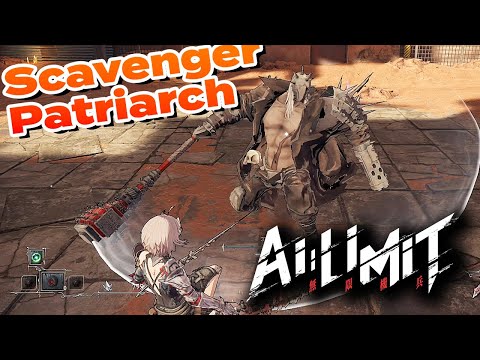
The Scavenger Patriarch is an imposing figure armed with a massive hammer and a relentless arsenal of attacks. Here's a breakdown of his abilities and how you can counter them:
Opening Tactic: Get the First Hit
- As the fight begins, quickly maneuver behind the boss before he fully activates. Land a few quick strikes to deal some early damage.
Dodging and Parrying the Hammer
- The boss's primary weapon is his devastating hammer.
- When he swings it at you, you can either dodge the attack or parry it. A successful parry creates an opportunity for a counterattack.
- Avoid parrying when the boss tries to grab you after sheathing his weapon—this is best avoided by dodging.
Exploiting Vulnerabilities
- Watch for the Scavenger Patriarch's two-hit combo. This attack leaves him exposed for a few seconds. Use this window to deliver damage but retreat before he recovers.
The Shotgun Surprise
- Once the boss's health drops to 50%, he will introduce new attacks,including a sudden swing of his hammer followed by a shotgun blast. Beon your toes and focus on evading these attacks to avoid heavy damage.
Hammer Charge
- In the later stages of the fight, the boss will charge at you with hishammer. Time your parries carefully during these moments to counter andretaliate effectively.
Utilize Weapon Skills
- To maximize damage during openings, activate your weapon’s skillimmediately after parrying the hammer charge. This can significantlyreduce the time you spend in combat.
Rewards for Your Victory
Defeating the Scavenger Patriarch not only progresses the story but also grants valuable rewards:
- Luminous Diamond: A key resource for crafting and upgrades.
- Turbid Nucleus: Another essential item that will aid you in your journey.
Final Thoughts
The Scavenger Patriarch is a true test of your skills early in AI Limit. By mastering dodge timings, parries, and capitalizing onvulnerabilities, you’ll emerge victorious. Remember to approach thisfight with patience and precision—rushing will only lead to defeat.
With the Scavenger Patriarch behind you, you’ll be ready to tackle eventougher challenges, like Necro, The Panic Reaper. Good luck, and mayyour journey through AI Limit be victorious!
Mode:
Other Articles Related
How to Fix The game keeps closing on PC or console — causes and solutionsExperiencing crashes? Find out why your game keeps closing on PC or console. Learnto fix corrupted files, driver issues, overheating & more. Get backto gaming fast.
HDMI no signal: how to fix it on consoles and PCs
Learn how to fix "HDMI no signal" on PS4, PS5, Xbox, Nintendo Switch, and PCwith our step-by-step troubleshooting guide. Quick, easy fixes to getyour screen back.
PC not detecting controller: effective solutions - How to Fix
PC not detecting your controller? Discover effective solutions to quicklyfix connectivity issues on Windows PCs. Learn step-by-steptroubleshooting methods.
Black screen on PC gaming: how to fix it
Troubleshoot and resolve PC gaming black screen issues. Learn step-by-step fixes for driver, hardware, and game setting problems to get back to your game.
Unable to save game: how to fix it in any game
Fix your game save problems with our expert tips and solutions. Learnhow to troubleshoot and restore your gaming
How to Choose a Gaming Monitor: A Complete Guide for 2026
ultimate guide to choosing a gaming monitor. Enhance your gaming experience with expert tips on resolution, refresh rates
How to set up OBS for lag-free streaming
Learn how to set up OBS for streaming with our easy guide. Optimize your settings for the best performance
How to record gameplay without losing FPS on PC or console
Capture your gameplay seamlessly without sacrificing FPS. Enjoy smooth recording and elevate your gaming
How to Optimize Windows 10/11 for Gaming and Higher FPS
Unlock peak gaming performance by optimizing your Windows settings. Enhance speed, reduce lag, and elevate your gaming
How to activate game mode on any TV and reduce lag
how to activate game mode on your TV for an enhanced gaming experience.Optimize settings for smoother graphics
How to parry and counterattack in AI Limit
Learn how to parry and counterattack effectively in AI Limit with this step-by-step combat guide.
How to get new customers in Schedule 1
Discover effective strategies to attract new customers in Schedule 1. Boost your business growth with proven techniques
How to Get a Loading Dock in Schedule 1
Learn how to get a loading dock with our comprehensive guide. Discover essential steps
How to make Zombie product in Schedule 1
Learn how to create a Zombie product in Schedule 1 with our step-by-step guide. Boost your skills and innovate today!
How to Make Cocaine in Schedule 1
Learn the step-by-step process of Schedule 1 substances, including how to make cocaine.