
How to parry and counterattack in AI Limit
AI Limit stands apart in the realm of action RPGs with its fluid combat system. Ditching the traditional stamina bar, players can attack and evade freely without limitation. However, this freedom doesn’t mean combat is simple—success lies in mastering the mechanics of parrying and counterattacking. With skillful timing and strategic approach, these techniques will ensure your survival against relentless foes and devastating bosses.
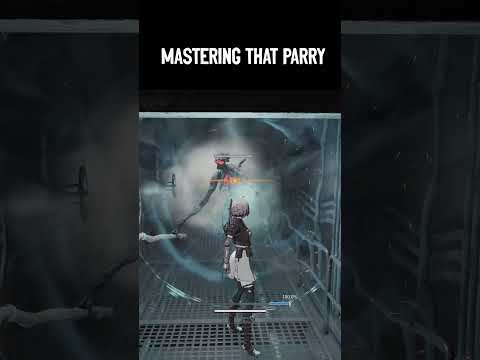
Parrying in AI Limit is more than reflexes—it's about reading and predicting enemy movements. Success demands preparation and anticipation. Equip the Counter Field skill on your left hand before entering challenging battles. This powerful frame allows you to block enemy attacks with precision, opening an opportunity for a devastating counterstrike.
While dodging is a common fallback in action games, AI Limit’s fast-paced enemies often have tracking attacks that are difficult to evade. Trusting dodging alone is unreliable. Parrying, on the other hand, provides controlled and effective combat advantages. However, certain attacks require dodging:
Aggression is Key: Engage enemies boldly to bait their attacks, simplifying your timing for parries. Recognize Unblockable Cues: A glowing red enemy attack must be dodged—it cannot be parried. Parry Bosses Wisely: Countering boss attacks delivers significant damage without depleting your sync rate.
Experiencing crashes? Find out why your game keeps closing on PC or console. Learnto fix corrupted files, driver issues, overheating & more. Get backto gaming fast.
HDMI no signal: how to fix it on consoles and PCs
Learn how to fix "HDMI no signal" on PS4, PS5, Xbox, Nintendo Switch, and PCwith our step-by-step troubleshooting guide. Quick, easy fixes to getyour screen back.
PC not detecting controller: effective solutions - How to Fix
PC not detecting your controller? Discover effective solutions to quicklyfix connectivity issues on Windows PCs. Learn step-by-steptroubleshooting methods.
Black screen on PC gaming: how to fix it
Troubleshoot and resolve PC gaming black screen issues. Learn step-by-step fixes for driver, hardware, and game setting problems to get back to your game.
Unable to save game: how to fix it in any game
Fix your game save problems with our expert tips and solutions. Learnhow to troubleshoot and restore your gaming
How to Choose a Gaming Monitor: A Complete Guide for 2026
ultimate guide to choosing a gaming monitor. Enhance your gaming experience with expert tips on resolution, refresh rates
How to set up OBS for lag-free streaming
Learn how to set up OBS for streaming with our easy guide. Optimize your settings for the best performance
How to record gameplay without losing FPS on PC or console
Capture your gameplay seamlessly without sacrificing FPS. Enjoy smooth recording and elevate your gaming
How to Optimize Windows 10/11 for Gaming and Higher FPS
Unlock peak gaming performance by optimizing your Windows settings. Enhance speed, reduce lag, and elevate your gaming
How to activate game mode on any TV and reduce lag
how to activate game mode on your TV for an enhanced gaming experience.Optimize settings for smoother graphics
How to get new customers in Schedule 1
Discover effective strategies to attract new customers in Schedule 1. Boost your business growth with proven techniques
How to Get a Loading Dock in Schedule 1
Learn how to get a loading dock with our comprehensive guide. Discover essential steps
How to make Zombie product in Schedule 1
Learn how to create a Zombie product in Schedule 1 with our step-by-step guide. Boost your skills and innovate today!
How to Make Cocaine in Schedule 1
Learn the step-by-step process of Schedule 1 substances, including how to make cocaine.
How to use the money glitch in Schedule 1
Discover how to use the money glitch in Schedule 1 for quick cash. Get step-by-step instructions, tips.
Steps to Parry and Counterattack in AI Limit
How to Parry Properly
Parrying in AI Limit is more than reflexes—it's about reading and predicting enemy movements. Success demands preparation and anticipation. Equip the Counter Field skill on your left hand before entering challenging battles. This powerful frame allows you to block enemy attacks with precision, opening an opportunity for a devastating counterstrike.
- Timing is Everything: Hit the parry button as the enemy's attack is about to connect. A well-timed parry stuns the enemy momentarily, creating the perfect window to counterattack.
- Anticipate, Don’t React: Unlike other games where last-second reflexes rule, AI Limit rewards proactive timing. Press and hold the designated button a split-second before the enemy's strike for optimal results. This approach makes the enemy flinch, leaving them vulnerable to massive damage.
Why Parrying Outshines Dodging
While dodging is a common fallback in action games, AI Limit’s fast-paced enemies often have tracking attacks that are difficult to evade. Trusting dodging alone is unreliable. Parrying, on the other hand, provides controlled and effective combat advantages. However, certain attacks require dodging:
- Unblockable Attacks: Enemies glowing red signal an impending unblockable attack. In such instances, dodge instead of attempting a parry.
- For all other scenarios, focus on refining your parry skills—they are the cornerstone of battle success.
When to Counterattack
A successful parry creates a pivotal moment to strike back. Once you’ve staggered an enemy:
- Follow up immediately with a fast weapon, such as a Sword or Dual Blades, to capitalize on their weakened state.
- Against bosses, take advantage of phase transitions. When a boss’s health drops below 50%, they enter a vulnerable transition phase. Use thisopportunity to land three-hit combos before they regain their stance.Beware of sudden electric surges or overhead plunges, as failure tododge these can spell disaster.
Weapon Choices for Parry and Counterattack
Strategic weapon choice greatly enhances your parrying game:
- Sword: Reliable and swift for high-damage combos.
- Dual Blades: Exceptional for rapid strikes that exploit staggered enemies.
Pair your chosen weapon with the Counter Field frame skill to block incoming attacks and seamlessly counterstrike. This synergy is the essence of AI Limit’s combat mastery.
Final Tips for Combat Success
Elevate your gameplay with these additional parrying tips:
With these insights and strategies, you’re ready to tackle AI Limit’sunforgiving combat system head-on. Parrying and counterattacking are not just techniques—they’re the difference between victory and defeat.Master them, and turn even the fiercest battles into your triumphs.
I hope this article hits the mark! Would you like any further refinements or additions?
Mode:
Other Articles Related
How to Fix The game keeps closing on PC or console — causes and solutionsExperiencing crashes? Find out why your game keeps closing on PC or console. Learnto fix corrupted files, driver issues, overheating & more. Get backto gaming fast.
HDMI no signal: how to fix it on consoles and PCs
Learn how to fix "HDMI no signal" on PS4, PS5, Xbox, Nintendo Switch, and PCwith our step-by-step troubleshooting guide. Quick, easy fixes to getyour screen back.
PC not detecting controller: effective solutions - How to Fix
PC not detecting your controller? Discover effective solutions to quicklyfix connectivity issues on Windows PCs. Learn step-by-steptroubleshooting methods.
Black screen on PC gaming: how to fix it
Troubleshoot and resolve PC gaming black screen issues. Learn step-by-step fixes for driver, hardware, and game setting problems to get back to your game.
Unable to save game: how to fix it in any game
Fix your game save problems with our expert tips and solutions. Learnhow to troubleshoot and restore your gaming
How to Choose a Gaming Monitor: A Complete Guide for 2026
ultimate guide to choosing a gaming monitor. Enhance your gaming experience with expert tips on resolution, refresh rates
How to set up OBS for lag-free streaming
Learn how to set up OBS for streaming with our easy guide. Optimize your settings for the best performance
How to record gameplay without losing FPS on PC or console
Capture your gameplay seamlessly without sacrificing FPS. Enjoy smooth recording and elevate your gaming
How to Optimize Windows 10/11 for Gaming and Higher FPS
Unlock peak gaming performance by optimizing your Windows settings. Enhance speed, reduce lag, and elevate your gaming
How to activate game mode on any TV and reduce lag
how to activate game mode on your TV for an enhanced gaming experience.Optimize settings for smoother graphics
How to get new customers in Schedule 1
Discover effective strategies to attract new customers in Schedule 1. Boost your business growth with proven techniques
How to Get a Loading Dock in Schedule 1
Learn how to get a loading dock with our comprehensive guide. Discover essential steps
How to make Zombie product in Schedule 1
Learn how to create a Zombie product in Schedule 1 with our step-by-step guide. Boost your skills and innovate today!
How to Make Cocaine in Schedule 1
Learn the step-by-step process of Schedule 1 substances, including how to make cocaine.
How to use the money glitch in Schedule 1
Discover how to use the money glitch in Schedule 1 for quick cash. Get step-by-step instructions, tips.