How To Fast Travel in Skate
Navigating the vast, bustling streets of San Vansterdam in Skate is a core part of the experience, but skating from one district to another can eat up valuable session time. If you're wondering how to skip the commute and get straight to the action, this guide is for you. We’ll explain the essential steps to unlock and use Skate's fast travel system, allowing you to spend less time traveling and more time landing perfect tricks.
While mastering your board skills is the ultimate goal, San Vansterdam is a massive city. Fast travel is not a cheat; it's a strategic tool for efficient gameplay. It lets you instantly jump between key locations, helping you tackle specific challenges, meet up with friends, or simply find a fresh spot to skate without the long journey. Understanding how it works will significantly enhance your flow and progression.
Fast travel isn't available from the start. To gain access, you must prove your skills to the local skaters. Here’s the key requirement:
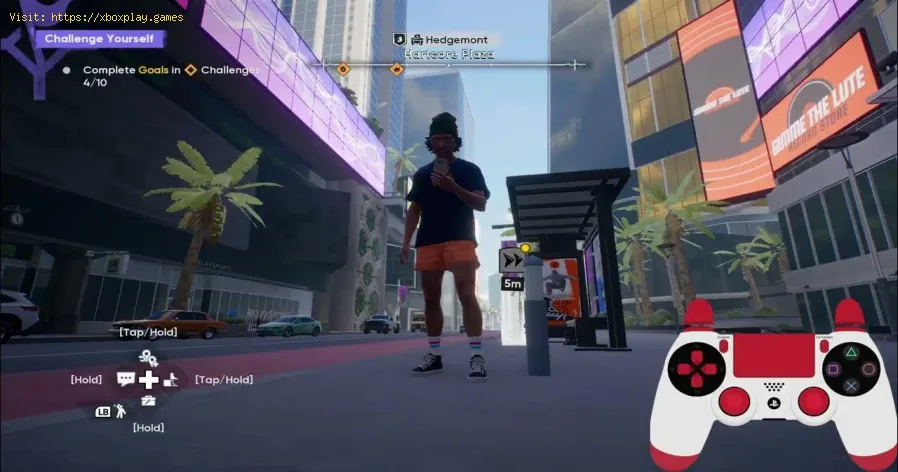
However, discovering a point on the map is only the first step. You must physically visit and activate each location yourself. Skate to the designated spot—often a bus stop, a distinctive landmark, or a hidden rooftop—and interact with it to permanently add it to your fast travel network.
Calibrate your TV for gaming with our step-by-step guide. Optimize response time, HDR, color, and input lag for the ultimate competitive edge and visualexperience.
How to Fix PC Blue Screen While Gaming
Stop gaming crashes! Learn step-by-step fixes for the PC blue screen (BSOD)during gameplay. Troubleshoot drivers, overheating, hardware &settings for a stable system.
How to Fix PC Restarts While Gaming
Expert tips to diagnose and fix sudden PC restarts during gaming. Learntroubleshooting steps for overheating, PSU issues, driver problems, andhardware stability.
How to Fix CPU Overheating While Gaming
Learn how to fix CPU overheating while gaming with effective coolingsolutions, proper maintenance, and system optimization tips to preventdamage and boost performance.
How to Fix Game Won’t Save Progress
"Troubleshoot and fix game progress not saving with our step-by-step guide. Learn how to check settings, clear cache, fix corrupt files, and solve storageissues to prevent lost saves."
How to fix PC Fans Too Loud While Gaming
Meta description: "PC fans too loud while gaming? Learn 8 simple fixes toreduce noise & cool your PC effectively. Easy, step-by-step guidefor a quieter gaming rig."
How to Fix PC Won’t Boot After Update
Struggling with a black screen or errors after an update? Learn step-by-step fixes to get your PC booting again. From safe mode to recovery tools, we'llguide you through the solutions.
How to Fix PC Stuttering in Games
Troubled by PC stuttering in games? Our guide shows you how to fix gamestuttering & lag with step-by-step solutions for settings, hardware, & drivers.
How to Fix PC Freezing While Gaming
Expert troubleshooting guide to stop PC freezing during games. Learn quickfixes for overheating, driver issues, and hardware bottlenecks torestore smooth gameplay.
How to Fix Game Crashes on Startup
Learn effective solutions to fix game crashes on startup and enjoy seamless gaming. Troubleshoot issues
How To Level Up Fast in Skate
Level up your skills quickly in Skate! Discover pro tips, efficient trickcombos, and the best spots for massive points to master the game fast.
How to Complete UFO Ending in Silent Hill f
Uncover the secrets to achieving Silent Hill f's secret UFO Ending. Our guidereveals the hidden steps, bizarre encounters, and out-of-this-worldconclusion for this wild easter egg.
How To Unlock All Endings in Silent Hill f
Uncover every ending in Silent Hill f. This guide details the requirements forthe good, bad, and secret endings, explaining the key choices andactions needed to see every conclusion.
How To Defeat Sakuko in Silent Hill f
Face the floral horror of Sakuko in Silent Hill f. Our guide reveals herweaknesses, attack patterns, and the best strategies to survive anddefeat this haunting boss.
How To Get The Sacred Sword in Silent Hill f
Uncover the steps to obtain the Sacred Sword in Silent Hill f. Our guide reveals the key locations, puzzles, and challenges you mustovercome to secure this powerful weapon and face the horrors that await.
Why Fast Travel is Essential in Skate
While mastering your board skills is the ultimate goal, San Vansterdam is a massive city. Fast travel is not a cheat; it's a strategic tool for efficient gameplay. It lets you instantly jump between key locations, helping you tackle specific challenges, meet up with friends, or simply find a fresh spot to skate without the long journey. Understanding how it works will significantly enhance your flow and progression.
How to Unlock Fast Travel Points
Fast travel isn't available from the start. To gain access, you must prove your skills to the local skaters. Here’s the key requirement:
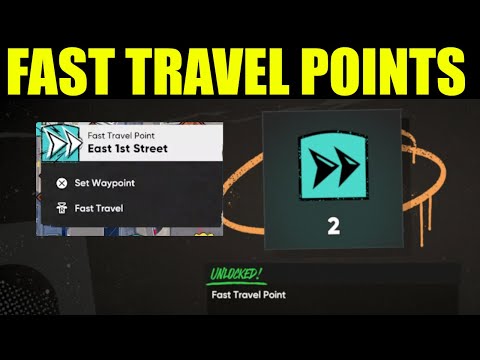
- Increase Your Pro Status: The primary way to unlock fast travel locations is by building your reputation in each neighborhood. Complete challenges, nail high-score lines, and impress the locals. As your "Pro" level rises in a specific area, new fast travel points will automatically appear on your in-game map.
However, discovering a point on the map is only the first step. You must physically visit and activate each location yourself. Skate to the designated spot—often a bus stop, a distinctive landmark, or a hidden rooftop—and interact with it to permanently add it to your fast travel network.
Locating and Using Fast Travel Effectively
Fast travel points are not always obvious. While many are at street level,some require exploration and skillful skating to reach. Be prepared tohunt for points perched on top of buildings or hidden in alleyways. Theeffort is well worth it, as each new point you activate dramaticallyreduces your future travel time.
To use the system, simply open your map, select an unlocked fast travelicon, and confirm your destination. You'll be transported thereinstantly.
Pro Tips for Advanced Navigation
- Fast Travel to Party Members: Playing with friends? If you're in a party, you can open your map andfast travel directly to any other player's location. This is the fastest way to regroup and start a session together.
- Utilize Session Markers: For difficult climbs or complex lines, always use a session marker. Byplacing a marker, you create a personal respawn point. If you bail,you'll restart from the marker instead of being sent back to thebeginning of your journey, saving immense amounts of time andfrustration.
By strategically unlocking fast travel points and using these advancedtechniques, you'll master the map of San Vansterdam and keep your focuswhere it belongs: on skating.
Mode:
Other Articles Related
How to Calibrate Your TV for GamingCalibrate your TV for gaming with our step-by-step guide. Optimize response time, HDR, color, and input lag for the ultimate competitive edge and visualexperience.
How to Fix PC Blue Screen While Gaming
Stop gaming crashes! Learn step-by-step fixes for the PC blue screen (BSOD)during gameplay. Troubleshoot drivers, overheating, hardware &settings for a stable system.
How to Fix PC Restarts While Gaming
Expert tips to diagnose and fix sudden PC restarts during gaming. Learntroubleshooting steps for overheating, PSU issues, driver problems, andhardware stability.
How to Fix CPU Overheating While Gaming
Learn how to fix CPU overheating while gaming with effective coolingsolutions, proper maintenance, and system optimization tips to preventdamage and boost performance.
How to Fix Game Won’t Save Progress
"Troubleshoot and fix game progress not saving with our step-by-step guide. Learn how to check settings, clear cache, fix corrupt files, and solve storageissues to prevent lost saves."
How to fix PC Fans Too Loud While Gaming
Meta description: "PC fans too loud while gaming? Learn 8 simple fixes toreduce noise & cool your PC effectively. Easy, step-by-step guidefor a quieter gaming rig."
How to Fix PC Won’t Boot After Update
Struggling with a black screen or errors after an update? Learn step-by-step fixes to get your PC booting again. From safe mode to recovery tools, we'llguide you through the solutions.
How to Fix PC Stuttering in Games
Troubled by PC stuttering in games? Our guide shows you how to fix gamestuttering & lag with step-by-step solutions for settings, hardware, & drivers.
How to Fix PC Freezing While Gaming
Expert troubleshooting guide to stop PC freezing during games. Learn quickfixes for overheating, driver issues, and hardware bottlenecks torestore smooth gameplay.
How to Fix Game Crashes on Startup
Learn effective solutions to fix game crashes on startup and enjoy seamless gaming. Troubleshoot issues
How To Level Up Fast in Skate
Level up your skills quickly in Skate! Discover pro tips, efficient trickcombos, and the best spots for massive points to master the game fast.
How to Complete UFO Ending in Silent Hill f
Uncover the secrets to achieving Silent Hill f's secret UFO Ending. Our guidereveals the hidden steps, bizarre encounters, and out-of-this-worldconclusion for this wild easter egg.
How To Unlock All Endings in Silent Hill f
Uncover every ending in Silent Hill f. This guide details the requirements forthe good, bad, and secret endings, explaining the key choices andactions needed to see every conclusion.
How To Defeat Sakuko in Silent Hill f
Face the floral horror of Sakuko in Silent Hill f. Our guide reveals herweaknesses, attack patterns, and the best strategies to survive anddefeat this haunting boss.
How To Get The Sacred Sword in Silent Hill f
Uncover the steps to obtain the Sacred Sword in Silent Hill f. Our guide reveals the key locations, puzzles, and challenges you mustovercome to secure this powerful weapon and face the horrors that await.