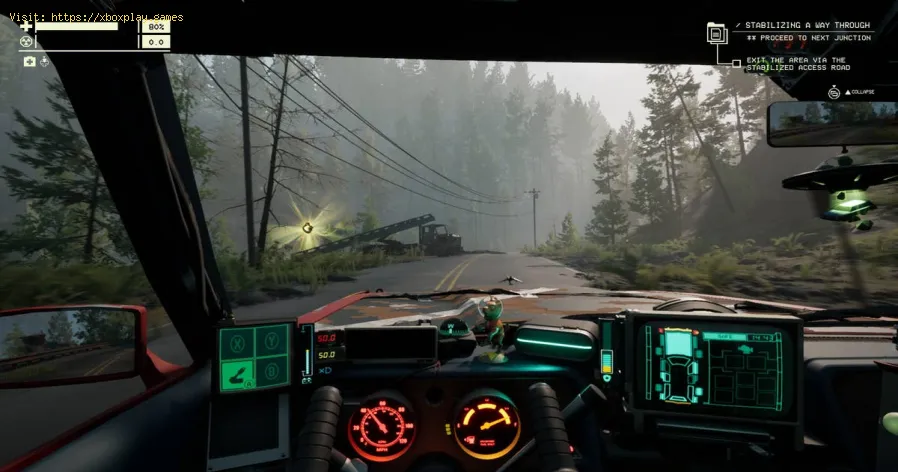
How To Customize Vehicle in Pacific Drive
Learn How To Customize Vehicle in Pacific Drive with our step-by-step guide. Discover tips for enhancing your ride and making it your own.
Welcome to the world of Pacific Drive, where the open road beckons and the possibilities for personalizing your vehicle are endless. Whether you're a seasoned driver or a newcomer to the world of automotive customization, this guide will walk you through the steps to transform your ride into a personalized oasis. From vibrant paint jobs to unique decals and stylish ornaments, Pacific Drive offers a plethora of options to make your vehicle truly your own.
The first step in customizing your vehicle in Pacific Drive is to procure the perfect car paint and bring it back to your garage. Once you have the paint in hand, the next decision is to select the car part you want to paint or add a decal to. It's important to keep in mind that car paints and decals have limited uses, so it's best to plan your customization carefully. Consider customizing your ride after unlocking the ability to repair car parts in the garage or ensuring you have enough Repair Putty to maintain your new look.
In Pacific Drive, the options for painting your vehicle are as diverse as the landscapes you'll encounter on your drives. From classic colors to bold metallic finishes, the paint options are designed to cater to every driver's individual style. Whether you're looking to give your car a fresh coat of paint or add a touch of flair with a carefully placed decal, Pacific Drive empowers you to express your creativity and make your vehicle stand out on the road.
Family fun for all ages! Discover the best board, card, and video games thatcreate laughter, teamwork, and lasting memories for your next gamenight. Find your new favorite!
What is thermal throttling and how to avoid it
Learn what thermal throttling is, how it slows down your CPU/GPU, and getpractical tips to avoid it for better device performance and longevity.Keep your system cool!
What is DLSS and how to enable it
Unlock smoother gameplay with NVIDIA DLSS. Learn what AI-powered DLSS does,how it boosts FPS, and a quick guide to enabling it in supported PCgames.
What is ping and how to lower it
Discover what ping is in online gaming and networking. Learn practical tips tolower high ping, reduce lag, and improve your connection speed for asmoother experience.
The best games to play with keyboard and mouse
Best keyboard and mouse games: Master FPS, RTS, & RPG titles designedfor precision control. Discover top PC games that play best with KBM.
The best games to play with a controller on PC
Top controller-supported PC games: action, racing, RPGs & more. Findthe best titles for Xbox, PlayStation, or generic gamepads. Ultimateguide for couch gaming.
The best role-playing games to start with
Looking to start playing RPGs? Discover the best beginner-friendly role-playing games with easy-to-learn rules, engaging stories, and memorableadventures for new players.
The best racing games for 2026
Discover the top racing games of 2026, from hyper-realistic simulators toexplosive arcade action. Get our expert picks for every platform andplay style.
What is GPU overclocking and should you do it?
Learn what GPU overclocking is, its performance benefits, and the risksinvolved. Discover if overclocking your graphics card is right for yourPC and gaming needs.
What is FSR and how does it work?
Learn what FSR (FidelityFX Super Resolution) is, how it upscales games forhigher performance & better visuals, and how it compares to otherupscaling tech. Get a clear, simple explanation here.
How To Beat Dreadnought In Deep Rock Galactic Survivor
Master the art of How To Beat Dreadnought In Deep Rock Galactic Survivor with expert tips and strategies.
How To Recruit Survivors in Nightingale
Discover the best methods for How To Recruit Survivors in Nightingale and strengthening your group.
How To Get Quartz in Nightingale
Discover the best strategies for How To Get Quartz in Nightingale on our comprehensive website.
How To Get Animal Fibre in Nightingale
Find out the techniques for How To Get Animal Fibre in Nightingale.
How To Get Alchemical Ink in Nightingale
Learn the methods for How To Get Alchemical Ink in Nightingale through our comprehensive guide.
Welcome to the world of Pacific Drive, where the open road beckons and the possibilities for personalizing your vehicle are endless. Whether you're a seasoned driver or a newcomer to the world of automotive customization, this guide will walk you through the steps to transform your ride into a personalized oasis. From vibrant paint jobs to unique decals and stylish ornaments, Pacific Drive offers a plethora of options to make your vehicle truly your own.
How To Customize Vehicle in Pacific Drive
Step 1: Painting Your Vehicle
The first step in customizing your vehicle in Pacific Drive is to procure the perfect car paint and bring it back to your garage. Once you have the paint in hand, the next decision is to select the car part you want to paint or add a decal to. It's important to keep in mind that car paints and decals have limited uses, so it's best to plan your customization carefully. Consider customizing your ride after unlocking the ability to repair car parts in the garage or ensuring you have enough Repair Putty to maintain your new look.
In Pacific Drive, the options for painting your vehicle are as diverse as the landscapes you'll encounter on your drives. From classic colors to bold metallic finishes, the paint options are designed to cater to every driver's individual style. Whether you're looking to give your car a fresh coat of paint or add a touch of flair with a carefully placed decal, Pacific Drive empowers you to express your creativity and make your vehicle stand out on the road.
Step 2: Adding Decorations
For those looking to take their vehicle customization to the next level in How To Customize Vehicle in Pacific Drive, consider building the Detailing Station. This unlocks a new inventory filled with various ornaments and different steering wheels, allowing you to elevate the interior and exterior of your vehicle with personalized touches. These decorations have unlimited uses and can be swapped without any loss, giving you the freedom to experiment and find the perfect combination that reflects your unique style and personality.
In Pacific Drive, the art of vehicle decoration is not just about adding a few trinkets here and there. It's about creating a space that feels like an extension of yourself, where every detail speaks to your individuality and passion for the open road. Whether you choose to adorn your vehicle with sleek chrome accents, eye-catching decals, or luxurious steering wheel ornaments, the options for customization are designed to inspire and empower you to make your vehicle a true reflection of your personal style.
While the idea of customizing your vehicle may not be an immediate priority in Pacific Drive, it's certainly a delightful addition that can enhance your driving experience and How To Customize Vehicle in Pacific Drive. The ability to personalize your ride with unique paint jobs, decals, and decorations adds comfort and personality to the time you spend behind the wheel. So go ahead, unleash your creativity and make your vehicle a true reflection of yourself as you navigate the stunning landscapes and thrilling roads of Pacific Drive.
Mode:
Other Articles Related
The best games to play with the familyFamily fun for all ages! Discover the best board, card, and video games thatcreate laughter, teamwork, and lasting memories for your next gamenight. Find your new favorite!
What is thermal throttling and how to avoid it
Learn what thermal throttling is, how it slows down your CPU/GPU, and getpractical tips to avoid it for better device performance and longevity.Keep your system cool!
What is DLSS and how to enable it
Unlock smoother gameplay with NVIDIA DLSS. Learn what AI-powered DLSS does,how it boosts FPS, and a quick guide to enabling it in supported PCgames.
What is ping and how to lower it
Discover what ping is in online gaming and networking. Learn practical tips tolower high ping, reduce lag, and improve your connection speed for asmoother experience.
The best games to play with keyboard and mouse
Best keyboard and mouse games: Master FPS, RTS, & RPG titles designedfor precision control. Discover top PC games that play best with KBM.
The best games to play with a controller on PC
Top controller-supported PC games: action, racing, RPGs & more. Findthe best titles for Xbox, PlayStation, or generic gamepads. Ultimateguide for couch gaming.
The best role-playing games to start with
Looking to start playing RPGs? Discover the best beginner-friendly role-playing games with easy-to-learn rules, engaging stories, and memorableadventures for new players.
The best racing games for 2026
Discover the top racing games of 2026, from hyper-realistic simulators toexplosive arcade action. Get our expert picks for every platform andplay style.
What is GPU overclocking and should you do it?
Learn what GPU overclocking is, its performance benefits, and the risksinvolved. Discover if overclocking your graphics card is right for yourPC and gaming needs.
What is FSR and how does it work?
Learn what FSR (FidelityFX Super Resolution) is, how it upscales games forhigher performance & better visuals, and how it compares to otherupscaling tech. Get a clear, simple explanation here.
How To Beat Dreadnought In Deep Rock Galactic Survivor
Master the art of How To Beat Dreadnought In Deep Rock Galactic Survivor with expert tips and strategies.
How To Recruit Survivors in Nightingale
Discover the best methods for How To Recruit Survivors in Nightingale and strengthening your group.
How To Get Quartz in Nightingale
Discover the best strategies for How To Get Quartz in Nightingale on our comprehensive website.
How To Get Animal Fibre in Nightingale
Find out the techniques for How To Get Animal Fibre in Nightingale.
How To Get Alchemical Ink in Nightingale
Learn the methods for How To Get Alchemical Ink in Nightingale through our comprehensive guide.