
How To Generate Electricity In Your Bunker in Misery
The Foundation: Generators and Fuel
The most straightforward way to get the lights on is with a Generator. Fortunately, your bunker comes with one pre-installed. Should you need another, you can craft one at your workbench using 20 Scrap, 10 Electronics, and 1 Insulating Tape.The generator won't run on hopes and dreams, however. It requires fuel. You'll need to venture out to find cans of Gasoline, a common but vital loot item found throughout the world. While they aren't rare, their size can be an inventory burden, so planning your scavenging runs is key.Distributing the Power: Cables and Splitters
Once your generator is humming with fuel, the next step is distribution. You'll need Cable to connect your power source to your appliances. Initial supplies can be found in your bunker, with more available as loot. Craft more with 5 Scrap and 2 Electronics if you run short.Plugging a single device directly into the generator is inefficient. This is where the Splitter becomes your best friend. This device takes one power input and splits it into three separate outputs, allowing you to run multiple devices from a single generator.To set it up:Advanced Power Grid Management
As your collection of powered devices grows, so will the complexity ofyour grid. Two other devices are invaluable for late-game setups:
- Combiner: This unit merges two separate power sources into a single output,perfect for linking a generator with an alternative power source.(Crafting Cost: 1 Scrap, 3 Electronics)
- Switcher: Acts as an on/off switch for a power line, allowing you to conservefuel by cutting power to non-essential devices without dismantlingcables. (Crafting Cost: 1 Scrap, 3 Electronics)
Beyond the Generator: Alternative Power Sources
Maybe you want a quieter, renewable source of energy, or perhaps you just need more power. The game offers several alternatives.
1. Wooden Wind Turbine
For a green energy solution, craft a Wooden Wind Turbine using 10 Plastic, 10 Scrap, 1 Iron Bar, and 1 Insulating Tape. Place it outside your bunker's entrance, and it will reliably generate one unit of power per second as long as the wind blows.
2. The Dwarf Generator
One of Misery's more unique power options is the Dwarf Generator. Yes, you read that correctly. This quirky device requires a captured Dwarf to operate. To build it, you'll need 1 Dwarf, 20 Wood, 3 Iron Bars, and 1 Insulating Tape. Be warned: your diminutive engineer requires a steady supply of Vodka to keep working, so always keep a bottle handy.
3. Car Batteries for Power Storage
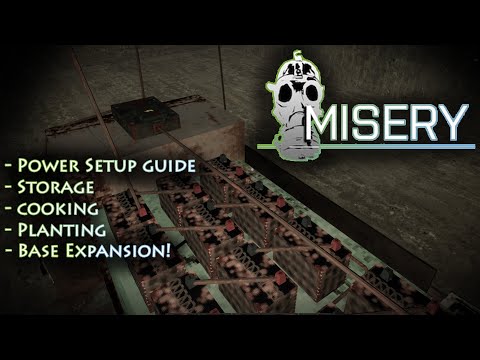
While not a generation method itself, the Car Battery is a game-changer for power management. It stores a massive 1,200 units of electricity, acting as a powerful buffer. You can charge it with any generator and then use it to run your devices, saving precious fuel.Find them in abandoned vehicles or craft your own with 20 Plastic, 15 Scrap, and 3 Electronics.
With this knowledge, you're ready to build a robust electrical grid thatwill keep your bunker bright, your incinerator hot, and your survivalchances high. Now go forth and power up
Other Articles Related
How to Improve Laptop Gaming PerformanceBoost your laptop's gaming performance with expert tips and tricks. Discover how to enhance speed, graphics, and overall gameplay
How to Lower Ping in Online Games
Discover effective tips to lower ping in online games and enhance your gaming experience. Improve your connection
Best Settings for High FPS in Any Game
Unlock the best settings for high FPS in your games! Boost performance and enjoy smoother gameplay with our expert tips.
How to Calibrate Your TV for Gaming
Calibrate your TV for gaming with our step-by-step guide. Optimize response time, HDR, color, and input lag for the ultimate competitive edge and visualexperience.
How to Fix PC Blue Screen While Gaming
Stop gaming crashes! Learn step-by-step fixes for the PC blue screen (BSOD)during gameplay. Troubleshoot drivers, overheating, hardware &settings for a stable system.
How to Fix PC Restarts While Gaming
Expert tips to diagnose and fix sudden PC restarts during gaming. Learntroubleshooting steps for overheating, PSU issues, driver problems, andhardware stability.
How to Fix CPU Overheating While Gaming
Learn how to fix CPU overheating while gaming with effective coolingsolutions, proper maintenance, and system optimization tips to preventdamage and boost performance.
How to Fix Game Won’t Save Progress
"Troubleshoot and fix game progress not saving with our step-by-step guide. Learn how to check settings, clear cache, fix corrupt files, and solve storageissues to prevent lost saves."
How to fix PC Fans Too Loud While Gaming
Meta description: "PC fans too loud while gaming? Learn 8 simple fixes toreduce noise & cool your PC effectively. Easy, step-by-step guidefor a quieter gaming rig."
How to Fix PC Won’t Boot After Update
Struggling with a black screen or errors after an update? Learn step-by-step fixes to get your PC booting again. From safe mode to recovery tools, we'llguide you through the solutions.
How to Solve Order Initiate Scavenger Hunt Puzzle in Outer Worlds 2
Stuck on the Order Initiate scavenger hunt in Outer Worlds 2? Our guidereveals the solution to this tricky puzzle. Find all the clues, decodethe messages, and claim your unique reward with our step-by-stepwalkthrough.
How To Increase Inventory Space in Misery
Learn how to maximize your carrying capacity in Misery. Discover inventoryexpansion tips, storage management strategies, and essential itemprioritization.
Where To Find Toasters in Arc Raiders
Fight for survival in ARC Raiders? Even heroes need breakfast. Find toasters& other supplies in our guide to looting the dangerous world of ARCRaiders.
Where To Find Rocketeer Drivers in Arc Raiders
Strap in, pilot. Find the best spots and strategies to hunt Rocketeer Drivers in ARC Raiders. Our guide shows you where to look and how to securethis vital component.
How to get Deep Immersifier in Honkai Star Rail
how to obtain the Deep Immersifier in Honkai Star Rail with our guide. Unlock powerful upgrades and enhance your gameplay