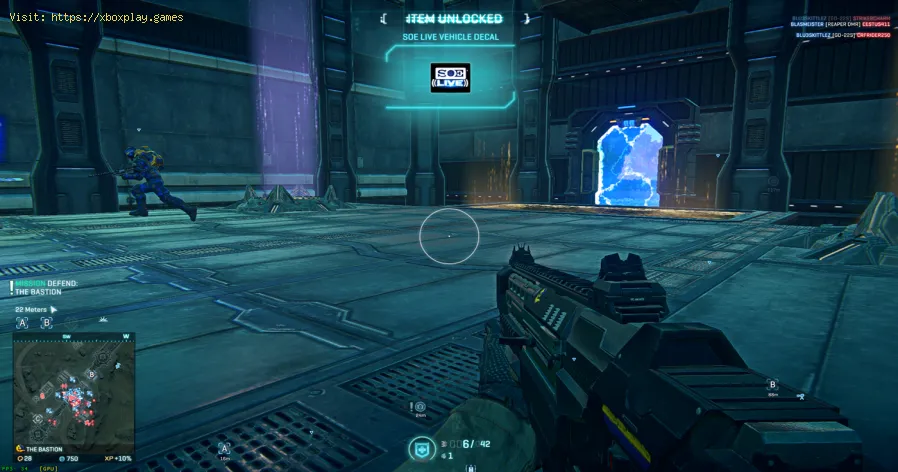
What Is a HUD in Video Games
What Does HUD Stand For & What Is Its Core Purpose?
HUD stands for Heads-Up Display. The term originates from aviation, where pilots have vital flight data (altitude, speed, targeting) projected onto their cockpit canopy or helmet visor, allowing them to keep their "heads up" and eyes on the sky, not down on their instruments.In video games, the HUD serves the same essential purpose: to convey crucial gameplay information without pulling the player's focus away from the primary action on screen. It is the game's way of constantly whispering status updates, warnings, and guidance directly into your peripheral vision.The Three Primary Types of Video Game HUDs
Game designers choose a HUD style based on the desired player experience, balancing clarity with immersion.1. Diegetic HUD (The "In-World" Interface)
- What it is: The HUD elements exist within the game world itself and are perceived by the player character. The information is displayed on devices, screens, or surfaces that are part of the narrative.
- Examples:
- Dead Space: Health is displayed as a bar on the spine of Isaac's suit. Ammo count is projected from the weapon itself.
- Metroid Prime: All data is viewed through Samus's helmet visor, complete with scan lines and faceplate reflections.
- F1 Racing Games: The speedometer and telemetry are part of the car's dashboard.
- Pros: Maximizes immersion, strengthens world-building, and can be incredibly creative.
- Cons: Can sometimes be harder to read at a glance or may not support complex information needs.
2. Non-Diegetic HUD (The "Classic" Overlay)
- What it is: The most common type. HUD elements are overlaid on top of the screen as a separate 2D interface that only the player can see, not the character.
- Examples: The health bar, mini-map, ammo counter, and ability icons in games like Call of Duty, World of Warcraft, The Legend of Zelda: Breath of the Wild.
- Pros: Extremely clear, highly functional, and can present a large amount of information efficiently. The player standard.
- Cons: Can break immersion by reminding the player they are looking at a screen. Can lead to "HUD clutter" if not designed well.
3. Spatial/Meta HUD (The "Hybrid" Approach)
- What it is: Information is anchored to objects or locations in the 3D game world but is not part of the diegesis. It's a floating label or icon that only the player sees.
- Examples: Floating names and health bars over enemies in Overwatch, interaction prompts (Press [F]) that appear when near an object, objective markers placed directly in the game world.
- Pros: Excellent for directing attention and providing context-sensitive information without permanent screen clutter.
- Cons: Information can be occluded by geometry or lost in visual noise.
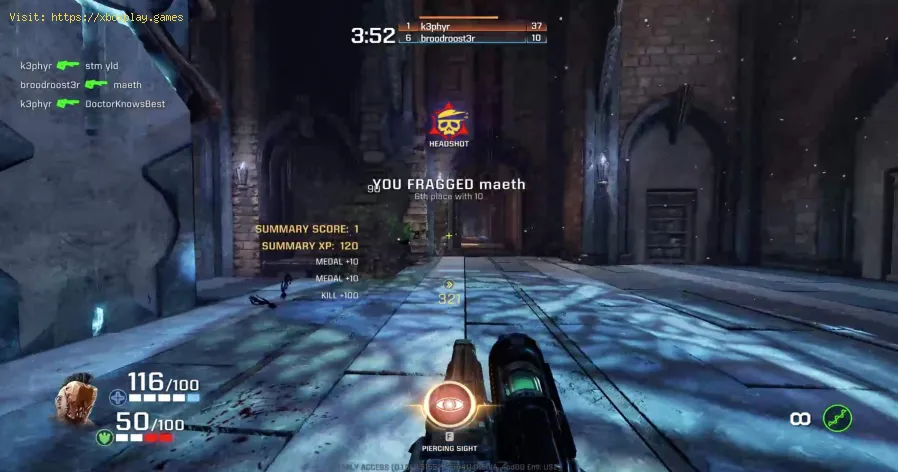
The Core Components of a Standard HUD (A Functional Breakdown)
While HUDs vary wildly, these are the most common elements you'll encounter:
- Health/Shield/Stamina: The most critical gauge. Visually indicates your character's vitality and capacity to act (run, dodge).
- Ammunition/Resources: Shows current and total ammunition, mana points, or other consumable resources needed for abilities.
- Mini-Map/Radar: A condensed, top-down view of the immediate area, showing terrain, objectives, allies, and often enemy locations or sounds.
- Objective/Quest Log: Tells you your current primary and secondary goals, often with distance markers.
- Ability/Item Hotbar: Shows cooldowns, ready status, and selectable inventory items (potions, grenades).
- Crosshair/Reticle: The center-screen aiming point, which often changes shape or color to indicate state (on target, reloading, out of ammo).
- Contextual Prompts: Appear only when relevant (e.g., "Press X to Open," "Hold E to Revive Teammate").
The Evolution & Philosophy: From Clutter to Minimalism
HUD design has evolved significantly. Early arcade and console games (NES, Sega Genesis) used bold, chunky HUDs out of necessity—they needed to be readable on low-resolution CRT TVs from across a room.
Modern design philosophy often leans toward minimalism and context-sensitivity.
- Dynamic HUDs: Elements fade out when not needed (e.g., the health bar in God of War disappears outside of combat).
- Extensive Customization: Many PC games and modern AAA titles allow players to toggle, resize, or completely disable individual HUD elements. This is crucial foraccessibility and personal preference.
- The "No-HUD" Challenge: Some games are designed to be playable with the HUD completelydisabled, relying on visual and audio cues within the world itself(e.g., Elden Ring's subtle enemy tells, the Far Cry series' animal calls and environmental painting).
How the HUD Affects Gameplay & Skill
A well-designed HUD is a teacher and a tool.
- For New Players: It provides essential guidance, teaching game rules and directing attention.
- For Competitive Players: It delivers the high-frequency data (cooldown timers, ultimate status,kill feed) required for split-second decision-making in games like Valorant or Apex Legends.
- For Immersive Players: A subtle or diegetic HUD can deepen the role-playing experience, making them feel more like an inhabitant of the world than a controller of acharacter.
Platform Considerations: How PC, Console, and Mobile HUDs Differ
- PC HUDs: Often denser, with more hotkeys (1-9, F-keys) displayed, and are highly customizable via settings or mods. Designed for viewing up close on amonitor.
- Console HUDs: Typically designed with larger text and icons for viewing on a TV from a distance (a "10-foot UI"). They rely more on radial menus or controller button prompts (A, X, ▢).
- Mobile HUDs: Must account for touch controls and the potential for fingers toobscure the screen. They often use large, transparent buttons on theedges and simpler, icon-driven information displays.
Frequently Asked Questions (FAQs)
Q: What's the difference between a HUD and a UI?
A: The HUD is a subset of the overall User Interface (UI). The HUD is the in-game, always-present overlay during gameplay. The UI encompasses everything the player interacts with: menus, inventory screens, character creation, settings, and the HUD itself.
Q: Can I turn the HUD off?
A: In most modern games, yes. Check the Settings > Interface or Gameplay menus. You can often adjust opacity, toggle specific elements, orsometimes disable it entirely for a greater challenge or increasedimmersion.
Q: Why do some games have such a cluttered HUD?
A: "HUD clutter" often happens in complex games (MMOs, simulators) thatneed to display a vast amount of simultaneous information. It's a design challenge to present data clearly without overwhelming the player. Poor HUD design is a common critique.
Q: What is a "GUI"?
A:Graphical User Interface (GUI). This term is essentially synonymous with UI in gaming, referring to the visual, graphical elements (windows, icons, buttons) that make up themenus and HUD, as opposed to a text-based command line.
Q: What's an example of a game with a "perfect" HUD?
A: This is subjective, but games praised for excellent HUD design often make it minimal, contextual, and informative.*Half-Life 2*'s simple health/ammo/suit charge in the corner. Halo's iconic shield bar and two-weapon display. Dead Space for its revolutionary diegetic approach. The "best" HUD is one you stop noticing because it works so seamlessly.
The HUD is the silent partner in your gaming journey. A great one empowersyou; a bad one fights you. Now that you understand its language, you can appreciate the craft behind it and take control of your own experience.
Take a look at the game you're playing right now. How is its HUD designed? Is it diegetic or an overlay? What's oneelement you love, and one you wish you could change or remove? Shareyour thoughts on iconic or frustrating HUDs in the comments below. Forguides on how to customize the HUD in popular games like Cyberpunk 2077, Elden Ring, or Final Fantasy XIV, explore our settings optimization guides. Now, game on—with your head up and your information clear.

Other Articles Related
What Is a Sandbox Gamethe world of sandbox games! Learn what defines this genre, its keyfeatures, and why players love the freedom to create and explore.
What Is a Skill Tree
Explore the intricacies of skill trees, their role in gaming, and howthey empower players to customize abilities.
What Is a HUD in Video Games
Explore what a HUD is in video games and its importance in deliveringessential information to players. Enhance your gaming
The Best Games for High‑End PCs
the best games for high-end PCs that deliver stunning graphics and immersive gameplay. Elevate your gaming experience
The Best RPGs for New Players
Discover the best RPGs for new players! Dive into immersive worlds, engaging stories, and easy-to-learn mechanics.
How to Play Better in Team‑Based Games
strategies to enhance your skills in team-based games. Learn tips and tricks for better teamwork and gameplay.
How to Improve Movement in Shooters
effective strategies to enhance movement in shooter games. Boost your gameplay and dominate the competition
What Is Motion Sickness in Gaming
Learn about motion sickness in gaming, including its triggers, effectson players, and tips to reduce symptoms
Best Games for Competitive Players
the best couch co-op games that bring friends and family together forunforgettable gaming experiences. Dive into fun and teamwork
The Best Couch Co‑Op Games
Explore our curated list of the best couch co-op games perfect forbonding with friends and family. Get ready for laughter
The Best Games for High‑End PCs
the best games for high-end PCs that deliver stunning graphics and immersive gameplay. Elevate your gaming experience
The Best RPGs for New Players
Discover the best RPGs for new players! Dive into immersive worlds, engaging stories, and easy-to-learn mechanics.