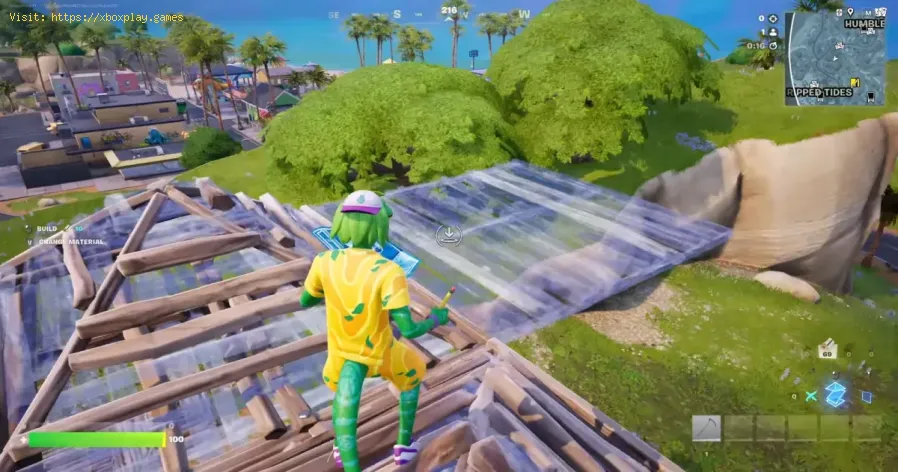
How to Use Simple Build in Fortnite
Fortnite: How to Use Simple Build
I. Understanding the Simple Build Mechanic
The core philosophy of Simple Build is simplification: reducing the necessary key presses and simplifying the piece selection process so players can instantly react to combat threats.Core Functionality: Two Keys to Rule Them All
With Simple Build enabled, the entire construction repertoire is compressed onto just two primary keybinds (or buttons):
- Key One (Wall): Dedicated solely to instantly building a Wall piece. This allows for immediate, basic defensive cover.
- Key Two (Stairs, Floor, and Roof): This single key handles the placement of the remaining three structural pieces, with the game intelligently determining which piece to placebased on the player’s camera angle and aiming position.
Contextual Placement Explained
The contextual placement mechanic is the heart of Simple Build:
- Building Stairs: If the player aims their camera toward the upper half of the screen (i.e., looking slightly up and forward), pressing Key Two will place a Stair piece.
- Building a Floor: If the player aims their camera toward the bottom half of the screen (i.e., looking slightly down), pressing Key Two will place a Floor piece.
- Building a Roof: By continuing to look at the bottom half of the screen, players can immediately press Key Two again to place a Roof piece directly above the recently placed Floor piece.
This system eliminates the need to cycle through four different piecekeybinds, offering a quick, fluid way to build basic protectivestructures or ascend obstacles.
II. Advantages and Limitations of Simple Build
Simple Build is an excellent entry point for new or non-building players, butit is not designed to replace the complex mastery required at thehighest levels of competitive play.
Key Advantages:
- Rapid Defensive Cover: Its greatest strength is the ability to instantly place a wall or afloor for quick protection during a gunfight, offering a huge boost tosurvivability for Zero Build players transitioning to standard modes.
- Easy High Ground: Building a short staircase to gain a height advantage or reach loot is now intuitive and requires minimal effort.
- Accessibility: It removes the steep learning curve associated with learning four separate building keys and complex build combinations.
Current Limitations:
- Not for Build Battles: Simple Build is not suitable for advanced build battles (high-speed, complex structure fighting). The game's contextual logiccan struggle to place the desired piece correctly when structures reach a certain height or when rapid, intricate editing is needed.
- Occasional Jitters: Early feedback suggests the system can sometimes be "janky,"misinterpreting the player's intent when the camera is positionedambiguously between the upper and lower screen halves. Epic Games isexpected to refine this feature based on player feedback throughout theseason.
III. How to Toggle Simple Build and Simple Edit On/Off
When the feature debuted in Chapter 7, many players accepted theintroductory pop-up without fully understanding the change. Thankfully,toggling Simple Build and its companion, Simple Edit, is a simpleprocess accessible at any time.
- Find the Simple Build setting and set it to Off to return to standard, complex building controls, or set it to On to re-enable the feature.
- You can also find and toggle the Simple Edit feature here if you wish to simplify the editing process as well.
Whether you are a Zero Build player testing the waters or a traditional builder looking for a streamlined backup, the ability to easily toggle SimpleBuild gives every player the power to customize their ideal Fortniteexperience.
Other Articles Related
How to Get the Starbrite Smasher Pickaxe for Free in FortniteGet the Starbrite Smasher Pickaxe in Fortnite without spending V-Bucks!This guide explains the limited-time methods to unlock this cosmicharvesting tool for free.
How to Get All SpongeBob Cosmetics in Fortnite
guide to unlocking all SpongeBob cosmetics in Fortnite. Dive into tips, tricks, and strategies to enhance your gaming
How to Collect Shiny Llamas in Fortnite
guide to collecting shiny llamas in Fortnite. Unlock tips, strategies, and locations to enhance your gaming experience
How to Get Harry Potter Skins in Fortnite
Learn the secrets to obtaining Harry Potter skins in Fortnite. Ourcomprehensive guide provides tips and tricks
Where to Find Back to the Future Mythic DeLorean in Fortnite
locations of the Mythic DeLorean from Back to the Future in Fortnite. Unlock its secrets and enhance your gameplay
How to Get the Free Rust Bucket Back Bling in Fortnite
unlock the Free Rust Bucket Back Bling in Fortnite with our step-by-step guide. Elevate your gameplay and style
How to Get a Perfect Gift in Fortnite
Learn how to gift items in Fortnite! Step-by-step guide for gifting skins,V-Bucks & more from the Item Shop. Requirements, restrictions &tips explained.
How to Get Free Cheeks and Glacial Dummy Skins in Fortnite
Want free Fortnite cosmetics? Learn legitimate methods to earn the Cheeksand Glacial Dummy skins without spending V-Bucks. Get tips for in-gamechallenges, events, and promotions.
Where to Find the Yule Trooper Boss in Fortnite
Discover the Yule Trooper Boss location in Fortnite! tips and strategies to defeat this festive foe and enhance your gameplay.
How to Fix Fortnite Unable to connect to server
Struggling with Fortnite connection errors? Discover effective solutions to fix your issues and get back to gaming
How to Get the Free Felinos Skin in Fortnite
Unlock the Felinos Skin in Fortnite! Discover step-by-step tips and tricks to get this free cosmetic and enhance your gaming experience.
How to Transform Into Bosses in Fortnite Chapter 7 Season 1
Discover Fortnite Chapter 7: Transform into powerful bosses and elevate your gameplay. Join the action now!
How to Get Wingsuits in Fortnite Chapter 7
Discover how to unlock wingsuits in Fortnite Chapter 7 with our guide. Elevate your gameplay and soar through the skies!
How to Get Blackpink LISA Skins in Fortnite
Unlock the ultimate Fortnite experience with exclusive Blackpink LISA skins! Discover tips and tricks to get your hands on these sought-after cosmetics.
How To Complete A Foolproof Plan Quest in Where Winds Meet
Successfully navigate the "Foolproof Plan" quest in Where WindsMeet. Our guide reveals how to find the letter, choose the beststrategy, and secure your rewards without any spoilers.