Fortnite: How to Dig Up Gnomes - Ultimate Guide
Guide to learn how to unearth gnomes in Fortnite
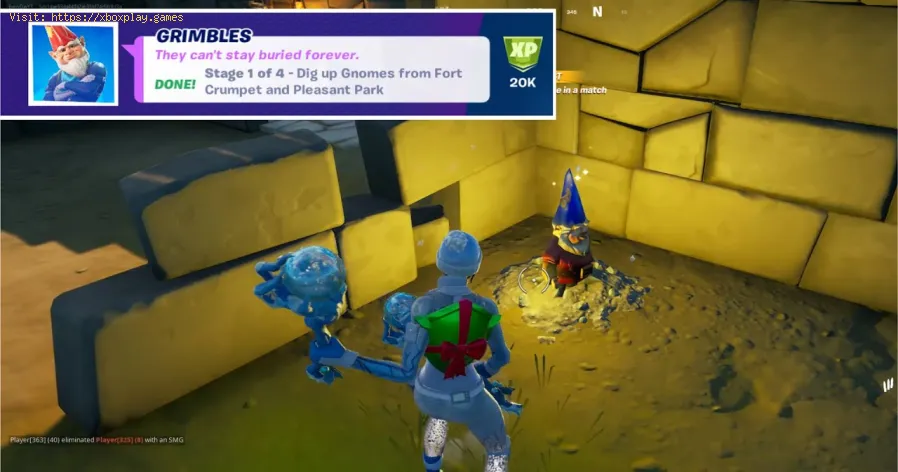
We are currently in Week 5 of Season 5 of Fortnite and as a tradition a number of weekly challenges have been released and many players are looking for the fastest way to complete them. One of them is about finding the way to How to Dig Up Gnomes taking place in Fort Crumpet and Pleasant Park. If you are interested in this challenge, in this guide we will tell you the details to complete it.Keep reading to find out!
For this challenge, four of these mythical creatures must be located in total and as an added value, you will discover that many can be a bit challenging but that will depend on the skill you have in the game.
When heading to Fort Crumpet, you'll need to walk through the structure's east entrance, turn right, and head straight for the wall in front of them. On the ground, right next to this wall, you'll see a glowing mound, and they can hit it with their gathering tools to reveal the first gnome. After that they can advance west passing under a small wooden bridge, to find a second mound where another gnome is located next to another wall.
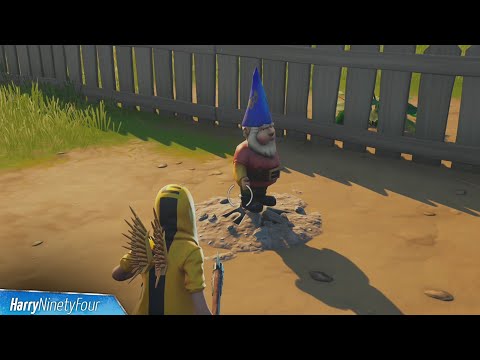
With two gnomes unearthed, you can now head to Pleasant Park, a named location east of Fort Crumpet. The first buried gnome is located almost directly in the center of the area, and as in Fort Crumpet it is located near a tree. The second gnome is to the north of this position, buried in the backyard of the large brick house with the candy canes flanking the front door.
Once the challenge is completed you should know that there is another similar one where you have to collect gnomes also in Fort Crumpet and Holly Hedges. There is also a challenge that focuses on burying these mythical creatures in Pleasant Park or Retail Row. Most of the released challenges are presented in the same areas so it should be a more "easy" job for players.
Now that you know how to unearth gnomes in Fortnite you can earn some good XP points in addition to completing a weekly challenge and thus dedicate yourself to other equally interesting ones. Luck!
Struggling with Fortnite connection errors? Discover effective solutions to fix your issues and get back to gaming
How to Get the Free Hogwarts Legacy Back Bling in Fortnite
Unlock the magic in Fortnite! This guide shows you the quick steps to claimthe free Hogwarts Legacy Back Bling in the Epic Games Store. Fly intobattle with style.
How to Get Kim Kardashian in Fortnite
Discover how to unlock Kim Kardashian in Fortnite with our step-by-step guide. Get tips and tricks
How to Find Morphite Weapons in Fortnite
Discover how to find Morphite Weapons in Fortnite with our comprehensive guide. Unlock powerful gear
How to Become a Ghost Sprite in Fortnite
Unlock the secrets of the Ghost Sprite in Fortnite! Discover tips and tricks on how to become a master
How to Unlock Entire CouRage Set in Fortnite
Unlock the entire CouRage set in Fortnite with our step-by-step. Discover tips and tricks to enhance your gaming
How to Get OG Headshot Sound Back in Fortnite
how to restore the classic OG headshot sound in Fortnite with our step-by-step guide. Level up your gaming experience
How to Get Free NINJAGO LEGO Sets in Fortnite
Unlock free NINJAGO LEGO sets in Fortnite! Join the adventure and collect exclusive rewards. Don't miss out!
How to Farm Gold Fast in Fortnite
effective strategies to farm gold fast in Fortnite. Boost your gameplay and unlock rewards quickly with our expert tips!
Where to Find Kingston in Fortnite
Discover the exact location of Kingston in Fortnite. This guide reveals the newlandmark's spot on the Chapter 5 Season 2 map, key loot points, and tips for landing.
Excel: How to Fix Can’t Edit in Read Only mode
Guide to learn how to fix the problem Cannot edit in read-only mode in Microsoft Excel
Archero: January 2021 Promo Codes
With our Archero guide you will learn more about the Promotional Codes for January 2021.
Apex Legends: How to get a legendary loot in Fight Night event
This guide is perfect for those wondering how to get a legendary loot in the Fight Night event at Apex Legends, so stay tuned.
G-Sync: How to Enable G-Sync on a FreeSync Monitor
In this guide you will find everything you need to know about how to enable G-Sync on a FreeSync monitor.
YouTube: How to Trim Video and Download
Discover How to trim videos and download them to have fun with everything that YouTube has to offer.
We are currently in Week 5 of Season 5 of Fortnite and as a tradition a number of weekly challenges have been released and many players are looking for the fastest way to complete them. One of them is about finding the way to How to Dig Up Gnomes taking place in Fort Crumpet and Pleasant Park. If you are interested in this challenge, in this guide we will tell you the details to complete it.Keep reading to find out!
How to dig up gnomes in Fortnite?
For this challenge, four of these mythical creatures must be located in total and as an added value, you will discover that many can be a bit challenging but that will depend on the skill you have in the game.
When heading to Fort Crumpet, you'll need to walk through the structure's east entrance, turn right, and head straight for the wall in front of them. On the ground, right next to this wall, you'll see a glowing mound, and they can hit it with their gathering tools to reveal the first gnome. After that they can advance west passing under a small wooden bridge, to find a second mound where another gnome is located next to another wall.
With two gnomes unearthed, you can now head to Pleasant Park, a named location east of Fort Crumpet. The first buried gnome is located almost directly in the center of the area, and as in Fort Crumpet it is located near a tree. The second gnome is to the north of this position, buried in the backyard of the large brick house with the candy canes flanking the front door.
Once the challenge is completed you should know that there is another similar one where you have to collect gnomes also in Fort Crumpet and Holly Hedges. There is also a challenge that focuses on burying these mythical creatures in Pleasant Park or Retail Row. Most of the released challenges are presented in the same areas so it should be a more "easy" job for players.
Now that you know how to unearth gnomes in Fortnite you can earn some good XP points in addition to completing a weekly challenge and thus dedicate yourself to other equally interesting ones. Luck!
Tags: Battle Royale, Fortnite Skins, V-Bucks, Fortnite Challenges, Fortnite Events, Fortnite Map, Fortnite Weapons, Fortnite S
Platform(s): Microsoft Windows PC, macOS, PlayStation 4 PS4, Xbox One, Nintendo Switch, PlayStation 5 PS5, Xbox Series X|S Android, iOS
Genre(s): Survival, battle royale, sandbox
Developer(s): Epic Games
Publisher(s): Epic Games
Engine: Unreal Engine 5
Release date: July 25, 2017
Mode: Co-op, multiplayer
Age rating (PEGI): 12+
Other Articles Related
How to Fix Fortnite Unable to connect to serverStruggling with Fortnite connection errors? Discover effective solutions to fix your issues and get back to gaming
How to Get the Free Hogwarts Legacy Back Bling in Fortnite
Unlock the magic in Fortnite! This guide shows you the quick steps to claimthe free Hogwarts Legacy Back Bling in the Epic Games Store. Fly intobattle with style.
How to Get Kim Kardashian in Fortnite
Discover how to unlock Kim Kardashian in Fortnite with our step-by-step guide. Get tips and tricks
How to Find Morphite Weapons in Fortnite
Discover how to find Morphite Weapons in Fortnite with our comprehensive guide. Unlock powerful gear
How to Become a Ghost Sprite in Fortnite
Unlock the secrets of the Ghost Sprite in Fortnite! Discover tips and tricks on how to become a master
How to Unlock Entire CouRage Set in Fortnite
Unlock the entire CouRage set in Fortnite with our step-by-step. Discover tips and tricks to enhance your gaming
How to Get OG Headshot Sound Back in Fortnite
how to restore the classic OG headshot sound in Fortnite with our step-by-step guide. Level up your gaming experience
How to Get Free NINJAGO LEGO Sets in Fortnite
Unlock free NINJAGO LEGO sets in Fortnite! Join the adventure and collect exclusive rewards. Don't miss out!
How to Farm Gold Fast in Fortnite
effective strategies to farm gold fast in Fortnite. Boost your gameplay and unlock rewards quickly with our expert tips!
Where to Find Kingston in Fortnite
Discover the exact location of Kingston in Fortnite. This guide reveals the newlandmark's spot on the Chapter 5 Season 2 map, key loot points, and tips for landing.
Excel: How to Fix Can’t Edit in Read Only mode
Guide to learn how to fix the problem Cannot edit in read-only mode in Microsoft Excel
Archero: January 2021 Promo Codes
With our Archero guide you will learn more about the Promotional Codes for January 2021.
Apex Legends: How to get a legendary loot in Fight Night event
This guide is perfect for those wondering how to get a legendary loot in the Fight Night event at Apex Legends, so stay tuned.
G-Sync: How to Enable G-Sync on a FreeSync Monitor
In this guide you will find everything you need to know about how to enable G-Sync on a FreeSync monitor.
YouTube: How to Trim Video and Download
Discover How to trim videos and download them to have fun with everything that YouTube has to offer.