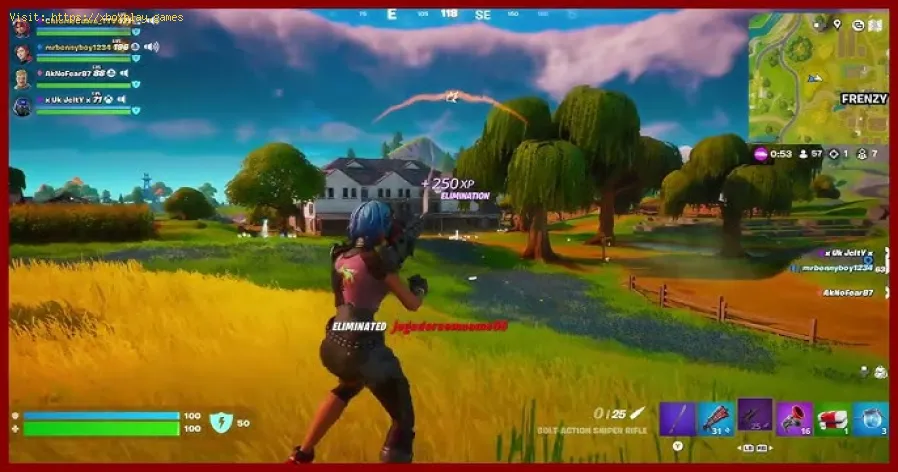
How to Get OG Headshot Sound Back in Fortnite
Fortnite: How to Get OG Headshot Sound Back
🎯 The Critical Difference: Understanding Hitmarkers
In Fortnite, landing a headshot is crucial because it deals critical damage, significantly higher than a standard body shot. The game provides players with immediate visual and auditory feedback to confirm this superior hit:- Visual Feedback: The damage numbers that pop up above the opponent's head are displayed in yellow (or orange/red, depending on distance/weapon) rather than the standard white used for body shots.
- Auditory Feedback: A distinct sound effect plays upon impact, different from the standard hit sound, to audibly confirm the critical hit.
🔊 How to Change Your Headshot Sound to "Legacy"
The option to change the headshot sound is not hidden in a deep, obscure sub-menu. It is easily accessible within thegame’s core settings, under the audio configuration.
Follow these simple steps to restore the classic Fortnite headshot sound:
- Open the Settings Menu: While in a match or in the lobby, pause the game and open the main Settings menu (usually accessible via the gear icon or the "Options" selection).
- Navigate to the Audio Tab: Look for the dedicated Audio Tab (often represented by a speaker icon). Click on it to bring up all sound-related configurations.
- Locate the Sound Section: Within the Audio Tab, you will need to scroll down until you find the general Sound section or a similar grouping of sound effects.
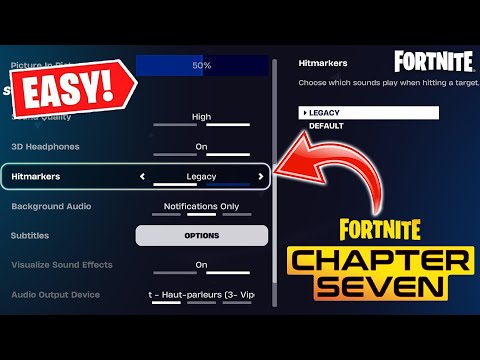
- Find the Hitmarkers Setting: Look for the setting labeled "Hitmarkers" (or sometimes related to Hit Sounds).
- Change the Setting: The default setting will be set to "Default" (the current Chapter 7 sound). Click on this option and change it to "Legacy."
Selecting Legacy instantly reverts the critical hit sound effect back to the originalversion that has been ingrained in players' minds over years ofcompetitive play. This simple adjustment can drastically improve aplayer's satisfaction and ability to process rapid combat information.
🧠 Why Auditory Feedback Matters in Competitive Gaming
The quick intervention by Epic Games to add the Legacy sound option highlights a critical lesson in competitive game design: auditory feedback is often as important as visual feedback.
- Immediacy and Confirmation: In high-stakes situations, a player's eyes might be momentarilytracking projectile paths or looking for follow-up targets. Theimmediate, distinct Legacy sound confirms the headshot without the player needing to consciously look at the damage numbers.
- Flow State: The classic sound is tied to a positive reinforcement loop. Hearingthat satisfying "ding" helps players get into a flow state, reinforcingthe habit of aiming for the head and providing a quick, rewardingconfirmation that their execution was perfect.
- Community Connection: For many players, the original sound is part of the game's identity.Restoring it is a nod of respect to the veteran community and theirestablished relationship with Fortnite's core mechanics.
By providing this flexible option, Epic Games allows both newer players to stick with the modern sounds and veteran players to reclaim thesatisfying auditory experience of the game they grew up with. Ensureyour settings are optimized for maximum critical hit satisfaction—headto the Audio tab and switch to Legacy today!
Other Articles Related
How to Get OG Headshot Sound Back in Fortnitehow to restore the classic OG headshot sound in Fortnite with our step-by-step guide. Level up your gaming experience
How to Farm Gold Fast in Fortnite
effective strategies to farm gold fast in Fortnite. Boost your gameplay and unlock rewards quickly with our expert tips!
Where to Find Kingston in Fortnite
Discover the exact location of Kingston in Fortnite. This guide reveals the newlandmark's spot on the Chapter 5 Season 2 map, key loot points, and tips for landing.
How to Unlock All Cat Holloway Cosmetics in Fortnite
Unlock all Cat Holloway cosmetics in Fortnite with this complete guide tochallenges, quests, and Battle Pass progression. Get the style variantsand cosmetics fast!
How to Get the Free Clyde Skin in Fortnite
Looking for the free Clyde Fortnite skin? Learn the exact steps to unlock thisexclusive cosmetic in Chapter 5 Season 3 through the Guitar Heistquestline.
All Secret Loot Rooms & Easter Eggs in Fortnite Chapter 7 Season 1
all secret loot rooms and hidden Easter eggs in Fortnite! Uncover tips and tricks to enhance your gaming experience.
All Reboot Van Locations in Fortnite Chapter 7 Season 1
Discover every Reboot Van location in Fortnite Chapter 7 Season 1. Get the fullmap guide to revive your squad and secure that Victory Royale.
Where to Find Drivable Reboot Vans in Fortnite Chapter 7
Find drivable Reboot Vans across the Fortnite Chapter 7 map with ourlocations guide. Learn where to get your squad back in the fight andsecure victory.
All New Mechanics in Fortnite Chapter 7
the exciting new mechanics in Fortnite Chapter 7! Unleash your skills and strategies with the latest updates. Join the battle now!
Where to Find Bloomreaper the Invincible in Borderlands 4
how to locate Bloomreaper the Invincible in Borderlands 4. Uncover tips, strategies, and secrets for your gaming
How to Find Foongus in Pokemon Legends Z-A Mega Dimension
Discover how to find Foongus in Pokemon Legends Z-A with our guide. Uncover tips and tricks for a successful hunt!
How to Get Free NINJAGO LEGO Sets in Fortnite
Unlock free NINJAGO LEGO sets in Fortnite! Join the adventure and collect exclusive rewards. Don't miss out!
All Rally Point Event Rewards in Black Ops 7 & Warzone
all Rally Point event rewards in BO7 and Warzone. Unlock exclusive items and enhance your gaming experience
How To Complete The Winterlights Bundle Board in Palia
Complete the Winterlights Bundle Board in Palia! Discover tips, tricks, and strategies to master this festive challenge