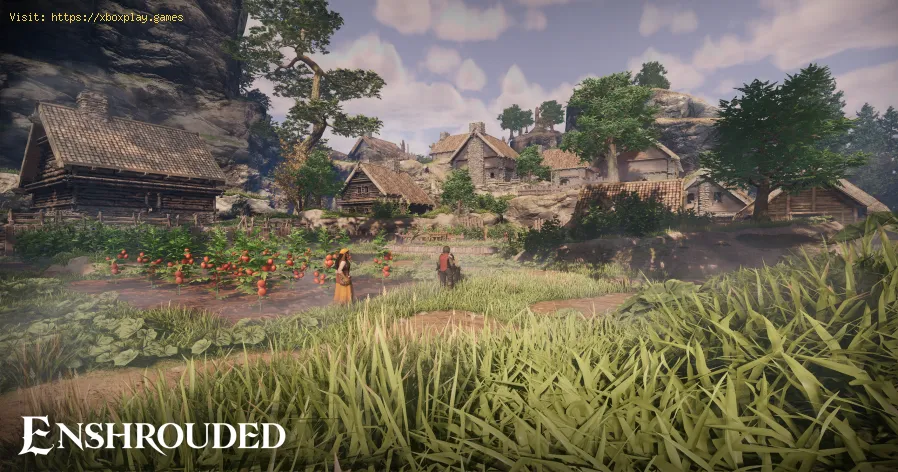
How to Hide the HUD for Photo Mode in Enshrouded
Learn How to Hide the HUD for Photo Mode in Enshrouded. Follow these simple steps to capture stunning in-game moments without distractions.
Welcome to the enchanting world of Enshrouded, where players can embark on a journey through the captivating realm of Embervale. Among the many unique features that set Enshrouded apart, one standout capability is the ability to hide the Heads-Up Display (HUD), offering players the opportunity to capture stunning screenshots and experience a more immersive and challenging gameplay. In this comprehensive guide, we will walk you through the steps to effectively hide the HUD in Enshrouded's photo mode, allowing you to unleash your creativity and enhance your gaming experience.
To begin, let's delve into the process of accessing the Hide HUD feature in Enshrouded. While playing the game, simply press the Escape button to bring up the game's menu. Within the menu, you will easily spot the prominent "Hide HUD" button, which is specifically designed to provide players with the ability to toggle the display of the HUD.
Learn how to unlock the Mill in Enshrouded: Wake of the Water. Follow our step-by-step guide to find the Mill, complete the quest, and gain access to new crafting recipes and resources for your base.
How to Fish in Enshrouded
Learn the essential steps to start fishing in Enshrouded. Our guide coversfinding a fishing rod, locating the best fishing spots, and how to catch fish to cook for powerful buffs. Reel in your next big catch today
Where to Find Paper Reed in Enshrouded
Struggling to find Paper Reed in Enshrouded? Discover the best locations in theRevelwood biome and learn how to farm this essential crafting materialfor scrolls and spells.
How to Enter the Veilwater Basin Biome in Enshrouded
Struggling to reach the Veilwater Basin in Enshrouded? This guide reveals how tosafely enter the biome, navigate its challenges, and discover its hidden secrets.
How to Get Giant Critter Scales in Enshrouded
Learn how to find and farm Giant Critter Scales in Enshrouded. Discover thebest locations, effective combat strategies, and essential tips togather this crucial upgrade material for your Flame Altar.
How To Find Frogs in Enshrouded
Learn how to find frogs in Enshrouded with this step-by-step guide. Discover frog locations, tips for spotting them, and how they’re used in crafting and survival.
How to get Gentian in Enshrouded
Learn how to find Gentian in Enshrouded with this step-by-step guide. Discover the best locations, farming tips, and strategies to gather this valuable resource for crafting and progression.
How to get a capybara in Enshrouded Wake of the Water
Learn the steps to find and befriend a capybara companion in Enshrouded'sWake of the Water biome. Our guide shows you where to look and whatyou'll need to claim your new loyal friend.
How to Get Gloomberry in Enshrouded
Discover the secrets of Gloomberry in Enshrouded. Unlock tips and tricks to find this elusive resource and enhance your gameplay!
How to Get Ectoplasm Fragment in Enshrouded
Discover the ultimate guide on how to obtain Ectoplasm Fragments in Enshrouded. Unlock secrets and enhance your gameplay today!
How To Upgrade the Flame Altar in Enshrouded
Learn How To Upgrade the Flame Altar in Enshrouded and enhance your gameplay. Master the secrets of the altar today!
How To Get and Farm Salt in Enshrouded
Learn How To Get and Farm Salt in Enshrouded Discover effective strategies for obtaining this crucial resource to enhance your gameplay experience.
How To Unlock Bone Blocks in Enshrouded
Discover How To Unlock Bone Blocks in Enshrouded and enhance your gaming experience with this step-by-step guide.
How To Craft Shroud Cores in Enshrouded
Learn How To Craft Shroud Cores in Enshrouded and enhance your gameplay. Discover the essential steps and strategies for creating these essential items.
How To Craft Died Fur in Enshrouded
Learn How To Craft Died Fur in Enshrouded with our step-by-step guide. Discover techniques to create unique and vibrant fur dyes. Start crafting today!
Welcome to the enchanting world of Enshrouded, where players can embark on a journey through the captivating realm of Embervale. Among the many unique features that set Enshrouded apart, one standout capability is the ability to hide the Heads-Up Display (HUD), offering players the opportunity to capture stunning screenshots and experience a more immersive and challenging gameplay. In this comprehensive guide, we will walk you through the steps to effectively hide the HUD in Enshrouded's photo mode, allowing you to unleash your creativity and enhance your gaming experience.
How to Hide the HUD for Photo Mode in Enshrouded
Step 1: Accessing the Hide HUD Feature
To begin, let's delve into the process of accessing the Hide HUD feature in Enshrouded. While playing the game, simply press the Escape button to bring up the game's menu. Within the menu, you will easily spot the prominent "Hide HUD" button, which is specifically designed to provide players with the ability to toggle the display of the HUD.
Step 2: Toggling the Hide HUD Feature
Once you have located the "Hide HUD" button, the next step is as simple as a click. By clicking on the "Hide HUD" button, you will seamlessly toggle off all elements of the HUD from your screen, including your inventory at the bottom of the display. This action instantly clears your view, allowing you to fully immerse yourself in the breathtaking world of Embervale.
Step 3: Capturing Vivid Screenshots
With the HUD hidden, you are now equipped to capture vivid and realistic screenshots of Embervale's overworld. This unobstructed view enables you to encapsulate the beauty and essence of the game without any distractions or clutter on your screen. Each screenshot taken in this mode has the potential to showcase the true artistry and wonder of Enshrouded's world.
Step 4: Returning to Normal Gameplay
When the time comes to transition back to normal gameplay with the HUD visible again, the process is as straightforward as it was to hide the HUD. Simply press the Escape button to access the game's menu once more, and then toggle off the "Hide HUD" feature. This will seamlessly restore the HUD elements to your screen, allowing you to resume your adventure with full visibility of the game's interface.
Benefits of Hiding the HUD
The decision to hide the HUD in Enshrouded's photo mode offers an array of benefits that can significantly enhance your gaming experience:
- Enhanced Screenshot Quality: By hiding the HUD, players can capture better screenshots with a clear and uncluttered view of the expansive and visually-stunning world of Embervale. The absence of HUD elements ensures that each screenshot depicts the true essence and beauty of the game, allowing players to immortalize their most cherished moments within Embervale.
- Increased Difficulty: For those seeking a more immersive and intense gameplay experience, the option to hide the HUD adds an extra layer of challenge. The removal of inventory and map visibility presents a more formidable and engaging gameplay environment, encouraging players to rely on their instincts and knowledge of the world around them.
- Less Cluttered Screen: Hiding the HUD in Enshrouded provides a cleaner and more visually appealing gaming experience. With no distracting elements on the screen, players can fully immerse themselves in the game's world, allowing for a heightened sense of immersion and connectivity with the rich and intricate details of Embervale.
Mastering Enshrouded's Hide HUD feature opens up new possibilities for capturing breathtaking moments within the enchanting world of Embervale. Whether you are an avid photographer seeking to immortalize the beauty of the game or simply wish to indulge in a more immersive gaming experience, hiding the HUD in Enshrouded is a valuable tool that enhances both creativity and gameplay. So why not embrace this feature during your next adventure in Embervale? Unleash your creativity, savor the unblemished beauty of the game, and embark on an unforgettable journey through the mesmerizing world of Enshrouded. Happy exploring!
Tags: Survival RPG, Open-world exploration, Crafting and building, Fantasy setting, Enshrouded gameplay, Enshrouded tips,
Platform(s): PlayStation 5 PS5, Microsoft Windows PC, Xbox Series X|S
Genre(s): RPG, Fighting, Shooter, Strategy, Adventure, Video game
Developer(s): Keen Games
Publisher(s): Keen Games
Release date: 24 January 2024
Mode: Single-player, multiplayer
Other Articles Related
How To Unlock the Mill in Enshrouded Wake of the WaterLearn how to unlock the Mill in Enshrouded: Wake of the Water. Follow our step-by-step guide to find the Mill, complete the quest, and gain access to new crafting recipes and resources for your base.
How to Fish in Enshrouded
Learn the essential steps to start fishing in Enshrouded. Our guide coversfinding a fishing rod, locating the best fishing spots, and how to catch fish to cook for powerful buffs. Reel in your next big catch today
Where to Find Paper Reed in Enshrouded
Struggling to find Paper Reed in Enshrouded? Discover the best locations in theRevelwood biome and learn how to farm this essential crafting materialfor scrolls and spells.
How to Enter the Veilwater Basin Biome in Enshrouded
Struggling to reach the Veilwater Basin in Enshrouded? This guide reveals how tosafely enter the biome, navigate its challenges, and discover its hidden secrets.
How to Get Giant Critter Scales in Enshrouded
Learn how to find and farm Giant Critter Scales in Enshrouded. Discover thebest locations, effective combat strategies, and essential tips togather this crucial upgrade material for your Flame Altar.
How To Find Frogs in Enshrouded
Learn how to find frogs in Enshrouded with this step-by-step guide. Discover frog locations, tips for spotting them, and how they’re used in crafting and survival.
How to get Gentian in Enshrouded
Learn how to find Gentian in Enshrouded with this step-by-step guide. Discover the best locations, farming tips, and strategies to gather this valuable resource for crafting and progression.
How to get a capybara in Enshrouded Wake of the Water
Learn the steps to find and befriend a capybara companion in Enshrouded'sWake of the Water biome. Our guide shows you where to look and whatyou'll need to claim your new loyal friend.
How to Get Gloomberry in Enshrouded
Discover the secrets of Gloomberry in Enshrouded. Unlock tips and tricks to find this elusive resource and enhance your gameplay!
How to Get Ectoplasm Fragment in Enshrouded
Discover the ultimate guide on how to obtain Ectoplasm Fragments in Enshrouded. Unlock secrets and enhance your gameplay today!
How To Upgrade the Flame Altar in Enshrouded
Learn How To Upgrade the Flame Altar in Enshrouded and enhance your gameplay. Master the secrets of the altar today!
How To Get and Farm Salt in Enshrouded
Learn How To Get and Farm Salt in Enshrouded Discover effective strategies for obtaining this crucial resource to enhance your gameplay experience.
How To Unlock Bone Blocks in Enshrouded
Discover How To Unlock Bone Blocks in Enshrouded and enhance your gaming experience with this step-by-step guide.
How To Craft Shroud Cores in Enshrouded
Learn How To Craft Shroud Cores in Enshrouded and enhance your gameplay. Discover the essential steps and strategies for creating these essential items.
How To Craft Died Fur in Enshrouded
Learn How To Craft Died Fur in Enshrouded with our step-by-step guide. Discover techniques to create unique and vibrant fur dyes. Start crafting today!