How to fix error code Plum in Destiny 2
Today we bring you an explanatory guide on How to fix the Plum error code in Destiny 2.
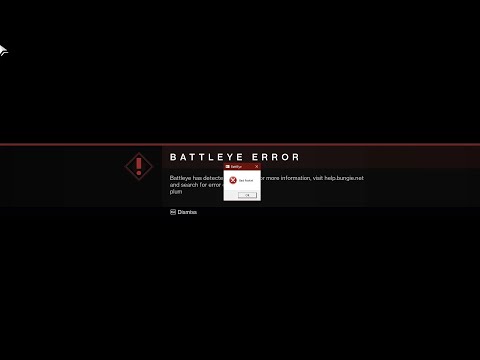
Unfortunately, within Destiny 2 there are varieties of error codes, which are classified in a unique way so that the reason why the error occurred can be identified faster. It is important that you know, that most errors arose following the expansion The Final Shape and this is where the Plum error enters.
This error is strictly a PC problem, which differentiates it from other errors that affects various platforms, which ends up being a rather annoying problem for the PC community. Although, it is not quite clear how to solve this error, we bring you an explanation of the causes of this and how you can solve it.
Master the hidden path. Our Destiny 2 guide details every step to complete The Way Between quest, claim your reward, and conquer this challengingpuzzle.
How to Transport Cargo via Site-To-Site Transmat in Destiny 2 Renegades
Learn how to transport cargo via Site-To-Site Transmat in Destiny 2'sRenegades mission. A quick guide to complete this objective and progress through the quest step.
How to complete Imperium Campaign Mission in Destiny 2 Renegades
Master Destiny 2's Renegades with our guide on how to complete the ImperiumCampaign Mission. Find key strategies, objective walkthroughs, andessential combat tips to conquer this challenging fight.
How To Get Exotic Orders in Destiny 2 Renegades
Destiny 2 Renegades: Learn how to unlock and farm Exotic Orders with ourcomplete guide. Get the best tips for acquiring these powerful newweapons.
How To Get the Upper Hand Catalyst for the Praxic Blade in Destiny 2 Renegades
Destiny 2 gameplay with the Upper Hand Catalyst for the Praxic Blade.Learn how to obtain it and gain the upper hand in your battles!
How To Get the Refraction Core in Destiny 2 Renegades
how to obtain the Refraction Core in Destiny 2 Renegades. Unlock secrets and enhance your gameplay with our guide!
How to Get Deathmarks in Destiny 2
how to obtain Deathmarks in Destiny 2 with our comprehensive guide. Unlock powerful rewards and enhance your gameplay
How To Get the Praxic Blade Exotic in Destiny 2 Renegades
Unlock the unique Vex-themed sword, the Praxic Blade Exotic, in Destiny 2: The Renegades. This guide covers all steps, from starting the "PraxicFirewall" quest to completing its challenging missions and secrets.
How to Get the Renegades Exotic Armor in Destiny 2
Learn how to get the exclusive Renegades Exotic armor set in Destiny 2. Thisguide covers the questline, required activities, and tips to completeyour Hunter, Titan, or Warlock's ultimate endgame look.
How To Get Service of Luzaku Machine Gun in Destiny 2 Renegades
Unlock the powerful Luzaku Machine Gun in Destiny 2. Our Renegades guidecovers the complete quest steps, location, and tips to secure this heavy weapon.
How to fix Destiny 2 One Moment Please error
Our guide today aims to explain to you How to fix Destiny 2 One Moment Please error.
How to fix Star Wars Hunters login failed
Welcome to our explanatory guide on How to fix Star Wars Hunters login failed Accurately.
Where to find a War Bus in Fortnite Chapter 5, season 3
Today we bring you an explanatory guide with everything you need to know about Where to find a War Bus in Fortnite Chapter 5, season 3.
Counter-Strike 2 Latest Update: What's New?
Valve released the Counter-Strike 2 update, which, with the first trailers, surprised players. The developers worked hard on the game and made a considerable number of changes—both targeted and revolutionary.
How To Complete Exegesis Mission Puzzle in Destiny 2
Today we bring you an explanatory guide on How To Complete Exegesis Mission Puzzle in Destiny 2.
Unfortunately, within Destiny 2 there are varieties of error codes, which are classified in a unique way so that the reason why the error occurred can be identified faster. It is important that you know, that most errors arose following the expansion The Final Shape and this is where the Plum error enters.
This error is strictly a PC problem, which differentiates it from other errors that affects various platforms, which ends up being a rather annoying problem for the PC community. Although, it is not quite clear how to solve this error, we bring you an explanation of the causes of this and how you can solve it.
How to fix error code Plum in Destiny 2
Understanding Error Code PLUM:
- Outdated Game Build: During scheduled maintenance or update periods, Destiny 2 may receive background updates. If you continue playing on an older version, BattlEye might misinterpret it as a potential security breach.
- Software Conflicts: Specific software applications, such as overlays from Discord or GeForce Experience, or active VPNs, can create compatibility issues with BattlEye.
- Missing Windows Updates: Outdated system software can sometimes lead to compatibility concerns between Destiny 2 and BattlEye.
- Corrupted Game Files: Missing or damaged Destiny 2 game files might trigger the PLUM error.
Effective Solutions for Error Code PLUM:
1. Implement System Updates:
"
- Windows: Ensure your Windows operating system is fully up-to-date, including any optional quality updates. Refer to the official Windows Update guide for detailed instructions. ([Windows Update Guide](search how to update windows))
- Destiny 2: Following maintenance windows, log out and log back in to the game. This action ensures you're playing the latest version, mitigating potential conflicts with BattlEye.
2. Verify Game File Integrity:
-Steam users can leverage Steam's built-in verification tool:
- Open your Steam Library.
- Right-click on Destiny 2 and select "Properties."
- Navigate to the "Local Files" tab and click "Verify Integrity of Game Files."
- Steam will automatically download and replace any missing or corrupted files.
3. Address Conflicting Software:
"
- As a temporary measure, disable overlays from programs like Discord or GeForce Experience.
- If you're utilizing a VPN, consider turning it off while playing Destiny 2.
4. Reinstall Destiny 2 (As a Last Resort):
"
- If the aforementioned solutions fail to resolve the issue, a complete uninstall and reinstall of Destiny 2 might be necessary.
5. Maintain System and Software Updates:
- Proactively monitor Bungie Help on Twitter ([Bungie Help Twitter](search bungie help twitter)) for maintenance notifications and potential solutions related to error codes like PLUM. This approach can help you stay informed and address issues efficiently.
This is all you need to know about How to fix error code plum in destiny 2, following this guide you can solve this annoying problem that prevents you from enjoying the experiences that the new expansion has for you, you will only need to follow the steps of our Guide and, of course, be aware of any update regarding this error.
Tags: Bungie, Guardians, Raids, Exotics, PvP, PvE, Strikes, Crucible, Gambit, Lightfall expansion, Seasonal events, Weapons a
Platform(s): PlayStation 4, PlayStation 5, Xbox One, Xbox Series X/S, Windows PC Google Stadia
Genre(s): First-person shooter, MMOG
Developer(s): Bungie, Vicarious Visions, High Moon Studios
Publisher(s): Bungie
Engine: Tiger Engine
Mode: Multiplayer
Age rating (PEGI): +16
Other Articles Related
How to Complete The Way Between Quest in Destiny 2Master the hidden path. Our Destiny 2 guide details every step to complete The Way Between quest, claim your reward, and conquer this challengingpuzzle.
How to Transport Cargo via Site-To-Site Transmat in Destiny 2 Renegades
Learn how to transport cargo via Site-To-Site Transmat in Destiny 2'sRenegades mission. A quick guide to complete this objective and progress through the quest step.
How to complete Imperium Campaign Mission in Destiny 2 Renegades
Master Destiny 2's Renegades with our guide on how to complete the ImperiumCampaign Mission. Find key strategies, objective walkthroughs, andessential combat tips to conquer this challenging fight.
How To Get Exotic Orders in Destiny 2 Renegades
Destiny 2 Renegades: Learn how to unlock and farm Exotic Orders with ourcomplete guide. Get the best tips for acquiring these powerful newweapons.
How To Get the Upper Hand Catalyst for the Praxic Blade in Destiny 2 Renegades
Destiny 2 gameplay with the Upper Hand Catalyst for the Praxic Blade.Learn how to obtain it and gain the upper hand in your battles!
How To Get the Refraction Core in Destiny 2 Renegades
how to obtain the Refraction Core in Destiny 2 Renegades. Unlock secrets and enhance your gameplay with our guide!
How to Get Deathmarks in Destiny 2
how to obtain Deathmarks in Destiny 2 with our comprehensive guide. Unlock powerful rewards and enhance your gameplay
How To Get the Praxic Blade Exotic in Destiny 2 Renegades
Unlock the unique Vex-themed sword, the Praxic Blade Exotic, in Destiny 2: The Renegades. This guide covers all steps, from starting the "PraxicFirewall" quest to completing its challenging missions and secrets.
How to Get the Renegades Exotic Armor in Destiny 2
Learn how to get the exclusive Renegades Exotic armor set in Destiny 2. Thisguide covers the questline, required activities, and tips to completeyour Hunter, Titan, or Warlock's ultimate endgame look.
How To Get Service of Luzaku Machine Gun in Destiny 2 Renegades
Unlock the powerful Luzaku Machine Gun in Destiny 2. Our Renegades guidecovers the complete quest steps, location, and tips to secure this heavy weapon.
How to fix Destiny 2 One Moment Please error
Our guide today aims to explain to you How to fix Destiny 2 One Moment Please error.
How to fix Star Wars Hunters login failed
Welcome to our explanatory guide on How to fix Star Wars Hunters login failed Accurately.
Where to find a War Bus in Fortnite Chapter 5, season 3
Today we bring you an explanatory guide with everything you need to know about Where to find a War Bus in Fortnite Chapter 5, season 3.
Counter-Strike 2 Latest Update: What's New?
Valve released the Counter-Strike 2 update, which, with the first trailers, surprised players. The developers worked hard on the game and made a considerable number of changes—both targeted and revolutionary.
How To Complete Exegesis Mission Puzzle in Destiny 2
Today we bring you an explanatory guide on How To Complete Exegesis Mission Puzzle in Destiny 2.