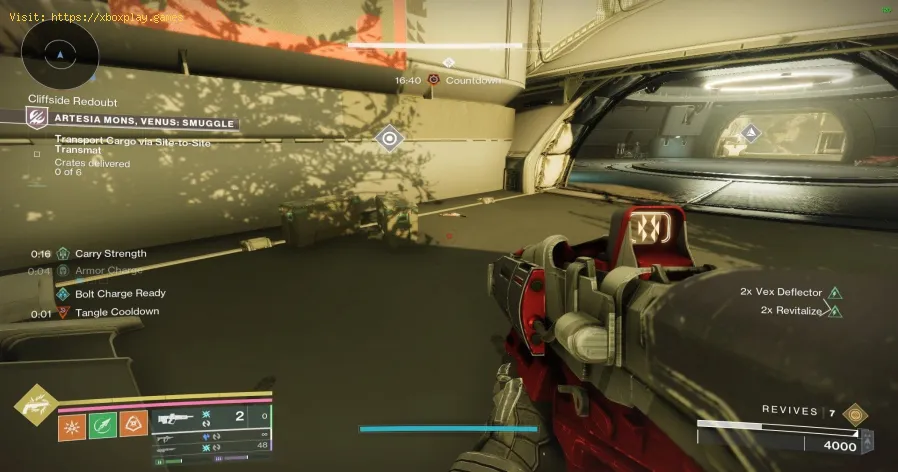
How to Transport Cargo via Site-To-Site Transmat in Destiny 2 Renegades
Causes of the Problem (Why Your Cargo Disappears)
The primary frustration stems from the cargo becoming "stuck" or the objective failing to progress. Here’s a detailed breakdown of why this happens:Simple Technical Explanation:
Think of it like mailing a fragile parcel. The transmat portal is the automated sorting machine. If you sprint and throw the package (cargo) into the machine, it might get rejected or damaged. The game expects you to walk up and place it gently into the system for a clean scan and teleport. The "bug" is actually a failsafe that removes the cargo if the correct, gentle sequence isn't followed.The Quick Fix (For Impatient Guardians)
Stop sprinting. Seriously. Clear all enemies from the cargo area first. Walk to the cargo, pick it up, and walk—don't run, don't jump, don't use abilities—directly into the center of the glowing orange transmat portal. On the other side, continue walking to the deposit zone. Do this four times. That's it.Detailed Step-by-Step Solutions
Follow these steps meticulously to ensure success every time.Step 1: Advance the Activity. Begin the Smuggle activity in the Lawless Frontier. Complete the initial 1-2 standard cargo deliveries until your objective updates to "Transport cargo via site-to-site transmat."Step 2: Locate the New Cargo. New cargo markers will appear, distinct from the earlier ones. They are often in more exposed or defended positions.Step 3: Clear the Area Thoroughly. Before you even look at the cargo crate, eliminate every single enemy in the vicinity. This includes snipers, shanks, and any major units. Create a safe perimeter.
Step 4: The Mindset Shift. Approach the cargo as if you're carrying a vase full of water. Yoursprint, lift, and strafe jump are now disabled in your mind.
Step 5: Pick Up the Cargo. Walk to the crate and hold your interact button (E on PC, Square on PlayStation, X on Xbox).
Step 6: The Careful Walk. With cargo in hand, walk at normal speed towards the glowing, pulsing transmat portal. It looks like a vertical ring of orange energy.
Step 7: Perfect Alignment. Ensure your Guardian walks directly through the center of the portal. You'll see a screen effect and hear a transmat sound.
Step 8: Arrival and Continuation. You'll materialize in a new, usually safer, area. Continue walking. A new deposit marker will be nearby, often just a few yards away.
Step 9: Successful Deposit. Walk into the deposit zone. You'll get an on-screen confirmation and a progress update (e.g., 1/4).
Step 10: Repeat. Return to the cargo area (now you can run!), clear newly respawned enemies, and repeat steps 3-9 three more times.
Platform-Specific Notes:
- PC: The default "Shift" to sprint is tempting. Be disciplined. Simply don't press it while holding cargo.
- Console: Ease off the left stick/L3. A gentle push is all you need. Avoid clicking the stick to sprint.
- All Platforms: Disabling "Toggle Sprint" in settings can offer more control, but mindful play is the real key.
Alternative Solutions if Problems Persist
If you're still encountering issues, try these:
- Fireteam Fix: Have a teammate clear enemies ahead of you while you walk with the cargo. They can also test the portal first.
- The "Reset": If the cargo seems bugged, deliberately let yourself be killed byenemies. Upon respawn, the cargo should reset to its pickup state.
- Change Character/Reload: In extreme cases, returning to orbit and reloading the activity, or switching characters, can reset any lingering phase errors.
How to Prevent This From Happening Again
Adopt the "Slow is Smooth, Smooth is Fast" mantra for this specific objective. Once you understand the mechanic,it becomes routine. Mentally tag the "site-to-site transmat" objectiveas the "walking simulator" phase. Always prioritize total area clearance before cargo retrieval. This method is not only reliable but oftenfaster than repeated failed attempts due to rushing.
Frequently Asked Questions (FAQs)
Q: Can I use a Sparrow?
A: No. You cannot pick up cargo while on a Sparrow.
Q: Does my Guardian's weight/mobility stat affect this?
A: No. The mechanic is scripted and identical for all classes and stats.
Q: What if the transmat portal doesn't activate?
A: Ensure you are at the correct portal. It will have a distinct circularmarker. If it's still inactive, a stealth enemy (like a mine or acloaked unit) might be nearby—clear the area again.
Q: I delivered cargo but didn't get progress. Why?
A: You likely sprinted or used an ability, causing a silent fail. The next cargo you deliver properly will still count, so just continue.
Q: Is this required for a quest or just the activity?
A: Successfully completing this objective is necessary to finish theSmuggle activity and progress certain Renegades quest steps and rewards.
Closing & Call to Action
Mastering the site-to-site transmat is your key to conquering the Smuggleactivity and efficiently farming the rewards of the Lawless Frontier.It’s a lesson in patience and precision in a game often defined bychaos. Now that you're armed with this knowledge, the frontier awaits.
Got your cargo secure, Guardian? Head back into the Lawless Frontier, putthis guide into practice, and turn that confusing objective into aflawless routine. Share this guide with your fireteam to ensureeveryone's a smooth operator. What other Renegades challenges are youfacing? Let the community know in the comments below!
Other Articles Related
How to Transport Cargo via Site-To-Site Transmat in Destiny 2 RenegadesLearn how to transport cargo via Site-To-Site Transmat in Destiny 2'sRenegades mission. A quick guide to complete this objective and progress through the quest step.
How to complete Imperium Campaign Mission in Destiny 2 Renegades
Master Destiny 2's Renegades with our guide on how to complete the ImperiumCampaign Mission. Find key strategies, objective walkthroughs, andessential combat tips to conquer this challenging fight.
How To Get Exotic Orders in Destiny 2 Renegades
Destiny 2 Renegades: Learn how to unlock and farm Exotic Orders with ourcomplete guide. Get the best tips for acquiring these powerful newweapons.
How To Get the Upper Hand Catalyst for the Praxic Blade in Destiny 2 Renegades
Destiny 2 gameplay with the Upper Hand Catalyst for the Praxic Blade.Learn how to obtain it and gain the upper hand in your battles!
How To Get the Refraction Core in Destiny 2 Renegades
how to obtain the Refraction Core in Destiny 2 Renegades. Unlock secrets and enhance your gameplay with our guide!
How to Get Deathmarks in Destiny 2
how to obtain Deathmarks in Destiny 2 with our comprehensive guide. Unlock powerful rewards and enhance your gameplay
How To Get the Praxic Blade Exotic in Destiny 2 Renegades
Unlock the unique Vex-themed sword, the Praxic Blade Exotic, in Destiny 2: The Renegades. This guide covers all steps, from starting the "PraxicFirewall" quest to completing its challenging missions and secrets.
How to Get the Renegades Exotic Armor in Destiny 2
Learn how to get the exclusive Renegades Exotic armor set in Destiny 2. Thisguide covers the questline, required activities, and tips to completeyour Hunter, Titan, or Warlock's ultimate endgame look.
How To Get Service of Luzaku Machine Gun in Destiny 2 Renegades
Unlock the powerful Luzaku Machine Gun in Destiny 2. Our Renegades guidecovers the complete quest steps, location, and tips to secure this heavy weapon.
How to Get All Star Wars Weapons in Destiny 2
Unlock the galaxy in Destiny 2! Discover how to obtain all Star Wars weapons and enhance your gameplay. Join the adventure
How To Defeat Rogue Mega Meowstic in Pokemon Legends Z-A
Face the psychic fury in Lumiose City! Learn strategies, type advantages,and team builds to defeat the formidable Rogue Mega Meowstic in PokémonLegends Z-A.
What You Need To Know About the Pfister X-Treme in GTA Online
Master the Pfister X-Treme in GTA Online. Get the full guide on itsperformance, upgrades, price, and how to unlock this top-tier sports car for racing and style.
Unable to save game: how to fix it in any game
Fix your game save problems with our expert tips and solutions. Learnhow to troubleshoot and restore your gaming
How to Fix DirectX has stopped working: causes and solutions
effective solutions for the "DirectX has stopped working" error. Getyour games and applications running smoothly
How To Get the Chic Outfits in Clair Obscur Expedition 33
Learn how to unlock every chic outfit in Clair Obscur: Expedition 33. Get our guide to earning cosmetic gear and customizing your characters' stylefor any expedition.