How To Disable the Sharpening in Clair Obscur Expedition 33
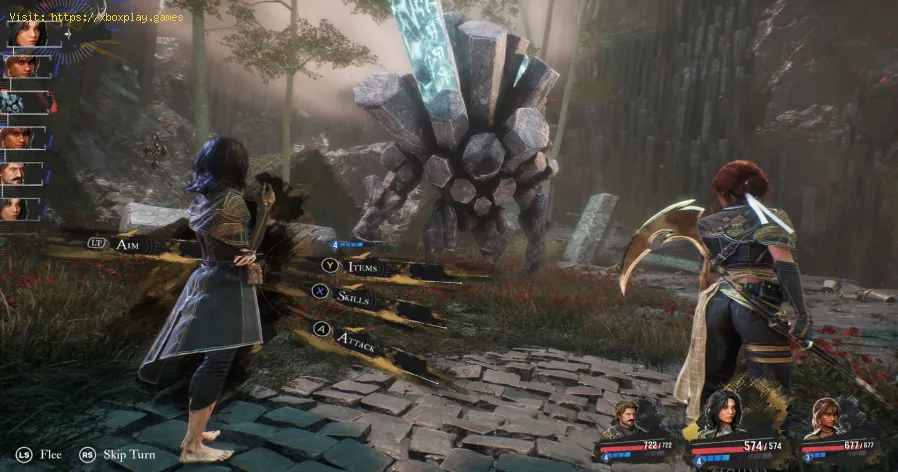
500K copies sold in just a day! That's an incredible debut for Sandfall Interactive and a testament to the buzz around Clair Obscur: Expedition 33. The impressive 70K concurrent players on Steam alone speaks volumes about its immediate popularity.It's interesting to hear about the PC version having some visual quirks, specifically the oversharpening filter that isn't adjustable through the in-game settings. It's fantastic that the PC modding community has already stepped in to address this! Lyall's patch sounds like a must-have for PC players looking for a cleaner visual presentation.Let's break down how to disable that sharpening effect and explore the other valuable features this patch offers:
Disabling the Sharpening in Clair Obscur Expedition 33 on PC
Good news for PC players bothered by the oversharpened look! Lyall's updated patch provides a straightforward way to completely remove this effect from Clair Obscur: Expedition 33.Installation Guide:
- Steam: ClairObscurFix_v0.0.3_Steam.zip
- Xbox App: ClairObscurFix_v0.0.3_Xbox.zip
Additional Features of ClairObscurFix:
Beyond just removing the sharpeningfilter, Lyall's incredible patch also comes with several otherbeneficial features, all enabled by default upon installation:
- Skip Intro Logos: Get into the game faster by automatically skipping the initial developer and publisher logos.
- Enable Developer Console: This opens up possibilities for more advanced tweaking and potentiallyaccessing debug commands (though the specific uses might vary).
- Disable Letterboxing/Pillarboxing in Cutscenes: For players with wider aspect ratio monitors, this removes the blackbars on the top and bottom (letterboxing) or sides (pillarboxing) during cutscenes, making them more immersive.
- Removes the 30 FPS Cap from Cutscenes: Enjoy smoother cutscenes with the removal of the artificial 30 frames per second limit.
- Fix FOV Issues on Ultrawide Resolutions: This is a significant fix for players using ultrawide monitors. Without the patch, the field of view (FOV) could be incorrectly readjusted(zoomed in) after battles, leading to a less than ideal visualexperience. The patch corrects this behavior.
Kudos to the Modder:
The author of the text rightly gives full credit to Lyall for creating and testing this highly helpful patch. Their contributions are invaluable to the PC gaming community. You can support their workand learn more about their other projects on their Patreon or Ko-fi pages (links not provided in the text).
A Necessary Improvement:
The author concludes by stating that this patch is considered necessary asit significantly improves the game's presentation on PC. While thedifference in a static comparison might be subtle, the oversharpeningcan be quite distracting during actual gameplay and give the game anunnatural look.
It's fantastic to see the modding community already enhancing the experience for PC players.If you're playing Clair Obscur: Expedition 33 on PC and find thesharpening bothersome, definitely look into downloading and installingLyall's patch!
Other Articles Related
Where To Find the Old Key in Clair Obscur Expedition 33Unlock new secrets in Clair Obscur Expedition 33. Our guide reveals the exactlocation of the elusive Old Key to help you progress.
How To Get Visages Outfit in Clair Obscur Expedition 33
Learn how to obtain the exclusive Visage's Outfit in Clair Obscur: Expedition 33. Follow our step-by-step guide to complete the required challengesand unlock this coveted cosmetic armor set.
How To Defeat Chromatic Franctale in Clair Obscur Expedition 33
Overwhelmed by Chromatic Franctale in Expedition 33? Learn the exact strategy, team composition, and mechanics to defeat this challenging boss in ClairObscur. Get the victory!
How To Find All Hopscotch Tile in Clair Obscur Expedition 33
Uncover all Hopscotch Tile secrets in Clair Obscur Expedition 33. Find exactlocations, solve the puzzle, and earn your achievement with ourstep-by-step guide.
How To Defeat Simon in the Endless Tower in Clair Obscur Expedition 33
Join Simon in the Endless Tower during the thrilling Clair Obscur Expedition 33. Discover secrets, challenges
All Merchant Locations In Clair Obscur Expedition 33
Discover all merchant locations in Clair Obscur Expedition 33. Explore unique items and enhance your adventure
Where to Find Sunless Cliffs in Clair Obscur Expedition 33
Discover the location of Sunless Cliffs in the Clair Obscur Expedition 33. Uncover hidden treasures
How To Get the Chic Outfits in Clair Obscur Expedition 33
Learn how to unlock every chic outfit in Clair Obscur: Expedition 33. Get our guide to earning cosmetic gear and customizing your characters' stylefor any expedition.
All Weapons in Verso’s Drafts DLC in Clair Obscur Expedition 33
Master every new tool of war. Dive into our complete guide to all weapons inVerso's Drafts DLC for Clair Obscur: Expedition 33, covering stats,upgrades, and how to unlock each powerful armament.
How to Use Photo Mode in Clair Obscur Expedition 33
Master the art of cinematic photography in Clair Obscur Expedition 33. Ourguide reveals all Photo Mode controls, filters, and tips to capture your most stunning in-game moments.
How to find all 3 lustrous rocks in Clair Obscur Expedition 33
Discover the allure of Clair Obscur Expedition 33, featuring all 3 lustrous rocks.
How to Fix Clair Obscur Expedition 33 Fatal Error
Learn how to resolve the Clair Obscur Expedition 33 Fatal Error with our expert tips. Ensure smooth gameplay and enjoy your adventure withoutinterruptions.
How to Use Chroma Catalyst and Colour of Lumina in Clair Obscur Expedition 33
Clair Obscur Expedition 33 to explore the vibrant Chroma Catalyst and the enchanting Colour of Lumina.
Fujifilm Instax Mini 41 Review: Capture Moments Instantly
Discover the Fujifilm Instax Mini 41 in our detailed review. Uncover its features, performance
Lenovo ThinkPad X9 15 Aura Edition: In-Depth Review
Uncover the strengths of the Lenovo ThinkPad X9 15 Aura Edition in ourcomprehensive review.