How to Fly Helicopters in Battlefield 6
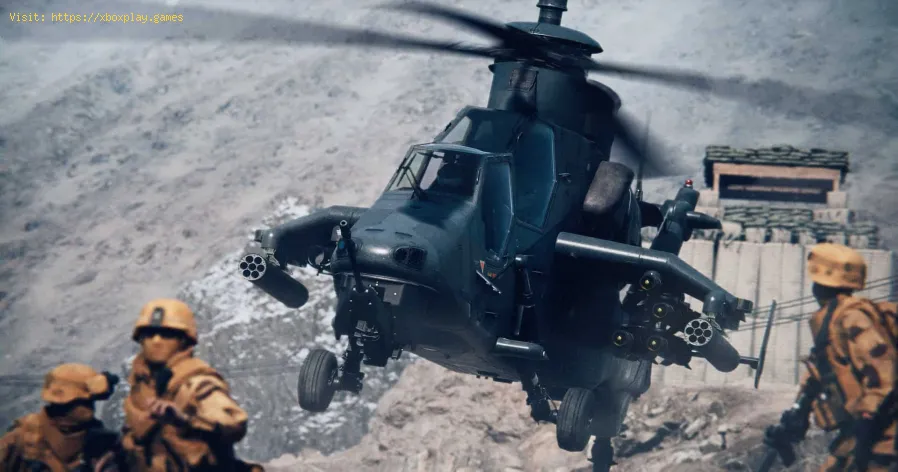
Helicopters have long been a pivotal part of the Battlefield experience, offering a unique blend of mobility, firepower, and tactical advantage. In Battlefield 6, taking to the skies in a chopper can be an exhilarating and effective way to dominate the battlefield. However, with new controls and a variety of threats from the ground and air, it's a skill that requires practice and strategy.This guide will walk you through everything you need to know, from acquiring an aircraft to surviving in the hostile skies.
Unlock all Red Bull Challenges rewards in Battlefield 6. Our guide coversstrategies, tips, and step-by-step instructions to complete everychallenge and earn exclusive in-game content.
How to Change Character Skins in Battlefield 6
Learn how to customize your soldier's appearance in Battlefield 6. Our guidecovers unlocking and equipping new character skins and camouflage tostand out on the battlefield.
How to Fix Battlefield 6 challenges not working
Struggling with Battlefield 6 challenges not tracking or completing? Learn how tofix common issues with our quick troubleshooting guide for resetting,updating, and getting back in the game.
Battlefield 6: Best Loadouts for Gauntlet Mode
the best class loadouts for Gauntlet Mode in BF6. Optimize your gameplay with tips and strategies to dominate the battlefield
How to Level Up Weapons in Battlefield 6
expert tips on leveling up weapons in BF6. Enhance your gameplay and dominate the battlefield with our guide!
How to Fix Battlefield 6 REDSEC error occurred when launching the game
Fix the frustrating REDSEC error in Battlefield 6 with our step-by-stepsolutions. Get back to gaming adventure!
How to Access a Vehicle Trailer in Battlefield RedSec
Discover the thrilling Vehicle Trailer for Battlefield RedSec! Dive into intense gameplay and explore new features.
How to Open Locked Safes in Battlefield RedSec
Unlock the secrets of Battlefield RedSec! Discover expert tips and strategies to open locked safes and enhance your gameplay.
How to Redeploy Teammates in Battlefield RedSec
Optimize your Battlefield RedSec strategy. Learn when and how to effectivelyredeploy teammates for tactical advantages, better positioning, andsecuring key objectives. Master the redeploy feature to control the flow of battle.
How to Complete All Exploration Challenges in Battlefield Redsec
Master all Battlefield Redsec exploration challenges with our expert guide.Find hidden intel, complete all objectives, and unlock every reward with step-by-step strategies.
How to Fix Battlefield 6 Error This Software Cannot Be Used
Resolve the Battlefield 6 Error: This Software Cannot Be Used issue quickly with our step-by-step guide.
How to Fix Battlefield 6 An Unknown Error Occurred
Resolve the 'Unknown Error' in Battlefield 6 with our step-by-step guide. Get back to gaming quickly
How to fix Marvel Rivals login issue
Discover effective solutions to fix your Marvel Rivals login issues quickly and easily. Get back to gaming
How to check stats recap in Battlefield 6
Discover how to check your stats recap in Battlefield 6. Stay updated on your performance and improve your gameplay
How to reduce fall damage in Battlefield 6
Learn strategies to reduce fall damage in Battlefield 6 and enhance your gameplay experience. tips and tricks
Battlefield 6: How to Fly Helicopters
How to Get a Helicopter
Securing a helicopter is the first step to becoming an ace pilot. These powerful vehicles are only available in large-scale game modes, such as Conquest, and on specific maps that support aerial combat, like Liberation Peak or Operation Firestorm.There are two main ways to get a chopper:- At the Start of a Match: Helicopters are often available at your team's headquarters at the beginning of a match. They will be sitting on the ground, ready for takeoff. A quick sprint to the cockpit will secure your seat, but be prepared to race against other aspiring pilots.
- Via the Spawn Map: If you miss the initial grab or your aircraft is destroyed, you can still acquire a chopper by respawning. After a death, select your team’s HQ as your spawn point on the deployment map. If a helicopter is available and not in use, you can choose to deploy directly into the pilot's seat. Keep in mind that a timer will be in effect if a helicopter has recently been destroyed, so you may have to wait for it to become available again.
Essential Flight Controls
The flight model in Battlefield 6 is a new experience for manypilots. While it takes some getting used to, the controls are fullycustomizable to suit your preference. By default, here's a breakdown ofthe controller layout:
- Right Stick: Controls pitch(tilting the nose up or down) and roll (tilting the helicopter left orright). Be aware that pitch is inverted by default, so pushing the stick forward will make your nose point down.
- Left Stick: Controls yaw (turning the helicopter left or right) and speed (moving forward or backward).
- R2/RT: Fires your primary weapon.
- Triangle/Y: Swaps between your two main weapons.
- L2/LT: Zooms in for precision aiming.
- Pressing Right Stick: Toggles your camera view between the first-person cockpit and the third-person chase camera.
- Hold Square/X: Exits the helicopter.
You can adjust all of these controls, including inverted pitch, in thesettings menu under the "Helicopter" section. You can also activate a Helicopter Assist Mode that automatically keeps your aircraft hovering when you aren't providing any movement input.
Staying Alive in the Skies
Once airborne, you'll need to stay sharp. The battlefield is a dangerousplace, and everything from enemy aircraft to Engineers with anti-airlaunchers will be trying to shoot you down.
- Avoid Hovering: A stationary helicopter is an easy target. Instead of hovering duringcombat, keep moving, execute quick strikes, and then retreat to a saferposition.
- Use Yaw for Turning: Helicopters in Battlefield 6 turn most effectively with yaw (left stick left/right), which allowsfor sharp, on-the-spot turns. Use roll primarily to keep your chopperlevel and only for sharper turns when necessary, as over-rolling canlead to a crash.
- Effective Use of Flares: Your flares are your most critical defense against incoming missiles. Only deploy themafter you see the "INCOMING" warning on your screen. Using them tooearly can leave you vulnerable to a follow-up lock-on.
- Leverage the Terrain: Use the environment to your advantage. Hiding behind tall buildings orhills can break an enemy's missile lock and give you a chance to escape.
- Repair Your Aircraft: Your helicopter can automatically heal if you fly low and slow overyour team's main deployment area. This is a safe way to get back intothe fight without having to abandon your vehicle.
- Change Camera Views: Regularly switch between the third-person view for better situationalawareness and the first-person view for more precise aiming.
- Know When to Bail Out: If your aircraft is heavily damaged and you have no flares left, it'sbetter to bail out and parachute to safety than to be shot down in afiery explosion.
Mode:
Other Articles Related
how to earn all Red Bull Challenges rewards in Battlefield 6Unlock all Red Bull Challenges rewards in Battlefield 6. Our guide coversstrategies, tips, and step-by-step instructions to complete everychallenge and earn exclusive in-game content.
How to Change Character Skins in Battlefield 6
Learn how to customize your soldier's appearance in Battlefield 6. Our guidecovers unlocking and equipping new character skins and camouflage tostand out on the battlefield.
How to Fix Battlefield 6 challenges not working
Struggling with Battlefield 6 challenges not tracking or completing? Learn how tofix common issues with our quick troubleshooting guide for resetting,updating, and getting back in the game.
Battlefield 6: Best Loadouts for Gauntlet Mode
the best class loadouts for Gauntlet Mode in BF6. Optimize your gameplay with tips and strategies to dominate the battlefield
How to Level Up Weapons in Battlefield 6
expert tips on leveling up weapons in BF6. Enhance your gameplay and dominate the battlefield with our guide!
How to Fix Battlefield 6 REDSEC error occurred when launching the game
Fix the frustrating REDSEC error in Battlefield 6 with our step-by-stepsolutions. Get back to gaming adventure!
How to Access a Vehicle Trailer in Battlefield RedSec
Discover the thrilling Vehicle Trailer for Battlefield RedSec! Dive into intense gameplay and explore new features.
How to Open Locked Safes in Battlefield RedSec
Unlock the secrets of Battlefield RedSec! Discover expert tips and strategies to open locked safes and enhance your gameplay.
How to Redeploy Teammates in Battlefield RedSec
Optimize your Battlefield RedSec strategy. Learn when and how to effectivelyredeploy teammates for tactical advantages, better positioning, andsecuring key objectives. Master the redeploy feature to control the flow of battle.
How to Complete All Exploration Challenges in Battlefield Redsec
Master all Battlefield Redsec exploration challenges with our expert guide.Find hidden intel, complete all objectives, and unlock every reward with step-by-step strategies.
How to Fix Battlefield 6 Error This Software Cannot Be Used
Resolve the Battlefield 6 Error: This Software Cannot Be Used issue quickly with our step-by-step guide.
How to Fix Battlefield 6 An Unknown Error Occurred
Resolve the 'Unknown Error' in Battlefield 6 with our step-by-step guide. Get back to gaming quickly
How to fix Marvel Rivals login issue
Discover effective solutions to fix your Marvel Rivals login issues quickly and easily. Get back to gaming
How to check stats recap in Battlefield 6
Discover how to check your stats recap in Battlefield 6. Stay updated on your performance and improve your gameplay
How to reduce fall damage in Battlefield 6
Learn strategies to reduce fall damage in Battlefield 6 and enhance your gameplay experience. tips and tricks