How to Fix Ashes of Creation Error Code 51
Error Code 51 Ashes of Creation - How to Fix
The core "problem" is that, due to the nature of its early access launch and overwhelming player response, many players are being stopped dead in their tracks by Error Code 51 immediately after character creation. This critical server-side error prevents them from continuing into the actual game world. While an official statement and patch from the developers, Intrepid Studios, are anticipated, this guide compiles the best community-sourced workarounds that players can attempt right now to bypass the issue and start playing.🛑 Why Error Code 51 Occurs (Server Overload and Routing Issues)
Error Code 51 is generally a critical networking failure, and its prevalence during the early access launch suggests two main issues related to capacity and data pathing:- Overwhelmed Server Capacity: The demand for early access likely exceeded the initial capacity planning for the servers, particularly within specific regions.
- Simple Technical Explanation: When a server reaches its maximum concurrent connection limit (N), it rejects new clients with a connection failure message (Error 51). The character creation data submission is likely being rejected because the server cannot allocate a stable instance for the new player entry.
- Corrupted or Incomplete Client Files: A common cause of 51xx errors in game launchers is a failed download or corrupted file preventing the client from correctly authenticating or communicating with the server.
- Simple Technical Explanation: If the game client's local files (e.g., authentication tokens or asset manifest) are corrupted, the request sent to the server for game entry will be malformed, leading the server to reject the client with a generic error code.
- Geographic/ISP Routing Conflict: Certain Internet Service Providers (ISPs) may be routing their traffic to the AoC servers through congested or non-optimal network nodes, which are being throttled or timing out.
- Simple Technical Explanation: The data path between the player's modem and the AoC server is unstable. When the client tries to transmit the large packet of character data and request world entry, the connection times out (Ttimeout), resulting in a connection failure or Error 51.
⚡ Quick Solution (For Impatient Adventurers)
The quickest and most frequently reported successful fix is a change to your connection path:⚙️ Detailed Step-by-Step Solutions: Bypassing Error Code 51
Since this is an early access issue, these community-sourced fixes focus on maximizing network stability and client integrity.Step 1: Switching to a Different Server/Realm (Network Fix)
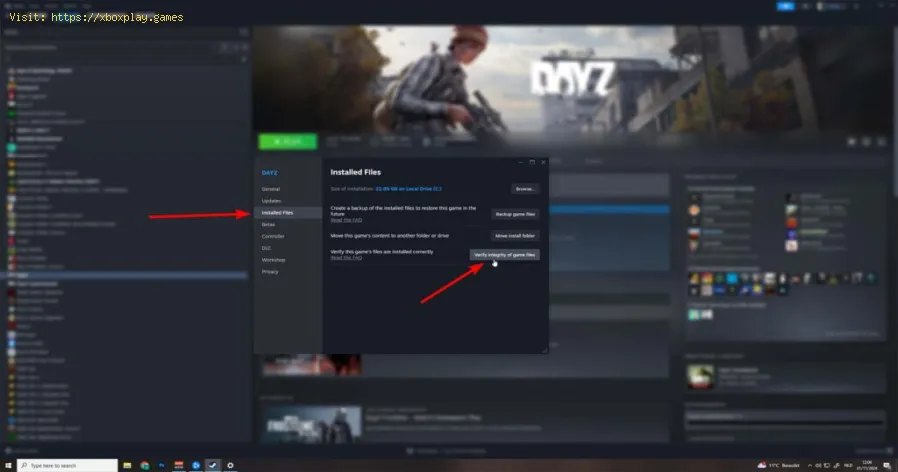
Step 2: Verifying the Integrity of Game Files (Client Fix)
- Close Game: Fully close the Ashes of Creation game client and the associated launcher (Steam or official).
- Access Launcher Settings (Steam Variant):
- Open Steam.
- Right-click on Ashes of Creation in your Library.
- Select Properties.
- Go to the Installed Files tab.
- Click Verify integrity of game files...
- Verification Process: Allow the launcher to scan and re-download any corrupted or missing files. This process may take several minutes.
- Relaunch: Once verification is complete, start the game and check if you can get past the character creation screen without the error.
Step 3: Changing Your ISP/Routing Path (Advanced Network Fix)
- Set up Mobile Hotspot: Use your smartphone to create a mobile hotspot (via Wi-Fi tethering).
- Connect PC: Connect your PC (desktop or laptop) to the mobile hotspot network. This changes the entire data routing path, bypassing your home ISP'spotentially congested server routing.
- Relaunch and Test: Launch Ashes of Creation while connected to the mobile network and attempt to proceed past character creation.
- Switch Back (Optional): If you successfully load into the game world, you might be able to switch back to your primary, stable Wi-Fi connection for abetter gameplay experience, though this is not guaranteed to maintainthe connection.
🔁 Alternative Solutions
- VPN Usage: Similar to the mobile hotspot method, using a reputable VPN (Virtual Private Network) service can completely change your exit node, routing your connectionthrough a less-congested path to the AoC servers. This may be a morestable alternative than a mobile hotspot if you have access to one.
- Firewall/Antivirus Whitelisting: Temporarily disable your firewall or antivirus software, or ensure that all Ashes of Creation executables are explicitly whitelisted as exceptions. Sometimes, overly aggressive security software blocks necessary ports for client-server communication.
🛡️ How to Avoid Error Code 51 in the Future
Once an official patch is released, these steps will become less necessary,but they represent good practice for MMORPG launches:
- Monitor Official Announcements: Always follow the official Intrepid Studios Twitter, Discord, and forums. Developers will post the most reliable status updates on server capacity and planned fixes.
- Avoid Peak Hours: For the first few days of early access, try playing during off-peak hours for your region (e.g., late night or very early morning) when server load is naturally lower.
- Maintain Client Health: Regularly use the "Verify integrity of game files" function whenever alarge patch is downloaded to prevent small file corruptions from causing large technical problems.
❓ Frequently Asked Questions
Q: Is Error Code 51 an issue with my PC hardware?A: No, Error Code 51 is overwhelmingly a networking or server-side issue. It is highly unlikely to be related to your CPU, GPU, or RAM.
Q: Will switching servers affect my character data?A: Generally, MMORPG character data is tied to the server/realm it was created on. You will need to create a new character on the new server you select, but this is necessary to test the fix.Once the primary server is patched, you can return to your originalcharacter.
Q: Why does the error only happen after character creation?A: Character creation is an offline client process. The erroroccurs when the client attempts to submit the finalized character datato the server and establish a persistent connection to the gameworld—the point where server load and network stability are tested mostseverely.
Q: Will the developers fix this soon?A: Given the critical nature of this error, preventing playerentry, it is almost certain that Intrepid Studios is actively working on a patch for server scaling and stability, likely to be released within24-48 hours of initial reports.
✅ Get Past the Gate and Begin Your Epic!
Error Code 51 is a frustrating, but common, hurdle in the early access phase of highly anticipated MMORPGs like Ashes of Creation. While these are community-sourced fixes and may not work for everyuser, the success rate reported for switching servers and changing thenetwork route is high.
Try switching to a different realm or using a mobile hotspot now—don't let a small errorcode keep you from your first legendary adventure in the world of Verra!

Other Articles Related
How To Link Intrepid Account to Steam in Ashes of CreationConnect your Intrepid account to Steam for Ashes of Creation! Follow our simple guide to link accounts, enabling seamless access, pre-order bonuses,and future beta participation.
How to Fix Ashes of Creation Error Code 51
effective solutions for Error Code 51 in Ashes of Creation. Troubleshoot and fix your gaming experience
Best Races in Ashes of Creation
Discover the definitive guide to the best races in Ashes of Creation. Exploreunique racial traits, abilities, and lore for the Aela, Dünir, Empyrean, Py’rai, Ren’kai, and Vaelune to optimize your MMORPG character build.
How to Find Treasure in Ashes of Creation
hidden treasures in Ashes of Creation! Explore key locations to uncover valuable loot and secrets in this immersive MMORPG.
How to Change Server in Ashes of Creation
This time we return with a guide with the objective of explaining How to Change Server in Ashes of Creation.
How to Fix Ashes of Creation Packet Loss
On this occasion we return with a guide aiming to explain to you How to Fix Ashes of Creation Packet Loss.
How to Fix Ashes of Creation Connection Issues
Discover How to Fix Ashes of Creation Connection Issues with this excellent and detailed explanatory guide.
How to Fix Ashes of Creation Lag
Discover How to Fix Ashes of Creation Lag with this excellent and detailed explanatory guide.
How to Boost FPS in Ashes of Creation
This time we return with a guide with the objective of explaining to you How to Boost FPS in Ashes of Creation.
How to Fix Ashes of Creation Server Down
Discover How to Fix Ashes of Creation Server Down with this excellent and detailed explanatory guide.
Clair Obscur Expedition 33: How to Solve Seesaw Puzzle
Solve the seesaw puzzle in Clair Obscur Expedition 33 with our step-by-stepguide. Learn the exact weight distribution strategy to unlock the secret and advance through the game.
How to Use the Heavenly Forge in Diablo 4
Learn how to unlock and master the Heavenly Forge in Diablo 4. Our guidecovers the secret quest location, how to use Hellforged weapons, and how to craft powerful Legendary items with this hidden tool.
How to Get All New Mega Evolutions in Pokemon Legends Z-A Mega Dimension
Discover every new Mega Evolution in Pokémon Legends Z-A! Unlock exclusiveforms, secrets, and strategies for the "Mega Dimension."
How To Beat The Balloon Gestral In Clair Obscur Expedition 33
Master the fight with our step-by-step guide on How To Beat The BalloonGestral in Genshin Impact's Clair Obscur Expedition: Expedition 33.Learn team comps, attack patterns, and essential strategies to claimvictory.
Best Races in Ashes of Creation
Discover the definitive guide to the best races in Ashes of Creation. Exploreunique racial traits, abilities, and lore for the Aela, Dünir, Empyrean, Py’rai, Ren’kai, and Vaelune to optimize your MMORPG character build.