
How to Get a Pet in 33 Immortals
Venturing into the Dark Woods: Acquiring Your Familiar
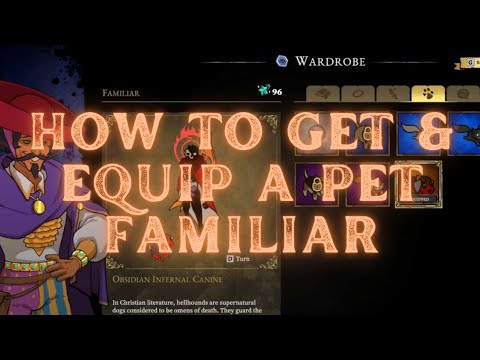
Your gateway to these delightful companions is none other than Charon, the enigmatic figure residing in the Dark Woods. To begin your collection, approach Charon and navigate to the "Familiar" tab, the fourth icon from the left. Here, a selection of diverse pets awaits your discerning eye, each available for purchase with Stardust.
Stardust, the currency of these ethereal companions, is earned through your participation in the Inferno. Unlike the rarer Paragon resource, which demands meticulous exploration and grinding, Stardust is a more accessible reward. Simply engaging in runs, regardless of their outcome, will steadily accrue this valuable currency. This ensures that even those still finding their footing in the treacherous landscapes can begin to assemble their menagerie.
For those eager to expedite their collection, the Epic Games and Microsoft Stores offer five distinct bundles for 33 Immortals. Each bundle not only includes a unique Familiar, accessible directly through Charon's Wardrobe post-purchase, but also a variety of additional in-game bonuses. These bundles are perfect for players looking to immediately customize their experience and showcase their style.
Equipping Your Loyal Companion: A Simple Process
Once you've acquired your desired Familiar, equipping it is astraightforward process. Return to Charon in the Dark Woods and accesshis shop. Navigate to the "Familiar" tab once more. Highlight the petyou wish to accompany you and press "E" on PC or "A" on a controller.With a simple click or press, your chosen companion will now faithfullyfollow you, whether you're navigating the serene, albeit eerie, DarkWoods or braving the chaotic battles of the Beyond.
More Than Just a Pretty Face: The Value of a Familiar
While it's true that Familiars do not directly impact your combat prowess orsurvivability, their value transcends mere statistics. They serve as apowerful form of self-expression in a world where individuality can beeasily lost amidst the chaos. The wide array of Familiars available,each with unique appearances and varying rarities, allows players tocurate their experience and showcase their personality.
These companions are more than just visual embellishments; they're atestament to your journey, a constant reminder of your progress andstyle. As you traverse the treacherous landscapes of 33 Immortals, yourFamiliar becomes a symbol of your unique path, a silent partner in yourstruggle against the odds.
In conclusion, while they may not offer tangible combat advantages,Familiars in 33 Immortals provide a meaningful way to personalize youradventure. They’re a charming and distinctive feature that adds a layerof depth to the immersive world, making each player's journey throughthe Beyond uniquely their own. So, venture forth, collect yourcompanions, and let your personality shine amidst the shadows.
Other Articles Related
How to configure a gaming monitor for the best image qualityDiscover how to configure your gaming monitor to get the best image quality and maximize your gaming experience.
How to use a Nintendo Switch controller on a PC, step by step
Learn how to connect and use your Nintendo Switch controller on a PC with our step-by-step. Enhance your gaming experience
How to connect a PS5 controller to your PC via USB or Bluetooth
Learn how to easily connect your PS5 controller to your PC using USB or Bluetooth with our step-by-step.
How to Connect an Xbox controller to your PC
Easily connect your Xbox controller to your PC running Windows 10/11 with our step-by-step guide. Enjoy seamless gaming
How to reduce input lag on consoles
Discover effective solutions to reduce input lag on Xbox, PS5, and Switch for a smoother gaming experience. Optimize your gameplay
How to improve FPS on PC
Boost your PC's performance with our comprehensive guide on improving FPS. Unlock smoother gameplay and enhance your gaming
How To Get Dual Hammers in Vermintide 2
Learn how to unlock the powerful Dual Hammers for the Bardin Goreksson inVermintide 2. This guide covers the simple steps to get this top-tiermelee weapon for the Ironbreaker, Ranger Veteran, and Slayer careers.
All Heroes and Careers in Vermintide 2
Explore the diverse heroes and careers in Vermintide 2. Discover unique abilities, playstyles, and strategies to enhance your gameplay
Return to the Reik Grimoire and Tome Locations in Vermintide 2
Searching for every grimoire and tome? Our Vermintide 2 collectible guide for"Return to the Reik" reveals all book locations to maximize your lootand complete the mission.
All Formable Nations in Europa Universalis 5
all formable nations in Europa Universalis 5! Explore strategies, tips, and guides to expand your empire and dominate the game.
Should You Let Mitsumune Kill Captured Soldiers in Assassin's Creed Shadows
the moral dilemma in AC Shadows as Mitsumune faces the choice to kill captured soldiers.
All Kuji Kiri Locations in Assassin's Creed Shadows
Discover all Kuji Kiri locations in AC Shadows. Uncover secrets
How To Earn Max Money with Rooms in Ale & Tale Tavern
Discover Ale & Tale Tavern! Maximize your earnings with our exclusive rooms.
Where to Find All Fish in Monster Hunter Wilds
Discover the ultimate guide to finding all fish in Monster Hunter Wilds. Unlock secrets
How to Get Paragons in 33 Immortals
Discover effective strategies to acquire Paragons in 33 Immortals. Unlock powerful gameplay tips