The best games for low-end PCs
What is a "Low-End PC" in 2025/2026?
For this guide, we're targeting systems that fall well below minimum specs for modern AAA games. Think:- CPU: Intel Core i3/i5 (2nd to 7th Gen), AMD Ryzen 3 (early series), or equivalent.
- GPU: Integrated Graphics (Intel UHD Graphics 620/630, older Intel HD Graphics, AMD Radeon Vega 3/8) or dedicated cards like the NVIDIA GT 1030, GTX 750 Ti, or AMD Radeon RX 550.
- RAM: 4GB (minimum), 8GB (recommended for multitasking).
- Storage: Any HDD or SSD. An SSD will drastically improve load times but isn't required for gameplay.
The Best Games for Low-End PCs by Genre
Category 1: The Timeless Masterpieces & Indies (Art Over Power)
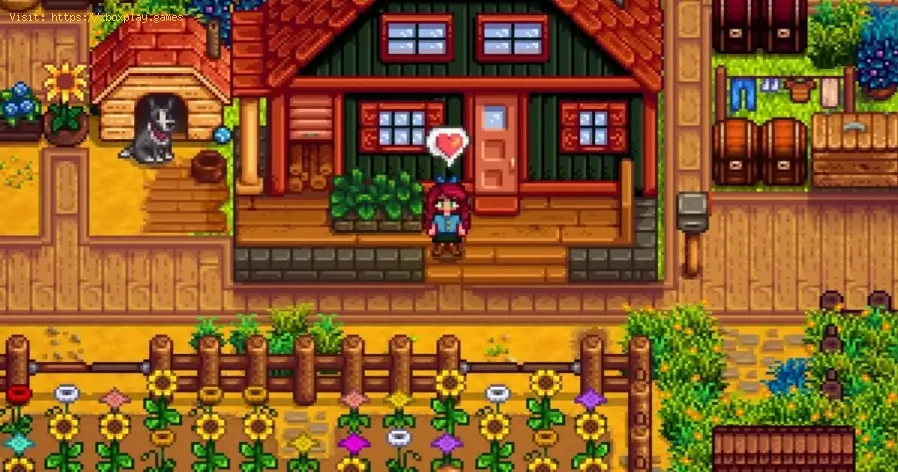
These games prove that visual style and gameplay depth are not tied to polygon count.- Stardew Valley
- Why It's Perfect: The ultimate low-end champion. Its charming 16-bit style runs on a potato. It’s a deep, addictive life/farming sim with mining, combat, fishing, and relationship-building that can consume hundreds of hours. It’s the perfect "one more day" game.
- Estimated Specs: Will run on virtually any PC made in the last 15 years.
- Terraria
- Why It's Perfect: "2D Minecraft" is a massive understatement. This is an action-adventure sandbox with incredible depth—exploration, building, crafting, and epic boss fights. The 2D sprite-based graphics are lightweight but brimming with personality and content (hundreds of hours worth).
- Estimated Specs: Runs smoothly on integrated graphics from the last decade.
- Hollow Knight
- Why It's Perfect: A masterpiece of the "Metroidvania" genre. Its hand-drawn art is gorgeous but not demanding. The world of Hallownest is vast, melancholic, and full of secrets, with tight, challenging combat and a haunting score. A must-play for any fan of exploration and skill-based gameplay.
- Estimated Specs: Runs at 60fps on Intel HD 4000 and above.
- Undertale / Deltarune
- Why They're Perfect: Landmark RPGs that subvert genre expectations with incredible writing, music, and choice-driven narratives. The simplistic, retro graphics are a stylistic choice that ensures flawless performance on any system. The emotional impact is anything but low-end.
Category 2: Addictive Strategy & Management (CPU-Friendly, GPU-Light)
These games are about brainpower, not graphics power.- Civilization V (Complete Edition)
- Why It's Perfect: Many consider this the peak of the Civilization series. It's now well-optimized and runs beautifully on low-end hardware. The "one more turn" addiction is real as you guide a civilization from the Stone Age to the Modern Era. The Complete Edition with all expansions is frequently on sale for a few dollars.
- Tip: Stick to smaller maps for faster turn times on weak CPUs.
- XCOM: Enemy Unknown / XCOM 2 (With Performance Mods)
- Why They're Perfect: Tense, turn-based tactical games where you command a squad of soldiers against an alien invasion. The first game, Enemy Unknown, is very forgiving on low-end PCs. XCOM 2 is more demanding but can be made playable on low settings with essential community performance mods (like "Stop Wasting My Time" and "Disable Lip Sync").
- Note: Start with Enemy Unknown for guaranteed smooth performance.
- RimWorld
- Why It's Perfect: A "story generator" colony sim. You manage survivors on a remote planet, handling their needs, moods, and defenses against raids. Its top-down, simple 2D visuals belie an incredibly deep and complex simulation. It’s wildly addictive and runs well on modest CPUs, though very large colonies may slow down.
- Into the Breach
- Why It's Perfect: A turn-based tactical puzzle game from the makers of FTL. Each battle is a small, perfect-information puzzle on an 8x8 grid. The pixel art is crisp, and the system demands are negligible. It’s easy to learn but offers immense strategic depth.

Category 3: Brilliant Rougelikes & Loop Games (Endless Replayability)
Games designed for hundreds of quick, rewarding sessions.
- Slay the Spire
- Why It's Perfect: The defining deck-building roguelike. Combine cards to battle monstersas you climb the Spire. It requires strategic thinking, not reflexes orgraphics power. You can play for 10 minutes or 3 hours. It runs onanything and is endlessly replayable.
- Vampire Survivors
- Why It's Perfect: The phenomenon that started the "bullet heaven" genre. It looks like asimple, retro game, and it is—technically. But its gameplay loop ofcollecting weapons and evading thousands of enemies is hypnoticallyaddictive. It costs pennies and will run on a literal calculator.
- Hades
- Why It's Perfect: While slightly more demanding than others here (needs a semi-modernintegrated GPU like Intel UHD 620), it's worth trying. If it runs, youget one of the best games ever made: a superbly written, action-packedroguelike with god-like combat and an art style that scales beautifullyto lower settings.
Category 4: Classic & Retro Revivals (Proven Performance)
Time-tested games and modern love letters to older hardware.
- Half-Life 2 & Portal 1 & 2
- Why They're Perfect: These Source Engine classics from Valve are masterclasses in design and run flawlessly on integrated graphics. *Half-Life 2*'s physics-driven action and Portal's mind-bending puzzles are as brilliant today as they were 15+ years ago. They are dirt cheap in sales.
- The Elder Scrolls V: Skyrim (Legendary or Special Edition on Low)
- Why It's Perfect: The 2011 original (Legendary Edition) is famously scalable. It will run on very old hardware at 720p/low settings. The 2016 Special Edition is more demanding but looks better; try it if you have a slightly newer iGPU. The open-world freedom is timeless.
- Emulation (Up to PlayStation 2 / GameCube / Wii)
- Why It's Perfect: A low-end PC is a fantastic emulation machine. Using programs like RetroArch, PCSX2, and Dolphin, you can playthousands of classic games from the NES, SNES, PS1, PS2, GameCube, andWii eras in high definition. The library is vast, from The Legend of Zelda: The Wind Waker to Shadow of the Colossus.
Category 5: Great Modern Multiplayer (That Runs on Anything)
For when you want to play with friends without them needing a supercomputer.
- Team Fortress 2
- Why It's Perfect: The free-to-play hero shooter king. Its art style is timeless, and it's so well-optimized it can run on a toaster. It's pure, chaotic,skill-based fun with a deep community.
- Counter-Strike: Global Offensive / Counter-Strike 2
- CS:GO (Still Available): The old version runs incredibly well on low-end hardware and is a tactical shooter masterpiece.
- CS2 (The New Version): More demanding. Test it first or check benchmarks for your specific iGPU. It may require lowerresolutions (720p) but can be playable on newer integrated graphics.
- League of Legends / Legends of Runeterra
- Why They're Perfect:League is famously optimized to run on a wide range of PCs. Its top-downperspective and stylized graphics are easy on your GPU. The auto-battler Teamfight Tactics and card game Legends of Runeterra are even less demanding and great alternatives.
Essential Tips for Low-End PC Gaming
- Lower Your Resolution: This is the #1 performance booster. Dropping from 1920x1080 to 1600x900 or 1280x720 (720p) can double your frame rate.
- Tweak In-Game Settings: Always disable: Shadows, Anti-Aliasing, Ambient Occlusion, Motion Blur, Depth of Field. Set Texture Quality to Medium or Low.
- Use Optimization Tools:Razer Cortex or MSI Afterburner (for monitoring) can help free up RAM and background processes.
- Buy Games on GOG.com When Possible: GOG versions are often DRM-free and can be more stable/less bloated than Steam versions.
- Check PCGamingWiki: For any game, search "Game Name PCGamingWiki". It has exhaustive guides on .ini file tweaks, fixes, and optimal settings for low-end systems.
- Keep Your Drivers Updated: Especially for AMD and Intel integrated graphics, new drivers can offer surprising performance gains.
Frequently Asked Questions (FAQ)
Q: My PC has Intel HD Graphics 4000/4400/4600. What can I play?
A: Almost everything in the "Timeless Masterpieces" and "Roguelike" categories will run at 720p/900p. Terraria, Stardew Valley, FTL, Undertale, Slay the Spire, Vampire Survivors, Hollow Knight (may need 720p), and classic Source games (*Half-Life 2, Portal*) are all excellent choices.
Q: Are there any good free games for low-end PCs?
A: Absolutely.
- Team Fortress 2 (Hero Shooter)
- Path of Exile (ARPG - may need settings low)
- Warframe (sci-fi looter - surprisingly scalable, try it)
- Doki Doki Literature Club! (Visual Novel/Psychological Horror)
- Open-source games like SuperTuxKart or 0 A.D.
Q: Should I upgrade my RAM from 4GB to 8GB?
A: Yes, if you can. It's usually the cheapest and most effective upgrade for a low-endsystem. It prevents stuttering in more complex 2D/indie games and allows you to run a game + a browser/chat app.
Q: Is cloud gaming an option for me?
A: Yes, but it requires excellent, stable internet. Services like Xbox Cloud Gaming (part of Game Pass Ultimate) or NVIDIA GeForce NOW let you stream high-end games to your low-end PC. If your internet is good, this is a game-changing way to play AAA titles.
Conclusion: Power Isn't Everything
Your low-end PC is not a prison; it's a passport to a vast continent ofgaming history and innovation. The games listed here represent some ofthe highest-rated, most influential, and most beloved titles acrossdecades—all accessible to you right now.
The pursuit of graphical fidelity is just one path in gaming. The path oftimeless design, compelling narrative, and pure addictive gameplay iswide open and waiting for you. Your next favorite game of all time might be a 2D indie title that costs $15 and runs at 120 fps on your laptop.
Ready to dive into a world of incredible games your PC can actually run? Pick one from this list, optimize your settings, and start playing. The golden age of gaming isn't behind you or in front of you—it's ready toboot up right now.
Other Articles Related
Guide to Understanding Latency in Video Games"Learn what gaming latency is and how it impacts your play. Discover types,causes, and proven tips to reduce lag for a smoother, more responsivegaming experience."
Guide to enabling Cross-Save in your games
Enabling Cross-Save? This guide shows you how to link your accounts and syncgame progress seamlessly between consoles, PC, and mobile platforms.Unlock true gaming freedom.
What is cross-save and how to use it
Unlock seamless gameplay across platforms. Learn what cross-save is and get asimple step-by-step guide to sync your progress and play anywhere.
Performance mode vs. quality mode: which to choose?
Performance mode prioritizes smoother frame rates for fast-paced gameplay, whilequality mode offers higher visual fidelity at lower frame rates.Discover which graphics setting is right for your playstyle.
What is V-Sync and should you enable it?
Discover the pros and cons of V-Sync technology. Learn how it reduces screentearing and its impact on gaming performance. Find out if you shouldenable V-Sync for a smoother experience.
What is anti-aliasing and which is the best?
Learn what anti-aliasing is, how different types (MSAA, FXAA, TAA, etc.)work, and which setting is best for performance vs. visual quality in PC gaming.
What is motion blur and when to disable it
Learn what motion blur is in video games, when it enhances realism, and keyscenarios to disable it for better clarity and performance.
The best shooters for beginners in 2026
the top shooters for beginners in 2026. Our expert reviews and tips will help you choose the perfect game to start your shooting
The best PS Plus games to download
the best PS Plus games to download this month. Explore top titles,hidden gems, and must-play classics to enhance your gaming
What is input mapping and what is it used for?
Discover what input mapping is and how it allows flexible control customizationin software, hardware, and games. Learn its key uses and benefits for an efficient user experience.
The best strategy games for beginners
the best strategy games for beginners! Dive into engaging gameplay, easy-to-learn mechanics, and fun challenges
What is SBMM and why is it controversial?
SBMM in gaming: What is skill-based matchmaking, why do players debate it, and how does it impact your multiplayer experience?
The best horror games to play at night
the best horror games to play at night for spine-chilling thrills and unforgettable scares. Get ready for a terrifying gaming
The best offline games to play without the internet
the best offline games to enjoy without an internet connection. Perfect for travel, downtime, or when Wi-Fi is unavailable!
The best games for kids in 2026
the best games for kids in 2026! Explore fun, educational, and engaging options that will keep your little ones entertained