
How to fix Warzone voice and text chat disabled due to platform restrictions
Fix the "Voice and Text Chat Disabled Due to Platform Restrictions" Error in Call of Duty
The "problem" is that this single error message can mask several different, complex issues, ranging from temporary server-side bugs to strict console privacy settings, or even a punitive action taken against your account. This ambiguity makes troubleshooting difficult, as the user doesn't know whether the cause lies with Activision/server-side code or their own console/privacy settings.This comprehensive guide will detail the known causes of this recurring and frustrating error, provide immediate solutions, and outline the steps necessary to ensure your account and platform settings are correctly configured for unrestricted communication.
🛑 Causes of the "Platform Restrictions" Chat Error
The Call of Duty "voice and text chat disabled due to platform restrictions" has been a recurring issue over the past few years, but it began to pop up a lot more during Black Ops 7’s Season 1 in December 2025. Many players have reported the issue appearing and then disappearing, only to reappear again. Here are the detailed causes:- Console/Platform Privacy Settings: The console's native privacy or parental control settings are actively restricting communication features for the account.
- Simple Technical Explanation: Both PlayStation and Xbox have system-level filters that can disable cross-platform voice/text communication. If these settings are set to Strict or Friends Only, the game respects the operating system's command and displays the "Platform Restrictions" error.
- Temporary Server-Side Bug (The PlayStation Plus Anomaly): Players, especially on PlayStation, have reported the error appearing and then disappearing, or linking it erroneously to the status of an active subscription (like PlayStation Plus).
- Simple Technical Explanation: This points toward a server-side synchronization failure where the game's authorization servers briefly fail to correctly verify the account's communication privileges or subscription status, resulting in a temporary block.
- Active Communication Ban from Activision: The most common official reason for a persistent, non-bug related chat block is a restriction placed on the account by Activision itself.
- Simple Technical Explanation: Call of Duty games monitor voice and text chat for toxic or offensive language. Activision sometimes submits automatic bans or restrictions from chat if you are labeled an offender. This restriction is tied directly to your Activision account ID and is enforced across all platforms.
- Crossplay Communication Settings: The in-game settings for Crossplay Communication may be disabled or incorrectly toggled.
- Simple Technical Explanation: If a user has disabled the ability to chat with players on other platforms, the system may interpret any attempt to join a mixed party chat as a violation of the defined restrictions, leading to the error message.
⚡ Quick Solution (For Impatient Users)
The quickest way to rule out local network issues and a temporary glitch is a full power cycle and game settings check:⚙️ Detailed Step-by-Step Solutions: Removing Restrictions
To definitively fix the problem, you must check both the platform (console/PC) settings and the account status.Phase 1: Platform-Specific Privacy Settings Check
| Platform Variant | Steps to Verify Communication Settings |
| PlayStation 5 (PS5) | Go to Settings > Users and Accounts > Privacy > View and Customize Your Privacy Settings. Ensure "Communication and Multiplayer" is set to "Allow" or "Anyone." |
| **Xbox Series X | S** |
| PC (Activision) | This platform relies primarily on the in-game and Activision account settings (see Phase 2). Ensure Windows Firewall isn't blocking the application and all audio drivers are current. |
Phase 2: Activision Account Status Check
- Check Account Status (The Ban Test): Open your browser and visit the Activision website's appeal/account status page.
- Login and Verify: Sign in to your linked Activision account. Check if there are any active communication bans or restrictions listed on your profile.
- Appeal if Restricted: If a restriction is found, you can attempt to appeal a ban directly through the provided portal on the Activision website. Note that Activision rarely overturns automatic chat bans.
Phase 3: In-Game Chat Channel Check
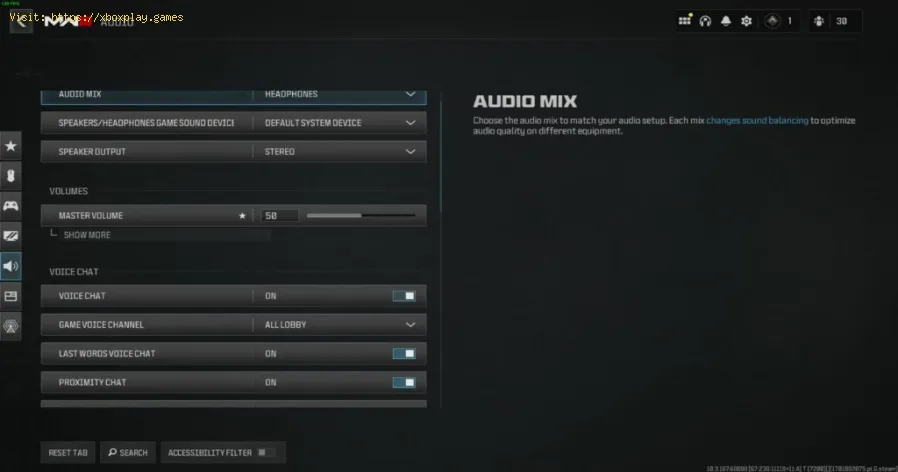
- Open Settings: In Call of Duty, navigate to Settings > Audio.
- Voice Chat Channel: Look for the Voice Chat Channel setting. Ensure it is set to All Lobby (if desired) or Party Only. If it's set to Mute All, it will appear as if your chat is disabled.
- Chat Mixing: In the same menu, verify that Voice Chat Volume and Open Mic Recording Threshold are correctly set. Sometimes, a high mic threshold makes it seem likeyour chat is disabled because your voice isn't triggering the mic.
🔁 Alternative Solutions
- Force Crossplay Off (If possible): If the error seems tied to communication across platforms, try temporarily disabling crossplay (Settings > Account & Network > Crossplay: Disabled). If this resolves the issue, it points strongly to a cross-platformserver synchronization bug or a privacy restriction on one of theconnected platforms.
- Temporary New Profile: On your console (PS5/Xbox), create a new, fresh user profile with zero restrictions and launch Call of Duty. If the chat worksperfectly on the new profile, the issue is definitively tied to the local privacy settings of your original account and not a system-wide bug.
- Reinstall Game/Update Files: If the error is sudden and persistent, the issue may be a corruptedgame file or patch data. On the console, fully uninstall and reinstallthe game to force a clean download of all required assets andcommunication dependencies.
🛡️ How to Avoid Future Restrictions
Communication problems are often preventable through conscious usage and proper settings maintenance:
- Be Conscious of Language: Activision employs strict filters and monitors reports. To avoidautomatic bans, refrain from using toxic, abusive, or excessivelyoffensive language in both voice and text chat.
- Verify Child Accounts: If the account belongs to a minor, ensure the Parental Control and associated Privacy Settings on both the console and the Activision website are configured to allowcommunication, as these are often the most common sources of platformrestrictions.
- Check for Account Hacks: If you receive a chat ban suddenly without cause, immediately change your password and enable Two-Factor Authentication (2FA) on your Activision account. A hacker might have used your account tobypass their own ban, resulting in a restriction on your legitimateaccount.
- Keep the Game Updated: Ensure you always run the latest version of Call of Duty. Since many problems are server-side bugs, the developers fix these issues through mandatory game patches.
❓ Frequently Asked Questions
Q: Can a platform ban me from Call of Duty chat for life?
A: The platform (Sony/Microsoft) can permanently restrict your console'sability to communicate, but Activision controls the game-level chat.Activision bans are usually temporary first offenses, but repeatoffenses can lead to permanent restrictions.
Q: How long do temporary chat bans usually last?
A: Temporary chat restrictions from Activision typically last $48$ hours,$7$ days, or $14$ days, depending on the severity and frequency of theviolation.
Q: Does clearing my cache help with this error?
A: Clearing the console's cache (by power cycling) can help if the issueis a temporary memory or system glitch, but it will not fix arestriction imposed by Activision or a hard privacy setting on theconsole.
Q: If I get banned from chat on PS5, am I banned on Xbox too?
A: Yes. If the ban is issued by Activision (due to in-game conduct), therestriction is applied to your central Activision Account and willfollow you across all linked platforms (PS5, Xbox, PC).
✅ Regain Your Voice and Text Chat!
Nothing is more frustrating than trying to game online and chop it up withfriends and being unable to do so. The "voice and text chat disabled due to platform restrictions" error is a major roadblock to successfulsquad play. By systematically eliminating platform privacy conflicts and verifying your Activision account status, you can diagnose the rootcause and restore your vital communication channels.
Don't chase W's in silence! Check your privacy settings and unmute your squad today!

Other Articles Related
How to fix Warzone voice and text chat disabled due to platform restrictionseffective solutions to fix Warzone voice and text chat issues caused byplatform restrictions. Enhance your gaming
How to Unlock the 'Now You See Me' Camo in Warzone
Unlock the elusive 'Now You See Me' camo in Warzone! Enhance your gameplay and stand out on the battlefield with this skin.
How To Complete Security Room Easter Egg in Warzone
Unlock the secrets of Warzone with our guide on completing the Security Room Easter Egg. Discover tips and strategies
How To Complete the Haven’s Hollow Jackpot Easter Egg in Warzone
Uncover the secrets of Warzone's Haven’s Hollow Jackpot Easter Egg! Dive into thrilling gameplay and unlock hidden treasures
How to Find Haven’s Hollow Pied Piper Easter Egg in Warzone
Hunt Haven's Hollow for the secret Pied Piper Easter egg in Warzone! Ourguide reveals the exact location & steps to unlock this creepyhidden quest.
How to Complete the Haven's Hollow Jackalope Easter Egg in Warzone
Uncover the secrets of Warzone's Haven's Hollow Jackalope Easter Egg! Dive into thrilling gameplay and hidden surprises.
Haven's Hollow Waterfall Cave Treasure Map Easter Egg in Warzone
Discover the secret Haven's Hollow Waterfall Cave Easter Egg in Warzone. Uncover the hidden treasure map location, solve the puzzle, and claim yourexclusive rewards with this complete guide.
Best Model L Loadout for Warzone
Unlock the true potential of the Best Model L loadout for Warzone. Dominatemid-range engagements with our optimized attachments for max damage,accuracy, and mobility. Get the class setup now.
Best PU-21 Loadout for Warzone
Level up your Warzone game with the best PU-21 Loadout. This guide detailsthe optimal attachments, perks, and equipment to maximize the PU-21'saccuracy, range, and damage for dominating in Urzikstan.
Best PP-919 Loadout for Warzone
Discover the meta attachments, perks, and equipment to maximizeTTK, mobility, and control. Get the class setup that pros are using towin.
How to activate game mode on any TV and reduce lag
how to activate game mode on your TV for an enhanced gaming experience.Optimize settings for smoother graphics
How to improve your internet connection for lag-free online gaming
Enhance your online gaming experience with tips to improve yourconnection. strategies for a smoother, lag-free gameplay
How to open ports for Xbox Live and improve NAT
open ports for Xbox to enhance your gaming experience.Optimize your connection and enjoy seamless online play
How to Use an External SSD on Xbox Series X/S Correctly
Discover how to enhance your Xbox gaming experience by using an external SSD. Boost storage, speed, and performance
How to free up space on PS5 without deleting your games
effective tips to free up space on your PS5. Optimize storage and enhance your gaming experience with our guide.