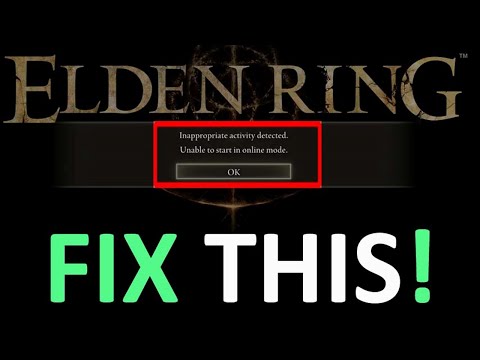
How to fix ‘inappropriate activity detected’ in Elden Ring Shadow of the Erdtree?
We've made an explanatory guide to tell you how to fix "inappropriate activity detected" in Elden Ring Shadow of the Erdtree.
Tarnished delving into Elden Ring's Shadow of the Erdtree DLC have encountered a new hurdle: the "Inappropriate Activity Detected" error. This error can kick players out of the game and prevent them from accessing multiplayer features, dashing hopes of cooperating and exploring the new areas together. While FromSoftware has yet to release an official fix, there are a few potential solutions and workarounds that players can try to get around this issue.
The most likely cause of the error appears to be the summoning functionality. Players are advised to avoid using or attempting to use summons for the time being until an official fix is released.
Corrupted or damaged game files may be causing the error. To verify the integrity of game files on Steam:
Unlock the secrets of Sorcerer’s Rise in Elden Ring Nightreign with our comprehensive guide.
What to expect when you die in Elden Ring Nightreign
Discover what to expect when you die in Elden Ring Nightreign. Uncover tips, strategies, and insights to enhance your gameplay
How to play Elden Ring Nightreign in offline mode
Experience the thrill of Elden Ring Nightreign in offline mode. Dive into an epic adventure and conquer challenges at your own pace!
How to Get the Sacred Blade in Elden Ring
Discover the step-by-step guide on how to obtain the Sacred Blade in Elden Ring.
How to Get the Rotten Winged Sword Insignia in Elden Ring
Discover the steps to obtain the Rotten Winged Sword Insignia in Elden Ring.
How to Fix Elden Ring Nightreign Lag
Discover effective solutions to fix lag issues in Elden Ring Nightreign.
All Hammers in Elden Ring
Discover all hammers in Elden Ring! Explore their unique abilities, stats, and how to wield them effectively
All Swords in Elden Ring
Discover the ultimate guide to all swords in Elden Ring. Uncover stats, locations, and tips
How to Check Elden Ring Nightreign Server Status
Our guide today is aimed at explaining to you How to Check Elden Ring Nightreign Server Status.
How to Fix Elden Ring Nightreign Crashes
Our guide today aims to explain to you How to Fix Elden Ring Nightreign Crashes.
How to unlock Lifeline Mythic skin in Apex Legends?
We invite you to discover How to unlock Lifeline Mythic skin in Apex Legends?, a new task.
How to find Well Depths Key in Elden Ring Shadow of the Erdtree?
We invite you to discover How to Find Well Depths Key in Elden Ring Shadow of the Erdtree with our guide today.
How to return to Lands Between in Elden Ring Shadow of Erdtree?
Our guide today allows us to explain to you How to return to Lands Between in Elden Ring Shadow of Erdtree, let's see.
Tarisland: Minimum and recommended system specs
With our help you will see that knowing Tarisland: Minimum and recommended system specs is easier than you thought.
How to get Tarisland battle pass?
In this guide post we will explain everything about How to get Tarisland Battle Pass.
Tarnished delving into Elden Ring's Shadow of the Erdtree DLC have encountered a new hurdle: the "Inappropriate Activity Detected" error. This error can kick players out of the game and prevent them from accessing multiplayer features, dashing hopes of cooperating and exploring the new areas together. While FromSoftware has yet to release an official fix, there are a few potential solutions and workarounds that players can try to get around this issue.
How to fix "inappropriate activity detected" in Elden Ring Shadow of the Erdtree?
Solution 1: Prevent Summons
The most likely cause of the error appears to be the summoning functionality. Players are advised to avoid using or attempting to use summons for the time being until an official fix is released.
Solution 2: Verify the integrity of game files
Corrupted or damaged game files may be causing the error. To verify the integrity of game files on Steam:
- Open the Steam library.
- Right-click on “Elden Ring” and select “Properties.”
- Under the “Local Files” tab, click “Verify integrity of game files.”
Solution 3: Reinstall the game
If verifying the integrity of the files doesn’t work, reinstalling the entire game might be the last solution. Make sure you have a backup of your save game before doing so.
Solution 4: Play offline
If the above solutions fail, playing Elden Ring offline may be a temporary alternative to avoid the error. This will disable multiplayer features, but will allow you to progress through the DLC without interruption.
Stay informed
It's crucial to stay informed about official FromSoftware updates and patches. Follow the game's official social media channels and check the community forums for the latest news and possible solutions.
Remember
- The "Inappropriate Activity Detected" error seems to be mostly related to summons. Avoiding them should be a temporary solution.
- Verifying the integrity of the game files or reinstalling the game completely might fix the problem in some cases.
- Playing offline is an alternative to progressing through the DLC without the error, but it disables multiplayer features.
- Stay informed about official FromSoftware updates and patches for permanent solutions.
Now that you know how to fix the "inappropriate activity detected" issue in Elden Ring Shadow of the Erdtree, you can apply any of these fixes and continue enjoying all the new features that the game brings.
Tags: FromSoftware game, Open-world RPG, Soulslike, Elden Ring gameplay, Elden Ring tips, Elden Ring updates, Elden Ring build
Platform(s): PlayStation 4 PS4, PlayStation 5 PS5, Xbox One, Xbox Series X/S, Microsoft Windows PC
Genre(s): Action role-playing
Developer(s): FromSoftware
Publisher(s): Bandai Namco Entertainment
Release date: February 25, 2022
Mode: Single-player, multiplayer
Age rating (PEGI): 16+
Other Articles Related
How To Unlock Sorcerer’s Rise in Elden Ring NightreignUnlock the secrets of Sorcerer’s Rise in Elden Ring Nightreign with our comprehensive guide.
What to expect when you die in Elden Ring Nightreign
Discover what to expect when you die in Elden Ring Nightreign. Uncover tips, strategies, and insights to enhance your gameplay
How to play Elden Ring Nightreign in offline mode
Experience the thrill of Elden Ring Nightreign in offline mode. Dive into an epic adventure and conquer challenges at your own pace!
How to Get the Sacred Blade in Elden Ring
Discover the step-by-step guide on how to obtain the Sacred Blade in Elden Ring.
How to Get the Rotten Winged Sword Insignia in Elden Ring
Discover the steps to obtain the Rotten Winged Sword Insignia in Elden Ring.
How to Fix Elden Ring Nightreign Lag
Discover effective solutions to fix lag issues in Elden Ring Nightreign.
All Hammers in Elden Ring
Discover all hammers in Elden Ring! Explore their unique abilities, stats, and how to wield them effectively
All Swords in Elden Ring
Discover the ultimate guide to all swords in Elden Ring. Uncover stats, locations, and tips
How to Check Elden Ring Nightreign Server Status
Our guide today is aimed at explaining to you How to Check Elden Ring Nightreign Server Status.
How to Fix Elden Ring Nightreign Crashes
Our guide today aims to explain to you How to Fix Elden Ring Nightreign Crashes.
How to unlock Lifeline Mythic skin in Apex Legends?
We invite you to discover How to unlock Lifeline Mythic skin in Apex Legends?, a new task.
How to find Well Depths Key in Elden Ring Shadow of the Erdtree?
We invite you to discover How to Find Well Depths Key in Elden Ring Shadow of the Erdtree with our guide today.
How to return to Lands Between in Elden Ring Shadow of Erdtree?
Our guide today allows us to explain to you How to return to Lands Between in Elden Ring Shadow of Erdtree, let's see.
Tarisland: Minimum and recommended system specs
With our help you will see that knowing Tarisland: Minimum and recommended system specs is easier than you thought.
How to get Tarisland battle pass?
In this guide post we will explain everything about How to get Tarisland Battle Pass.