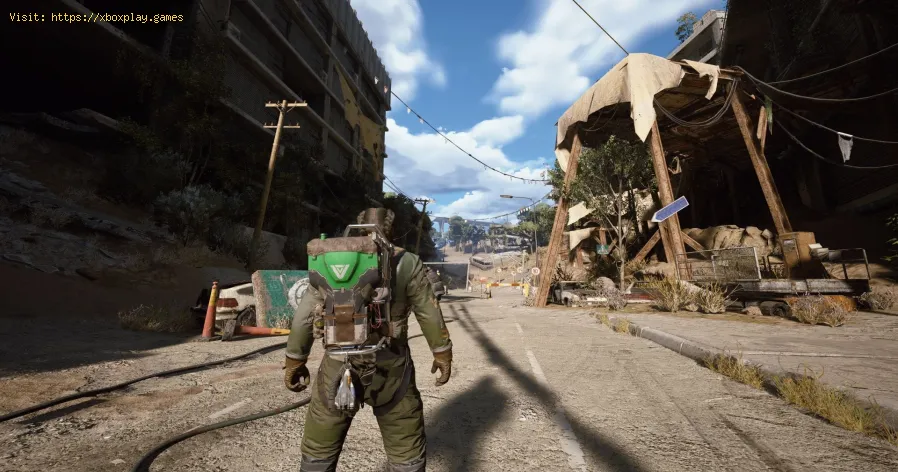
How to get Emerald Wave Electrician Backpack for free in ARC Raiders
Claim the FREE Emerald Wave Electrician Backpack in ARC Raiders
🛑 Causes of Redemption Issues
While the process is designed to be smooth, issues often arise due to the dual-platform nature of the redemption:- GeForce Eligibility Requirement: Attempting to claim the reward on a PC that does not have a qualifying NVIDIA GPU (GeForce GTX 10 Series or newer) or attempting to access it without the correct NVIDIA app installed.
- Simple Technical Explanation: NVIDIA's rewards platform checks the hardware ID and driver status of the system accessing the app to verify eligibility for promotional offers tied to their GPU line.
- Limited Supply/Time Constraint: The reward is available for a limited time (December 11, 2025, 6 am PT, until December 31, 2025) and only "while supplies last."
- Simple Technical Explanation: Despite being a digital item, the promotion has a capped number of available codes, leading to server congestion or the code being fully depleted before the deadline.
- Browser/Login Conflict: Issues arising when the NVIDIA app redirects to the browser for final login and code reveal.
- Simple Technical Explanation: Security checks and browser cookie settings can interfere with the seamless handoff between the NVIDIA app and the web portal, sometimes causing login errors or preventing the reward code from displaying correctly.
- Embark Account Linking Error: The Embark Studios account used for redemption is not properly linked to the platform where you play ARC Raiders (Steam, PlayStation, Xbox, etc.).
- Simple Technical Explanation: The code is redeemed to your central Embark ID. If that ID isn't correctly connected to your desired gaming platform account, the cosmetic item won't appear in your in-game inventory.
⚡ Quick Solution (For Impatient Raiders)
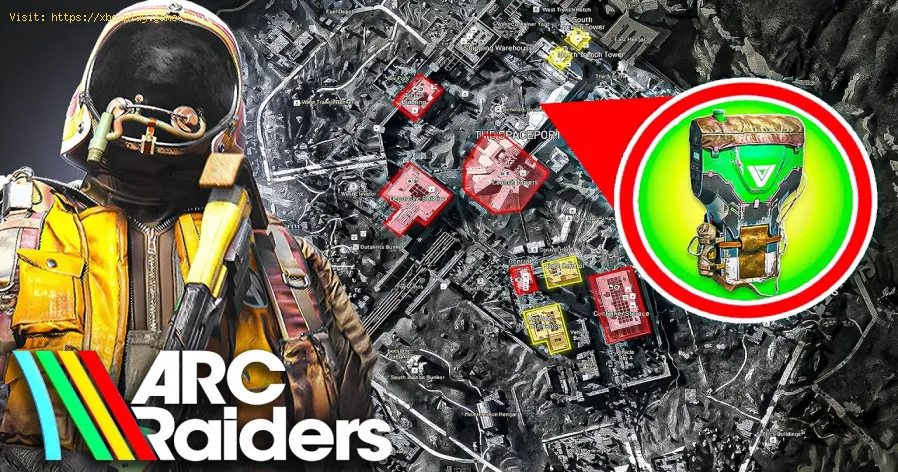
If you have the NVIDIA App installed and are logged in, follow these three quick steps:
- Open NVIDIA app and select the "Redeem" tab from the left menu.
- Locate the ARC Raiders Emerald Wave reward and click through the prompts to complete the NVIDIA registration/security check and reveal your unique code.
- Go directly to the Embark Studios gift redemption page (the link is provided in the final NVIDIA redemption prompt), sign in with your linked gaming platform, and paste the code.
⚙️ Detailed Step-by-Step Solutions: Claiming Your Backpack
The redemption process is split into two mandatory parts: obtaining thecode from NVIDIA and applying the code to your Embark account.
Phase 1: Obtaining the Code via the NVIDIA App
[Image Placeholder: A screenshot of the NVIDIA App interface with the "Redeem" tab highlighted on the left menu.]
- Launch the NVIDIA App: Open the NVIDIA app (formerly GeForce Experience) from your Windows taskbar or by searching for it in the Start Menu.
- Navigate to the Redeem Section: Look for the "Redeem" tab on the left-hand navigation menu of the application and click on it.
- Locate the ARC Raiders Reward: Scroll through the list of available rewards and find the entry for the "Electrician Backpack: Emerald Wave Variant" or similar ARC Raiders reward.
- Initiate Redemption: Click on the reward. The app will open a browser window and prompt youto log in to your NVIDIA account (if you are not already logged in).
- Complete Security Check and Confirm: Follow the on-screen instructions to log in and complete any security checks.
- Reveal and Copy the Code: The next page should confirm your eligibility and allow you to "Redeem" the reward, which then reveals a unique alphanumeric code. Copy this code immediately.
Phase 2: Redeeming the Code on the Embark Studios Website
[Image Placeholder: A screenshot of the Embark Studios gift redemption page showing the platform login options.]
- Access the Embark Studios Redemption Page: The NVIDIA redemption screen should provide a direct link. If not, open your browser and head to the Embark Studios gift redemption page (URL typically starts with id.embark.games).
- Sign In with Preferred Platform: Log in using the platform you use to play ARC Raiders (e.g., Steam, PlayStation, Xbox, etc.). This ensures the cosmetic is tied to the correct game profile. Note: Ensure this is the same account that is linked to your Embark ID.
- Access the Code Input Field: Once logged into your Embark ID, navigate to the Redeem Gift Code section.
- Paste and Finalize: Paste the unique code you obtained from the NVIDIA app into the required field and click the final "Redeem" button.
- In-Game Confirmation: You should receive an on-screen confirmation that the item has beenadded to your account. The Emerald Wave Electrician Backpack should beavailable under the Styles menu in the Customization tab the next time you launch ARC Raiders.
🔁 Alternative Solutions (Troubleshooting)
- Browser Error Workaround: If the NVIDIA app struggles to open the browser or you encountercontinuous login errors, try copying the direct redemption URL (ifprovided) and pasting it into a different browser (e.g., Chrome, Firefox, or Edge) to complete the login/code reveal.
- GeForce App Refresh: If the reward does not appear in the "Redeem" tab, try logging out ofthe NVIDIA App, closing it completely from the task manager, reopeningit, and logging back in. Server congestion at the launch of thepromotion often requires multiple refreshes.
- Embark Account Check: If the code is redeemed but the backpack doesn't appear in the game, visit the main Embark ID website and verify that your gaming platform (Steam/Xbox/PS) is correctly linked to your main Embark account.
🛡️ How to Avoid Missing Future Rewards
NVIDIA and Embark Studios frequently offer free cosmetics. Stay prepared by:
- Enable Notifications: Ensure your NVIDIA App has notifications enabled so you are alerted when new GeForce Rewards become available.
- Keep the App Updated: Regularly update the NVIDIA App to ensure stable server connection and access to the newest redemption portals.
- Check Social Channels: Follow official ARC Raiders and NVIDIA GeForce social media accounts, as they announce these limited-time drops and provide direct links.
- Confirm GPU Status: Always ensure your graphics drivers are up-to-date, which is a keyrequirement for the NVIDIA App to correctly verify your GPU eligibility.
❓ Frequently Asked Questions
Q: Do I need to own ARC Raiders on PC to claim the backpack?A: No. You need a PC with a qualifying NVIDIA GPU to obtain the code via the NVIDIA app. Once the code is redeemed on the Embark Studios website, the cosmetic is tied to your Embark ID and can be accessed on any platform (PC, Xbox, PlayStation) linked to that ID.
Q: I redeemed the code, but the backpack isn't in my inventory. Where is it?A: Check under the Customization menu, specifically the Styles tab for Backpacks. If it's not there, ensure your gaming platform (e.g., Steam) iscorrectly linked to your Embark ID, and allow up to 24 hours for thecosmetic to fully sync to your game account.
Q: The code redemption page says the code is invalid or already redeemed.A: If it says invalid, double-check the code you copied. If it says already redeemed, you may have successfully redeemed it during an earlier attempt when the browser failed to confirm. Log into ARC Raiders and check your inventory, or contact Embark Studios support if you are certain the code was not used.
Q: My GPU is older than the GTX 10 series. Can I still get the backpack?A: Unfortunately, the promotion is explicitly limited to GeForce GTX 10 Series and above. This is a restriction tied to the NVIDIA GeForce Rewards program.
✅ Don the Emerald Wave: Claim Your Exclusive Backpack Now!
The Emerald Wave Electrician Backpack is a standout cosmetic and a free opportunity to enhance your Raider'slook. Given the limited-time and first-come, first-served nature of this reward, time is of the essence. Follow the two-part redemption processcarefully to bypass the server hurdles and secure your green gear today!
Launch the NVIDIA app, claim your code, and step topside in the Emerald Wave Electrician Backpack!
Other Articles Related
How to get Emerald Wave Electrician Backpack for free in ARC RaidersDiscover how to obtain the Emerald Wave Electrician Backpack in ARC Raiders. Unlock this unique item and enhance your gameplay
How To Defeat Matriarch in Arc Raiders
Conquer the Matriarch in Arc Raiders with our step-by-step guide. Learn keystrategies, optimal loadouts, and crucial weak points to defeat thisepic boss.
Where To Find Magnetron in Arc Raiders
the best locations to find Magnetron in Arc Raiders. Unlock powerful upgrades and enhance your gameplay with our guide!
How to Craft Energy Clips in ARC Raiders
Learn how to craft Energy Clips in ARC Raiders with our comprehensive guide. Boost your gameplay and enhance your strategies
How To Customise Your Raider Den in Arc Raiders
how to customize your Raider Den in Arc Raiders. Explore unique designs and features to enhance your gaming experience
How To Claim Free Emerald Wave Electrician Backpack in Arc Raiders
Arc Raiders Free Emerald Wave Electrician Backpack, designed fordurability and style. Perfect for professionals and enthusiasts alike.
How To Craft Items During a Match in Arc Raiders
Master crafting on the fly in Arc Raiders! Learn how to craft items mid-matchwith our step-by-step guide. Boost your survival & tacticaladvantage.
All Security Breach Locker Locations in Arc Raiders
Find all Security Breach Locker codes & locations in Arc Raiders withthis complete interactive map and step-by-step guide. Unlock exclusiverewards fast.
Arc Raiders: How To Get Kinetic Converter
Learn how to unlock the Kinetic Converter in Arc Raiders, a powerful gearthat significantly enhances your mobility and combat effectiveness inthis co-op extraction shooter.
How To Use Skill Tree in Arc Raiders
Master the Skill Tree in Arc Raiders with our detailed guide. Learn optimalprogression, key abilities, and strategic builds to dominate the game.
How to configure a gaming monitor for the best image quality
Discover how to configure your gaming monitor to get the best image quality and maximize your gaming experience.
How to use a Nintendo Switch controller on a PC, step by step
Learn how to connect and use your Nintendo Switch controller on a PC with our step-by-step. Enhance your gaming experience
How to connect a PS5 controller to your PC via USB or Bluetooth
Learn how to easily connect your PS5 controller to your PC using USB or Bluetooth with our step-by-step.
How to Connect an Xbox controller to your PC
Easily connect your Xbox controller to your PC running Windows 10/11 with our step-by-step guide. Enjoy seamless gaming
How to reduce input lag on consoles
Discover effective solutions to reduce input lag on Xbox, PS5, and Switch for a smoother gaming experience. Optimize your gameplay