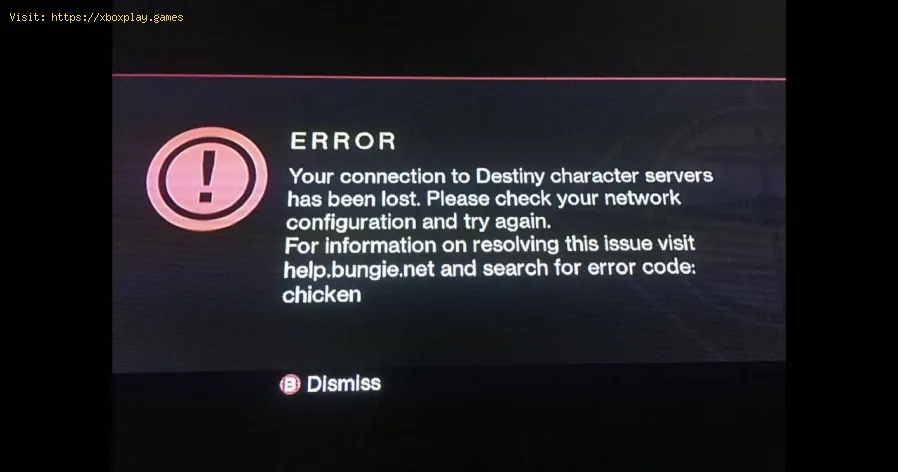
Destiny 2: How to fix Error Code Chicken - Ultimate Guide
With our Destiny 2 guide, you will learn more about How to fix chicken error code.
What to know about the Chickeb error code in Destiny 2?
It is a problem that is related to the game servers, with no known apparent cause, it harms us preventing access to our characters and play normally, apart from this we will be stuck for the time it takes to be solved, there is a possibility that it is a maintenance, but if not it is necessary to have idea of How to fix error code Chicken and this guide presents the answers that can help us, let's see them below.
How to fix error code Chicken in Destiny 2?
A group of possible solutions will be presented on How to fix error code chicken in Destiny 2 and these are as follows:
Wired connection: this is a necessary option because a wired connection is more stable than a wireless connection, so we will be connected to the Destiny 2 servers, it is also important to avoid bandwidth consumption by other programs or devices.
Connection to the server or VPN: the server may have been affected by simultaneous connections from the same place, so the problem occurs. What we will do on How to fix error code chicken is to disconnect and make the connection again, even use a VPN to access a different server that is not so busy.
Restarting our router: what we will do is disconnect it for a few minutes to connect it again, then we log in to our network and make sure we have a stable internet that can help us solve How to fix error code chicken .
Delete cache: it is possible that the temporary files of our console are corrupted, then we need to delete them to end the problems that this causes in Destiny 2, then we download the new files, and we can have the perfect solution.
Turn off the console: either way we have to unplug the console for at least 5 minutes, then we connect it back to the power to turn it on, we start Destiny 2 and make a removal of the cache of downloads that correspond to the Steam launcher, which is done from the same client by opening the configuration panel, in the settings we choose the downloads tab to delete the cache, we click on except to confirm and log back into Steam.
Contact the ISP: there is the possibility that the problem is our internet provider, then we must contact them to be sure and check that it is not related to a service interruption.
Remove and reinstall: as for How to fix error code chicken we have an extreme option, where we uninstall and install the game, if we have not come up with anything before it may be our best option, then we remove all files from our device and reinstall new ones, thus achieving whatever is causing problems.
We can conclude that knowing How to fix error code chicken is easier than thought thanks to these indications, it only remains to apply them to be normally in Destiny 2.
Master the hidden path. Our Destiny 2 guide details every step to complete The Way Between quest, claim your reward, and conquer this challengingpuzzle.
How to Transport Cargo via Site-To-Site Transmat in Destiny 2 Renegades
Learn how to transport cargo via Site-To-Site Transmat in Destiny 2'sRenegades mission. A quick guide to complete this objective and progress through the quest step.
How to complete Imperium Campaign Mission in Destiny 2 Renegades
Master Destiny 2's Renegades with our guide on how to complete the ImperiumCampaign Mission. Find key strategies, objective walkthroughs, andessential combat tips to conquer this challenging fight.
How To Get Exotic Orders in Destiny 2 Renegades
Destiny 2 Renegades: Learn how to unlock and farm Exotic Orders with ourcomplete guide. Get the best tips for acquiring these powerful newweapons.
How To Get the Upper Hand Catalyst for the Praxic Blade in Destiny 2 Renegades
Destiny 2 gameplay with the Upper Hand Catalyst for the Praxic Blade.Learn how to obtain it and gain the upper hand in your battles!
How To Get the Refraction Core in Destiny 2 Renegades
how to obtain the Refraction Core in Destiny 2 Renegades. Unlock secrets and enhance your gameplay with our guide!
How to Get Deathmarks in Destiny 2
how to obtain Deathmarks in Destiny 2 with our comprehensive guide. Unlock powerful rewards and enhance your gameplay
How To Get the Praxic Blade Exotic in Destiny 2 Renegades
Unlock the unique Vex-themed sword, the Praxic Blade Exotic, in Destiny 2: The Renegades. This guide covers all steps, from starting the "PraxicFirewall" quest to completing its challenging missions and secrets.
How to Get the Renegades Exotic Armor in Destiny 2
Learn how to get the exclusive Renegades Exotic armor set in Destiny 2. Thisguide covers the questline, required activities, and tips to completeyour Hunter, Titan, or Warlock's ultimate endgame look.
How To Get Service of Luzaku Machine Gun in Destiny 2 Renegades
Unlock the powerful Luzaku Machine Gun in Destiny 2. Our Renegades guidecovers the complete quest steps, location, and tips to secure this heavy weapon.
Nintendo Switch: How to play Spotify
Knowing how to listen to Spotify is an interesting action to execute in Nintendo Switch and here we tell you everything you need to do.
GTA Online: Buying a Garage
At GTA Online, there are lots and lots of things to do, so today we'll show you how to buy a garage.
Call of Duty Black Ops Cold War: How to craft LT53 Kazimir Grenade
The creations persist in Call of Duty Black Ops Cold War and for that reason we will tell you how to craft Kazimir LT53 grenade.
Red Dead Online: How to get Arthur’s Outfit
Earlier we told you how to get Dutch's outfit in Red Dead Online, but today we are going to tell you how to get Arthur's outfit.
Red Dead Online: How to get Dutch’s Outfit
This article has everything you need to know about how to get Dutch'soutfit in Red Dead Online, so if this interests you, let's get started.
What to know about the Chickeb error code in Destiny 2?
It is a problem that is related to the game servers, with no known apparent cause, it harms us preventing access to our characters and play normally, apart from this we will be stuck for the time it takes to be solved, there is a possibility that it is a maintenance, but if not it is necessary to have idea of How to fix error code Chicken and this guide presents the answers that can help us, let's see them below.
How to fix error code Chicken in Destiny 2?
A group of possible solutions will be presented on How to fix error code chicken in Destiny 2 and these are as follows:
Wired connection: this is a necessary option because a wired connection is more stable than a wireless connection, so we will be connected to the Destiny 2 servers, it is also important to avoid bandwidth consumption by other programs or devices.
Connection to the server or VPN: the server may have been affected by simultaneous connections from the same place, so the problem occurs. What we will do on How to fix error code chicken is to disconnect and make the connection again, even use a VPN to access a different server that is not so busy.
Restarting our router: what we will do is disconnect it for a few minutes to connect it again, then we log in to our network and make sure we have a stable internet that can help us solve How to fix error code chicken .
Delete cache: it is possible that the temporary files of our console are corrupted, then we need to delete them to end the problems that this causes in Destiny 2, then we download the new files, and we can have the perfect solution.
Turn off the console: either way we have to unplug the console for at least 5 minutes, then we connect it back to the power to turn it on, we start Destiny 2 and make a removal of the cache of downloads that correspond to the Steam launcher, which is done from the same client by opening the configuration panel, in the settings we choose the downloads tab to delete the cache, we click on except to confirm and log back into Steam.
Contact the ISP: there is the possibility that the problem is our internet provider, then we must contact them to be sure and check that it is not related to a service interruption.
Remove and reinstall: as for How to fix error code chicken we have an extreme option, where we uninstall and install the game, if we have not come up with anything before it may be our best option, then we remove all files from our device and reinstall new ones, thus achieving whatever is causing problems.
We can conclude that knowing How to fix error code chicken is easier than thought thanks to these indications, it only remains to apply them to be normally in Destiny 2.
Tags: Bungie, Guardians, Raids, Exotics, PvP, PvE, Strikes, Crucible, Gambit, Lightfall expansion, Seasonal events, Weapons a
Platform(s): PlayStation 4, PlayStation 5, Xbox One, Xbox Series X/S, Windows PC Google Stadia
Genre(s): First-person shooter, MMOG
Developer(s): Bungie, Vicarious Visions, High Moon Studios
Publisher(s): Bungie
Engine: Tiger Engine
Mode: Multiplayer
Age rating (PEGI): +16
Other Articles Related
How to Complete The Way Between Quest in Destiny 2Master the hidden path. Our Destiny 2 guide details every step to complete The Way Between quest, claim your reward, and conquer this challengingpuzzle.
How to Transport Cargo via Site-To-Site Transmat in Destiny 2 Renegades
Learn how to transport cargo via Site-To-Site Transmat in Destiny 2'sRenegades mission. A quick guide to complete this objective and progress through the quest step.
How to complete Imperium Campaign Mission in Destiny 2 Renegades
Master Destiny 2's Renegades with our guide on how to complete the ImperiumCampaign Mission. Find key strategies, objective walkthroughs, andessential combat tips to conquer this challenging fight.
How To Get Exotic Orders in Destiny 2 Renegades
Destiny 2 Renegades: Learn how to unlock and farm Exotic Orders with ourcomplete guide. Get the best tips for acquiring these powerful newweapons.
How To Get the Upper Hand Catalyst for the Praxic Blade in Destiny 2 Renegades
Destiny 2 gameplay with the Upper Hand Catalyst for the Praxic Blade.Learn how to obtain it and gain the upper hand in your battles!
How To Get the Refraction Core in Destiny 2 Renegades
how to obtain the Refraction Core in Destiny 2 Renegades. Unlock secrets and enhance your gameplay with our guide!
How to Get Deathmarks in Destiny 2
how to obtain Deathmarks in Destiny 2 with our comprehensive guide. Unlock powerful rewards and enhance your gameplay
How To Get the Praxic Blade Exotic in Destiny 2 Renegades
Unlock the unique Vex-themed sword, the Praxic Blade Exotic, in Destiny 2: The Renegades. This guide covers all steps, from starting the "PraxicFirewall" quest to completing its challenging missions and secrets.
How to Get the Renegades Exotic Armor in Destiny 2
Learn how to get the exclusive Renegades Exotic armor set in Destiny 2. Thisguide covers the questline, required activities, and tips to completeyour Hunter, Titan, or Warlock's ultimate endgame look.
How To Get Service of Luzaku Machine Gun in Destiny 2 Renegades
Unlock the powerful Luzaku Machine Gun in Destiny 2. Our Renegades guidecovers the complete quest steps, location, and tips to secure this heavy weapon.
Nintendo Switch: How to play Spotify
Knowing how to listen to Spotify is an interesting action to execute in Nintendo Switch and here we tell you everything you need to do.
GTA Online: Buying a Garage
At GTA Online, there are lots and lots of things to do, so today we'll show you how to buy a garage.
Call of Duty Black Ops Cold War: How to craft LT53 Kazimir Grenade
The creations persist in Call of Duty Black Ops Cold War and for that reason we will tell you how to craft Kazimir LT53 grenade.
Red Dead Online: How to get Arthur’s Outfit
Earlier we told you how to get Dutch's outfit in Red Dead Online, but today we are going to tell you how to get Arthur's outfit.
Red Dead Online: How to get Dutch’s Outfit
This article has everything you need to know about how to get Dutch'soutfit in Red Dead Online, so if this interests you, let's get started.