Call of Duty Warzone: How To Fix Error Code 6661 - Ultimate Guide
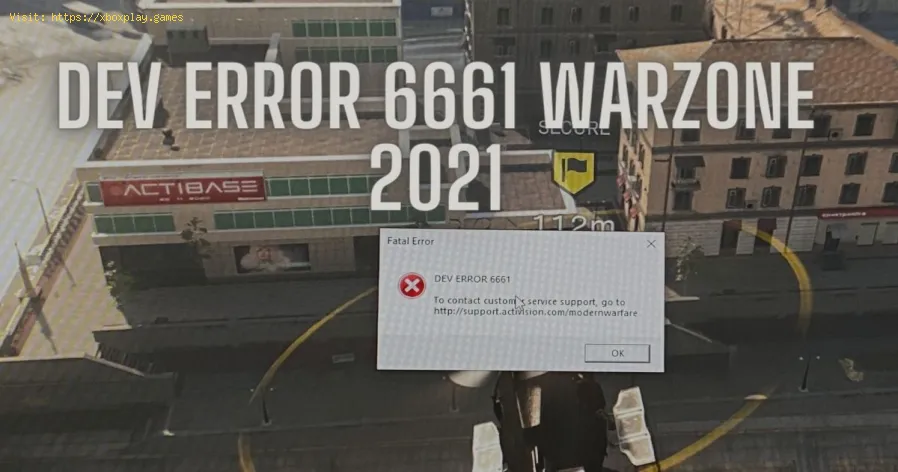
Welcome to our Call of Duty Warzone guide, in which we will tell you about How to fix error code 6661.
Unlock the elusive 'Now You See Me' camo in Warzone! Enhance your gameplay and stand out on the battlefield with this skin.
How To Complete Security Room Easter Egg in Warzone
Unlock the secrets of Warzone with our guide on completing the Security Room Easter Egg. Discover tips and strategies
How To Complete the Haven’s Hollow Jackpot Easter Egg in Warzone
Uncover the secrets of Warzone's Haven’s Hollow Jackpot Easter Egg! Dive into thrilling gameplay and unlock hidden treasures
How to Find Haven’s Hollow Pied Piper Easter Egg in Warzone
Hunt Haven's Hollow for the secret Pied Piper Easter egg in Warzone! Ourguide reveals the exact location & steps to unlock this creepyhidden quest.
How to Complete the Haven's Hollow Jackalope Easter Egg in Warzone
Uncover the secrets of Warzone's Haven's Hollow Jackalope Easter Egg! Dive into thrilling gameplay and hidden surprises.
Haven's Hollow Waterfall Cave Treasure Map Easter Egg in Warzone
Discover the secret Haven's Hollow Waterfall Cave Easter Egg in Warzone. Uncover the hidden treasure map location, solve the puzzle, and claim yourexclusive rewards with this complete guide.
Best Model L Loadout for Warzone
Unlock the true potential of the Best Model L loadout for Warzone. Dominatemid-range engagements with our optimized attachments for max damage,accuracy, and mobility. Get the class setup now.
Best PU-21 Loadout for Warzone
Level up your Warzone game with the best PU-21 Loadout. This guide detailsthe optimal attachments, perks, and equipment to maximize the PU-21'saccuracy, range, and damage for dominating in Urzikstan.
Best PP-919 Loadout for Warzone
Discover the meta attachments, perks, and equipment to maximizeTTK, mobility, and control. Get the class setup that pros are using towin.
Best Krig C Loadout for Warzone
Maximize your close-range dominance in Warzone with the best Krig 6 loadout. Our meta build focuses on laser-beam accuracy and minimalrecoil to win those crucial mid to long-range fights.
PS5: How To Enable Two-Factor Authentification
With our PS5 guide you will learn more about How to enable two-factor authentication.
GTA Online: How to Watch UFOs
Today we bring you a guide from GTA Online where we will explain how to WatchUFOs.
New World: How to Get Corrupted Sliver
You've come to the right place if you want to know how to get corrupted sliver in New World, because here we've covered everything you need to know.
BitLife: How to summon Ghosts
Read on, because today we will tell you how to summon ghosts in BitLife.
The Good Life: How to fix Naomi getting stuck on Rita Barrett
Read on to find out how to fix Naomi getting stuck on Rita Barrett in The Good Life.
What to know about error code 6661 in Call of Duty Warzone?
It is an error that affects when we try to play, certainly they are resolved when presented, but considering the long list of problems we have seen lately it is appropriate to know how to fix error code 6661 and is when the content of this guide will be the great support we are looking for, let's see it.How to fix error code 6661 in Call of Duty Warzone?
Despite being a known problem, there are no official How to fix error code 6661 in Call of Duty Warzone, we can only take into account the following details:- We will start by checking our internet connection, the server status and restarting our console or computer.
- When we are on the PC it is possible to repair Call of Duty Warzone files, we enter the Battle.net application on the desktop, click on the icon of the game and then we have to click on the wheel to play to scan and repair.
- We start the scan and wait as to How to fix error code 6661 for the repair to complete.
- It is important to have the software updates.
- We can lower the memory scale being used from 0.85 to 0.6, which can be found in documentsplayers and choose advanced settings.
- We can uninstall and reinstall the game as a last resort.
Regarding How to fix the error code 6661 in Call of Duty Warzone it is worth noting that we are before a problem that occurs periodically, in 2020 and the beginning of 2021 came to present, considering its appearance at the time of updating the game, this October came to season 6, which came with this problem, it is certainly not clear what causes this error code, but the message that says DEV ERROR 6661 is presented, what can change the situation with this failure is that through the developers we have an update that allows the correction of the problem.
Knowing how to fix the error code 6661 is interesting because we can have options that allow us to return to normal in Call of Duty Warzone.
Tags: Call of Duty, Battle royale, Warzone tips, Warzone updates, Warzone weapons, Warzone maps, Warzone strategies, Warzone l
Platform(s): Microsoft Windows PC, Xbox One, Playstation 4
Genre(s): Battle royale, first-person shooter
Developer(s): Infinity Ward
Publisher(s): Activision
Release date: March 10, 2020
Mode: Multiplayer
Age rating (PEGI): 18+
Other Articles Related
How to Unlock the 'Now You See Me' Camo in WarzoneUnlock the elusive 'Now You See Me' camo in Warzone! Enhance your gameplay and stand out on the battlefield with this skin.
How To Complete Security Room Easter Egg in Warzone
Unlock the secrets of Warzone with our guide on completing the Security Room Easter Egg. Discover tips and strategies
How To Complete the Haven’s Hollow Jackpot Easter Egg in Warzone
Uncover the secrets of Warzone's Haven’s Hollow Jackpot Easter Egg! Dive into thrilling gameplay and unlock hidden treasures
How to Find Haven’s Hollow Pied Piper Easter Egg in Warzone
Hunt Haven's Hollow for the secret Pied Piper Easter egg in Warzone! Ourguide reveals the exact location & steps to unlock this creepyhidden quest.
How to Complete the Haven's Hollow Jackalope Easter Egg in Warzone
Uncover the secrets of Warzone's Haven's Hollow Jackalope Easter Egg! Dive into thrilling gameplay and hidden surprises.
Haven's Hollow Waterfall Cave Treasure Map Easter Egg in Warzone
Discover the secret Haven's Hollow Waterfall Cave Easter Egg in Warzone. Uncover the hidden treasure map location, solve the puzzle, and claim yourexclusive rewards with this complete guide.
Best Model L Loadout for Warzone
Unlock the true potential of the Best Model L loadout for Warzone. Dominatemid-range engagements with our optimized attachments for max damage,accuracy, and mobility. Get the class setup now.
Best PU-21 Loadout for Warzone
Level up your Warzone game with the best PU-21 Loadout. This guide detailsthe optimal attachments, perks, and equipment to maximize the PU-21'saccuracy, range, and damage for dominating in Urzikstan.
Best PP-919 Loadout for Warzone
Discover the meta attachments, perks, and equipment to maximizeTTK, mobility, and control. Get the class setup that pros are using towin.
Best Krig C Loadout for Warzone
Maximize your close-range dominance in Warzone with the best Krig 6 loadout. Our meta build focuses on laser-beam accuracy and minimalrecoil to win those crucial mid to long-range fights.
PS5: How To Enable Two-Factor Authentification
With our PS5 guide you will learn more about How to enable two-factor authentication.
GTA Online: How to Watch UFOs
Today we bring you a guide from GTA Online where we will explain how to WatchUFOs.
New World: How to Get Corrupted Sliver
You've come to the right place if you want to know how to get corrupted sliver in New World, because here we've covered everything you need to know.
BitLife: How to summon Ghosts
Read on, because today we will tell you how to summon ghosts in BitLife.
The Good Life: How to fix Naomi getting stuck on Rita Barrett
Read on to find out how to fix Naomi getting stuck on Rita Barrett in The Good Life.