How to Play with Friends in ARC Raiders
ARC Raiders: How to Play with Friends
Part 1: Ensuring Crossplay is Enabled
While crossplay may be enabled by default for many users, it’s a setting that’s easy to miss during the initial setup. Always confirm the feature is active before trying to invite friends.How to Turn On Crossplay
If you missed the initial prompt, you can easily toggle the setting from the main menu:
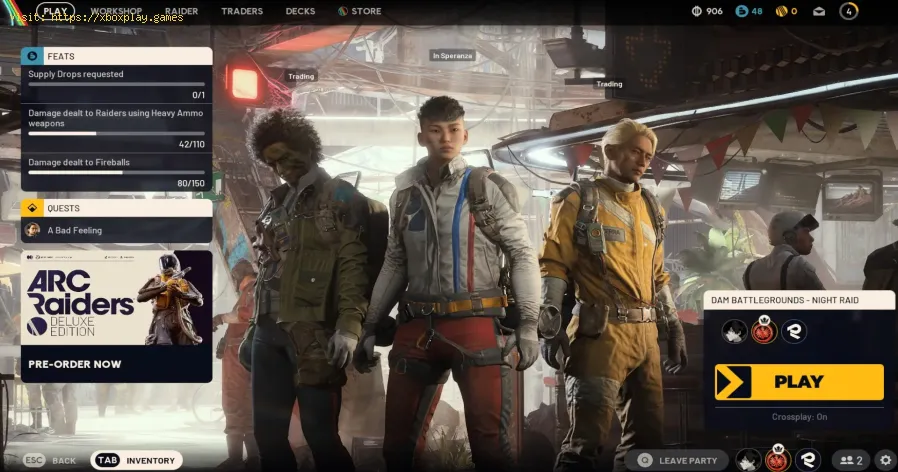
- Access Settings: Look for the Settings icon (usually represented by a cog) in the bottom-right corner of the screen, typically located right beneath the main Play button. Click or select this icon.
- Navigate to Gameplay: Head into the first tab within the Settings menu, commonly labeled "Gameplay."
- Find the Toggle: Scroll down until you find the Online section. The "Crossplay" setting will be located here.
- Confirm Activation: If the setting isn't already active, simply turn it on.
Bonus Tip: Improve Latency! In this same section of the settings menu, you can also change your region for ARC Raiders. Selecting a server closer to your location can significantly help you achieve better ping and lower latency in matches.
Part 2: The Embark ID System—Finding and Adding Friends
Crossplay in ARC Raiders works by connecting all players—regardless of their console or PC—through a unified Embark ID. You must know your own ID and your friends' IDs to establish connections.
1. Locating Your Embark ID
To help your friends add you, you need to find your unique Embark ID, which follows the format USERNAME#1234.
- Open the Friend/Party Menu: Click on the "+" Icon situated near the Play button and next to your display picture. This action opens the friend and party menu.
- Manage Embark ID: From this menu, click on the "Manage Embark ID" button, usually found in the bottom-left section. This will open an Embark ID management portal.
- Log In to Portal: You will be prompted to log into one of your existing platform accounts (Steam, Epic Games, PlayStation, or Xbox) to verify your identity.
- Find Your ID: Once the sign-in process is complete, you'll be taken to the Embark ID portal. Look under your "Display Name"—this is where your unique Embark ID (e.g., "ARCRAIDER#9876") is listed.
- Share Your Code: Share this full ID with your friends on any platform. They will use this exact code to send you a friend request.
2. Adding a Friend Using Their ID
If you already have your friend's Embark ID, adding them is much faster.
- Open the Party Menu: Click the "+" Icon to access the friend/party menu.
- Add Friends Button: Click on the "Add Friends" button, usually located in the top-right corner of the menu.
- Enter ID: A window will pop up. Enter your friend’s exact Embark ID (including the numbers and hashtag).
- Send Request: Click OK to dispatch the friend request.
3. Accepting the Request and Teaming Up
Once you accept your friend’s incoming request (which appears in the same friend/party menu), you'll be able to team up.
- Simply select your new cross-platform friend from your friend list and choose the option to invite them to your party.
With crossplay enabled and your friends added via the Embark ID system, youand your squad are ready to head out on expeditions together, regardless of what platform everyone is playing on.
Other Articles Related
How to get Emerald Wave Electrician Backpack for free in ARC RaidersDiscover how to obtain the Emerald Wave Electrician Backpack in ARC Raiders. Unlock this unique item and enhance your gameplay
How To Defeat Matriarch in Arc Raiders
Conquer the Matriarch in Arc Raiders with our step-by-step guide. Learn keystrategies, optimal loadouts, and crucial weak points to defeat thisepic boss.
Where To Find Magnetron in Arc Raiders
the best locations to find Magnetron in Arc Raiders. Unlock powerful upgrades and enhance your gameplay with our guide!
How to Craft Energy Clips in ARC Raiders
Learn how to craft Energy Clips in ARC Raiders with our comprehensive guide. Boost your gameplay and enhance your strategies
How To Customise Your Raider Den in Arc Raiders
how to customize your Raider Den in Arc Raiders. Explore unique designs and features to enhance your gaming experience
How To Claim Free Emerald Wave Electrician Backpack in Arc Raiders
Arc Raiders Free Emerald Wave Electrician Backpack, designed fordurability and style. Perfect for professionals and enthusiasts alike.
How To Craft Items During a Match in Arc Raiders
Master crafting on the fly in Arc Raiders! Learn how to craft items mid-matchwith our step-by-step guide. Boost your survival & tacticaladvantage.
All Security Breach Locker Locations in Arc Raiders
Find all Security Breach Locker codes & locations in Arc Raiders withthis complete interactive map and step-by-step guide. Unlock exclusiverewards fast.
Arc Raiders: How To Get Kinetic Converter
Learn how to unlock the Kinetic Converter in Arc Raiders, a powerful gearthat significantly enhances your mobility and combat effectiveness inthis co-op extraction shooter.
How To Use Skill Tree in Arc Raiders
Master the Skill Tree in Arc Raiders with our detailed guide. Learn optimalprogression, key abilities, and strategic builds to dominate the game.
How to Fast Travel in Dragon Quest 1 HD-2D Remake
how to fast travel in the Dragon Quest 1 HD-2D Remake. Unlock new adventures and explore the world with ease!
All Special Scroll Locations in Dragon Quest 1 HD-2D Remake
all special scrolls in the Dragon Quest 1 HD-2D Remake! Uncover secrets, enhance your gameplay, and master this classic adventure.
How to Open Locked Safes in Battlefield RedSec
Unlock the secrets of Battlefield RedSec! Discover expert tips and strategies to open locked safes and enhance your gameplay.
How to Fix ARC Raiders Error ARMR0002
Struggling with ARC Raiders error, ARMR0002? Get quick, step-by-step solutions.Learn how to fix common causes like corrupted files, outdated drivers,and security conflicts to get back into the game.