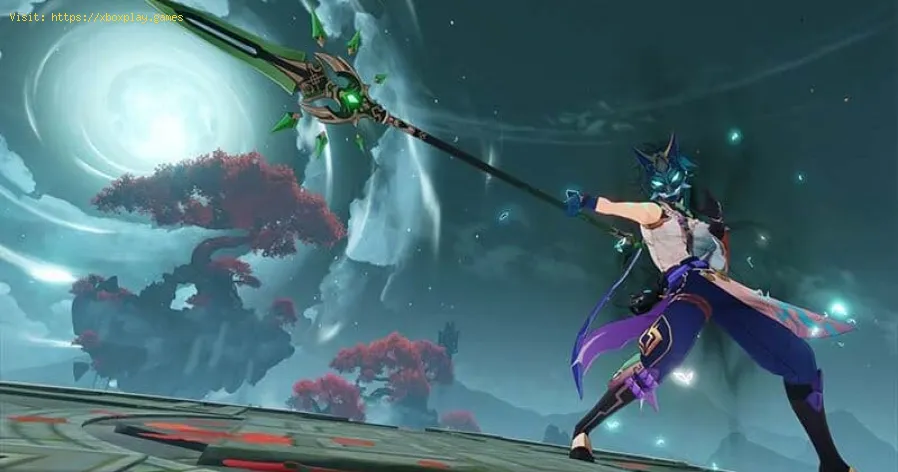
Genshin Impact: How to Fix Error Code 4201 and 9203 - Ultimate Guide
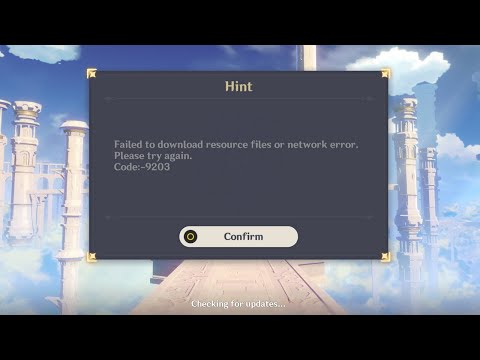
Today we bring you a Genshin Impact guide where we will talk about how to fix error code 4201 and 9203.
These are problems that are related to each other, having so many errors present, it is necessary to take into account a set of recommendations that can be of great help in terms of how to fix error code 4201 and 9203, the details being presented in this guide next.
We have that in the case of error code 4201 in Genshin Impact it is related to a server connection problem, which may be due to failures in them, although the local is not ruled out, to have an idea of how to fix error code 4201 and 9203 starting with this we have to verify through Twitter or Downdetector what information there is about it, in case the failure is very long it would become indicative that the problem will be in the server, only waiting for it to be resolved by the developers, otherwise we have that the error will be local, something that requires many complex things to solve it. This problem can occur in Genshin Impact on all devices, highlighting that it has nothing to do with performance, therefore, if it occurs on any platform, as for how to fix the error code 4201 and 9203, we will start by verifying our connection Internet, which will be useful to play another game online, this must require a good bandwidth, then we try to play normally, since this is not the problem, it may be the ISP of the game server, considering that they are almost normal failures when connecting to some servers, to find out we have to see that our friends are playing with the same error, if so we will contact the ISP, but changing the connection is the solution, being useful to our mobile.
It may be that these errors occur suddenly and disappear later, which will lead us to how to correct error code 4201 and 9203 in Genshin Impact to relate it to the DNS servers, so we will use those of Google to try to correct it, in the case of the PS4 we open the main menu on the console to go to the configuration, we will choose network configuration, internet connection in personalized, we will go through LAN for cable and Wi-Fi for wireless depending on the type of connection we have, the following is to customize it by making changes to the IP automatically without specifying the DHCP host name, manually for the DNS and enter 8.8.8.8 in primary and 8.8.4.4 in secondary, while the automatic MTU configuration without using a proxy server, As for how to fix error code 4201 and 9203, we save and restart the PS4.
In the case of DNS in Windows 10 or PC in Genshin Impact we have to press Windows I to access the configuration, we choose network and internet, we go through the change of adapter options, we will choose the network and with the right click we will go to the properties, here we enter internet protocol version 4 TCP/IPv4 and its properties, the addresses that we must alternate in the DNS server, and we will complete the Google DNS, being 8.8.8.8 and 8.8.4.4, the last is to accept.
When we find ourselves playing Genshin Impact on a mobile we can also find these problems, this being the internet connection the case, therefore, in terms of how to correct the error code 4201 and 9203, it is important that we have a stable connection, for this reason it is opportune to use of Wi-Fi without it being public, considering the NAT that is not adequate for the game, the use of a VPN on PC may be a problem, also for the cases of proxies that are used, even a high influx of players can cause us this inconvenience, if so, we will only have to try to play at the right time and thus avoid these error codes.
Finally, now that we know how to fix error code 4201 and 9203 we can have a possible return to our normal gameplay in Genshin Impact.
Master Genshin Impact with our guide on acquiring Arcane Keystones.Elevate your character's potential and explore new strategies
How to get Geode of Replication in Genshin Impact
Unlock the secrets of Genshin Impact with the Geode of Replication! Discover tips, strategies, and more to enhance your gameplay.
Nefer Ascension and Talent Materials in Genshin Impact
essential Nefer Ascension and Talent Materials for Genshin Impact.Enhance your gameplay with our guides
How To Build Manekin In Genshin Impact
Learn how to build Manekin in Genshin Impact effectively. Our detailedguide offers essential tips and strategies
How To Exit Miliastra Wonderland In Genshin Impact
Explore the enchanting world of Genshin Impact: Exit MiliastraWonderland. Discover secrets, quests, and characters
How To Get All Miliastra Wonderland Odes Currencies In Genshin Impact
all the currencies in Genshin Impact's Miliastra Wonderland Odes. Maximize your gameplay with our guide
Rainbowdrop Crystal Locations In Genshin Impact
all the Rainbowdrop Crystal locations in Genshin Impact! Unlock secrets and enhance your gameplay with our guide.
Which Manekin Should You Choose In Genshin Impact
which Manekin to choose in Genshin Impact! Uncover tips and strategies to enhance your gameplay and make the best decision.
Nefer Team Composition In Genshin Impact
the ultimate Nefer team composition in Genshin Impact! Optimize your gameplay with expert tips and strategies
How to Unlock Miliastra Wonderland in Genshin Impact
Unlock the enchanting Miliastra Wonderland in Genshin Impact with our step-by-step guide. Discover secrets, tips
Fortnite: Where to Find a Shockwave Grenade
If you don't know where to find a shockwave grenade in Fortnite don't worry, because here we will tell you where to find them.
Raft: Getting Trade Coins in Trading Post
Do you want to know how to get trade coins at the trading post in Raft then pay attention, because here we have everything you need.
Tiny Tina’s Wonderlands: How to Get More Ammo Capacity
If you want to know how to get more ammo capacity in Tiny Tina's Wonderlands, below you will find everything you need to get it.
Genshin Impact: How to Fix Error Code 9905 - No Network Access
Crashes usually occur in all games and Genshin Impact is no different, let's see How to fix error code 9905 - No network access.
Genshin Impact: How to Fix Error 4026
Failures usually occur regularly in Genshin Impact, so we tell you how to fix errors 4026 and 4206.
What to know about error code 4201 and 9203 in Genshin Impact?
These are problems that are related to each other, having so many errors present, it is necessary to take into account a set of recommendations that can be of great help in terms of how to fix error code 4201 and 9203, the details being presented in this guide next.
How to fix error code 4201 and 9203 in Genshin Impact?
We have that in the case of error code 4201 in Genshin Impact it is related to a server connection problem, which may be due to failures in them, although the local is not ruled out, to have an idea of how to fix error code 4201 and 9203 starting with this we have to verify through Twitter or Downdetector what information there is about it, in case the failure is very long it would become indicative that the problem will be in the server, only waiting for it to be resolved by the developers, otherwise we have that the error will be local, something that requires many complex things to solve it.
It may be that these errors occur suddenly and disappear later, which will lead us to how to correct error code 4201 and 9203 in Genshin Impact to relate it to the DNS servers, so we will use those of Google to try to correct it, in the case of the PS4 we open the main menu on the console to go to the configuration, we will choose network configuration, internet connection in personalized, we will go through LAN for cable and Wi-Fi for wireless depending on the type of connection we have, the following is to customize it by making changes to the IP automatically without specifying the DHCP host name, manually for the DNS and enter 8.8.8.8 in primary and 8.8.4.4 in secondary, while the automatic MTU configuration without using a proxy server, As for how to fix error code 4201 and 9203, we save and restart the PS4.
In the case of DNS in Windows 10 or PC in Genshin Impact we have to press Windows I to access the configuration, we choose network and internet, we go through the change of adapter options, we will choose the network and with the right click we will go to the properties, here we enter internet protocol version 4 TCP/IPv4 and its properties, the addresses that we must alternate in the DNS server, and we will complete the Google DNS, being 8.8.8.8 and 8.8.4.4, the last is to accept.
When we find ourselves playing Genshin Impact on a mobile we can also find these problems, this being the internet connection the case, therefore, in terms of how to correct the error code 4201 and 9203, it is important that we have a stable connection, for this reason it is opportune to use of Wi-Fi without it being public, considering the NAT that is not adequate for the game, the use of a VPN on PC may be a problem, also for the cases of proxies that are used, even a high influx of players can cause us this inconvenience, if so, we will only have to try to play at the right time and thus avoid these error codes.
Finally, now that we know how to fix error code 4201 and 9203 we can have a possible return to our normal gameplay in Genshin Impact.
Tags: miHoYo game, Open-world RPG, Teyvat, Genshin Impact characters, Genshin Impact tips, Genshin Impact updates, Genshin Imp
Platform(s): PlayStation4 PS4, Nintendo Switch, iOS, PC, Android
Genre(s): Action role-playing
Developer(s): miHoYo.com
Publisher(s): miHoYo
Engine: Unity
Release date: September 28, 2020
Mode: Single-player, Multiplayer
Age rating (PEGI): 12+
Other Articles Related
How to get Arcane Keystones in Genshin ImpactMaster Genshin Impact with our guide on acquiring Arcane Keystones.Elevate your character's potential and explore new strategies
How to get Geode of Replication in Genshin Impact
Unlock the secrets of Genshin Impact with the Geode of Replication! Discover tips, strategies, and more to enhance your gameplay.
Nefer Ascension and Talent Materials in Genshin Impact
essential Nefer Ascension and Talent Materials for Genshin Impact.Enhance your gameplay with our guides
How To Build Manekin In Genshin Impact
Learn how to build Manekin in Genshin Impact effectively. Our detailedguide offers essential tips and strategies
How To Exit Miliastra Wonderland In Genshin Impact
Explore the enchanting world of Genshin Impact: Exit MiliastraWonderland. Discover secrets, quests, and characters
How To Get All Miliastra Wonderland Odes Currencies In Genshin Impact
all the currencies in Genshin Impact's Miliastra Wonderland Odes. Maximize your gameplay with our guide
Rainbowdrop Crystal Locations In Genshin Impact
all the Rainbowdrop Crystal locations in Genshin Impact! Unlock secrets and enhance your gameplay with our guide.
Which Manekin Should You Choose In Genshin Impact
which Manekin to choose in Genshin Impact! Uncover tips and strategies to enhance your gameplay and make the best decision.
Nefer Team Composition In Genshin Impact
the ultimate Nefer team composition in Genshin Impact! Optimize your gameplay with expert tips and strategies
How to Unlock Miliastra Wonderland in Genshin Impact
Unlock the enchanting Miliastra Wonderland in Genshin Impact with our step-by-step guide. Discover secrets, tips
Fortnite: Where to Find a Shockwave Grenade
If you don't know where to find a shockwave grenade in Fortnite don't worry, because here we will tell you where to find them.
Raft: Getting Trade Coins in Trading Post
Do you want to know how to get trade coins at the trading post in Raft then pay attention, because here we have everything you need.
Tiny Tina’s Wonderlands: How to Get More Ammo Capacity
If you want to know how to get more ammo capacity in Tiny Tina's Wonderlands, below you will find everything you need to get it.
Genshin Impact: How to Fix Error Code 9905 - No Network Access
Crashes usually occur in all games and Genshin Impact is no different, let's see How to fix error code 9905 - No network access.
Genshin Impact: How to Fix Error 4026
Failures usually occur regularly in Genshin Impact, so we tell you how to fix errors 4026 and 4206.