
Fortnite: How to scan the Reality Tree in Chapter 3 Season 3 - Ultimate Guide
The current season of Fortnite is going on and if you want to know how to scan the Reality Tree in Chapter 3 Season 3 pay attention.
In the second part of the Vibin missions in Chapter 3 Season 3, you will have to scan the Tree of Reality, but first you will need to uplink the device to one of the blue uplink sites near the Tree of Reality. After scanning the tree, you will have to do another two scans, one of the root between Reality Tree and Reality Bloom, and one of Reality Bloom. Either way, keep reading, so you can know how to scan the Reality Tree in Chapter 3 Season 3.
The first thing you need to do is head to the Tree of Reality, the glowing tree in the middle of Reality, Falls on the west side of the map. It is in this location that you will have to find Reality Seeds, depending on where you are in the Vibin questline.
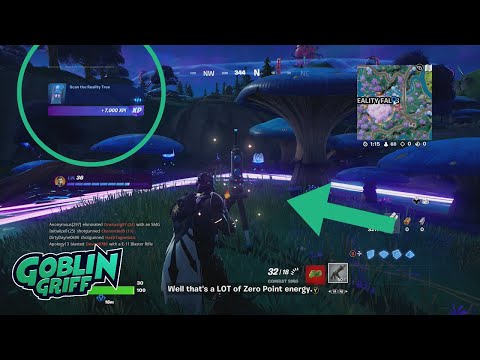
To find the scan site you will have to go north of the tree, it is on a bronze plateau in front.
The scan site is actually northeast of the tree itself, on a square plateau in front of a log cabin. Upon arrival, you will have to look for a blue exclamation mark marker.
The route you'll need to scan joins the path east of Rave Cave, which is inside the mountain west of the large lake in the center of the map. The site will be south of the root, on the side of the road.
The Reality Bloom is the pink flow in the middle of Logjam Lotus, it is a camp on the north shore of the lake, northeast of the map.
The scan site is to the west of the camp, on a ridge between the camp and the road that passes northwest of the camp. Scanning this will complete the first set of objectives in Vibin' Part 2.
In this way we come to the end of this guide on how to scan the Reality Tree in Chapter 3 Season 3 in Fortnite, so now that we are done, we hope that you will be able to complete this challenge quickly.
Discover every Reboot Van location in Fortnite Chapter 7 Season 1. Get the fullmap guide to revive your squad and secure that Victory Royale.
Where to Find Drivable Reboot Vans in Fortnite Chapter 7
Find drivable Reboot Vans across the Fortnite Chapter 7 map with ourlocations guide. Learn where to get your squad back in the fight andsecure victory.
All New Mechanics in Fortnite Chapter 7
the exciting new mechanics in Fortnite Chapter 7! Unleash your skills and strategies with the latest updates. Join the battle now!
How to Find Battle Bus Parts in Fortnite
essential tips on locating Battle Bus parts in Fortnite. Enhance your gameplay and master the art of scavenging with our guide!
What to Do With the Unstable Element in Fortnite
strategies for handling the Unstable Element in Fortnite. Unlock secrets and enhance your gameplay with our expert tips!
How to Self-Revive in Fortnite
Learn how to self-revive in Fortnite with our step-by-step guide. Master this essential skill to enhance your gameplay
How to Get the Forsaken Vow Blade in Fortnite
how to obtain the Forsaken Vow Blade in Fortnite. Unlock its powerfulabilities and enhance your gameplay with this exclusive weapon.
How to Lift the 515 KG Weight in Fortnite
expert tips and strategies to successfully lift the 515 KG weight inFortnite. Boost your gameplay and impress your friends with this guide!
How to Get all Mythics in Fortnite Chapter 7 Season 1
Master Fortnite Chapter 7 Season 1 with our complete list of Mythics.Equip yourself with the best items and elevate your gaming skills
All Fortnite Chapter 7 Season 1 Boss Locations
all Chapter 7 Season 1 boss locations in Fortnite. Master the game with our detailed guide and enhance your gameplay experience
MADiSON: How To Solve The Well Puzzle
MADiSON has come to take care of us and that is why today we will tell you how to solve the well puzzle.
Phasmophobia: How to Find Mimic
Phasmophobia offers us another search, let's see How to find Mimic.
Fallout 76: Where to find Fusion Cores
Fallout 76 offers us another quest, let's see where to find Fusion Cores.
Marauders: How to sign up for closed beta
Today we bring a Marauders guide where we will explain how to register for the closed beta.
Elder Scrolls Online: How to fix Crashing on Startup
Crashes usually occur in all games and Elder Scrolls Online is no different, let's see how to fix Crashing on startup.
What is the reality tree scan challenge in Fortnite?
In the second part of the Vibin missions in Chapter 3 Season 3, you will have to scan the Tree of Reality, but first you will need to uplink the device to one of the blue uplink sites near the Tree of Reality. After scanning the tree, you will have to do another two scans, one of the root between Reality Tree and Reality Bloom, and one of Reality Bloom. Either way, keep reading, so you can know how to scan the Reality Tree in Chapter 3 Season 3.
How to scan the Reality Tree in Chapter 3 Season 3 in Fortnite?
To find the scan site you will have to go north of the tree, it is on a bronze plateau in front.
The scan site is actually northeast of the tree itself, on a square plateau in front of a log cabin. Upon arrival, you will have to look for a blue exclamation mark marker.
The route you'll need to scan joins the path east of Rave Cave, which is inside the mountain west of the large lake in the center of the map. The site will be south of the root, on the side of the road.
The Reality Bloom is the pink flow in the middle of Logjam Lotus, it is a camp on the north shore of the lake, northeast of the map.
The scan site is to the west of the camp, on a ridge between the camp and the road that passes northwest of the camp. Scanning this will complete the first set of objectives in Vibin' Part 2.
In this way we come to the end of this guide on how to scan the Reality Tree in Chapter 3 Season 3 in Fortnite, so now that we are done, we hope that you will be able to complete this challenge quickly.
Tags: Battle Royale, Fortnite Skins, V-Bucks, Fortnite Challenges, Fortnite Events, Fortnite Map, Fortnite Weapons, Fortnite S
Platform(s): Microsoft Windows PC, macOS, PlayStation 4 PS4, Xbox One, Nintendo Switch, PlayStation 5 PS5, Xbox Series X|S Android, iOS
Genre(s): Survival, battle royale, sandbox
Developer(s): Epic Games
Publisher(s): Epic Games
Engine: Unreal Engine 5
Release date: July 25, 2017
Mode: Co-op, multiplayer
Age rating (PEGI): 12+
Other Articles Related
All Reboot Van Locations in Fortnite Chapter 7 Season 1Discover every Reboot Van location in Fortnite Chapter 7 Season 1. Get the fullmap guide to revive your squad and secure that Victory Royale.
Where to Find Drivable Reboot Vans in Fortnite Chapter 7
Find drivable Reboot Vans across the Fortnite Chapter 7 map with ourlocations guide. Learn where to get your squad back in the fight andsecure victory.
All New Mechanics in Fortnite Chapter 7
the exciting new mechanics in Fortnite Chapter 7! Unleash your skills and strategies with the latest updates. Join the battle now!
How to Find Battle Bus Parts in Fortnite
essential tips on locating Battle Bus parts in Fortnite. Enhance your gameplay and master the art of scavenging with our guide!
What to Do With the Unstable Element in Fortnite
strategies for handling the Unstable Element in Fortnite. Unlock secrets and enhance your gameplay with our expert tips!
How to Self-Revive in Fortnite
Learn how to self-revive in Fortnite with our step-by-step guide. Master this essential skill to enhance your gameplay
How to Get the Forsaken Vow Blade in Fortnite
how to obtain the Forsaken Vow Blade in Fortnite. Unlock its powerfulabilities and enhance your gameplay with this exclusive weapon.
How to Lift the 515 KG Weight in Fortnite
expert tips and strategies to successfully lift the 515 KG weight inFortnite. Boost your gameplay and impress your friends with this guide!
How to Get all Mythics in Fortnite Chapter 7 Season 1
Master Fortnite Chapter 7 Season 1 with our complete list of Mythics.Equip yourself with the best items and elevate your gaming skills
All Fortnite Chapter 7 Season 1 Boss Locations
all Chapter 7 Season 1 boss locations in Fortnite. Master the game with our detailed guide and enhance your gameplay experience
MADiSON: How To Solve The Well Puzzle
MADiSON has come to take care of us and that is why today we will tell you how to solve the well puzzle.
Phasmophobia: How to Find Mimic
Phasmophobia offers us another search, let's see How to find Mimic.
Fallout 76: Where to find Fusion Cores
Fallout 76 offers us another quest, let's see where to find Fusion Cores.
Marauders: How to sign up for closed beta
Today we bring a Marauders guide where we will explain how to register for the closed beta.
Elder Scrolls Online: How to fix Crashing on Startup
Crashes usually occur in all games and Elder Scrolls Online is no different, let's see how to fix Crashing on startup.